PKI (Public Key Infrastructure) from First Principles: How Keys, Certificates and Trust Fit Together
Contents
If you build or run software, you use TLS (Transport Layer Security) constantly. You put https:// in front of a URL, paste a certificate bundle into an nginx config, or read “the service mesh handles mTLS (mutual TLS)” in a design doc, and it just works. Ask a few follow-up questions, though, and things start to get hazy pretty fast. Does the CA (certificate authority) ever see your private key? Why does a server send more than one certificate? How does a CA know that a pod running in a Kubernetes cluster really is orders-api? What does mTLS add on top of ordinary TLS?
The answers come from a handful of ideas: key pairs, signatures, certificates, certificate authorities and chains of trust. None of them is hard on its own. They get confusing because most of us pick them up piece by piece, from error messages and config files, and never see how they connect.
This post attempts to connect the dots by bridging the concepts. It starts with what a signature actually proves and builds up to certificates and chains of trust. Then it covers how a CA decides who gets a certificate (for a website, and for a VM or pod), how the TLS handshake uses that certificate, and how tools like Vault, Istio and Envoy automate all of it for thousands of services. Along the way, we’ll trace how blogs like this one get their HTTPS (HTTP Secure) certificates.
No cryptography background is needed. The only math used here is kept simple with one small-number example, and every term is explained when it first appears.
Disclaimer. This post is drafted with assistance from large language models (Claude Opus 5.5 and DeepSeek V4.1 Flash) based on conversations exploring public key infrastructure, TLS and mTLS from first principles. All content has been reviewed, edited, and verified.
The route we’ll take
- The problem: what can go wrong on a network you don’t control.
- Keys and signatures: the two building blocks everything else is made of.
- Certificates and chains: how a stranger’s key becomes trustworthy.
- Getting a certificate: what a certificate authority actually checks, for websites and for machines.
- Using the issued certificate: the handshake, and mTLS, where both sides show a certificate.
- Taking trust back: what happens when a key is leaked.
- At scale: where Vault, Istio and Envoy fit in the overall architecture of applications.
- The whole story in one picture, and where trust ultimately comes from.
1. The problem: talking to a stranger
When your browser calls https://bank.com, or one microservice calls another, the bytes pass through networks you don’t control: café Wi-Fi, your ISP, a cloud provider, proxies, load balancers. Anyone sitting on that path can try three kinds of attack.
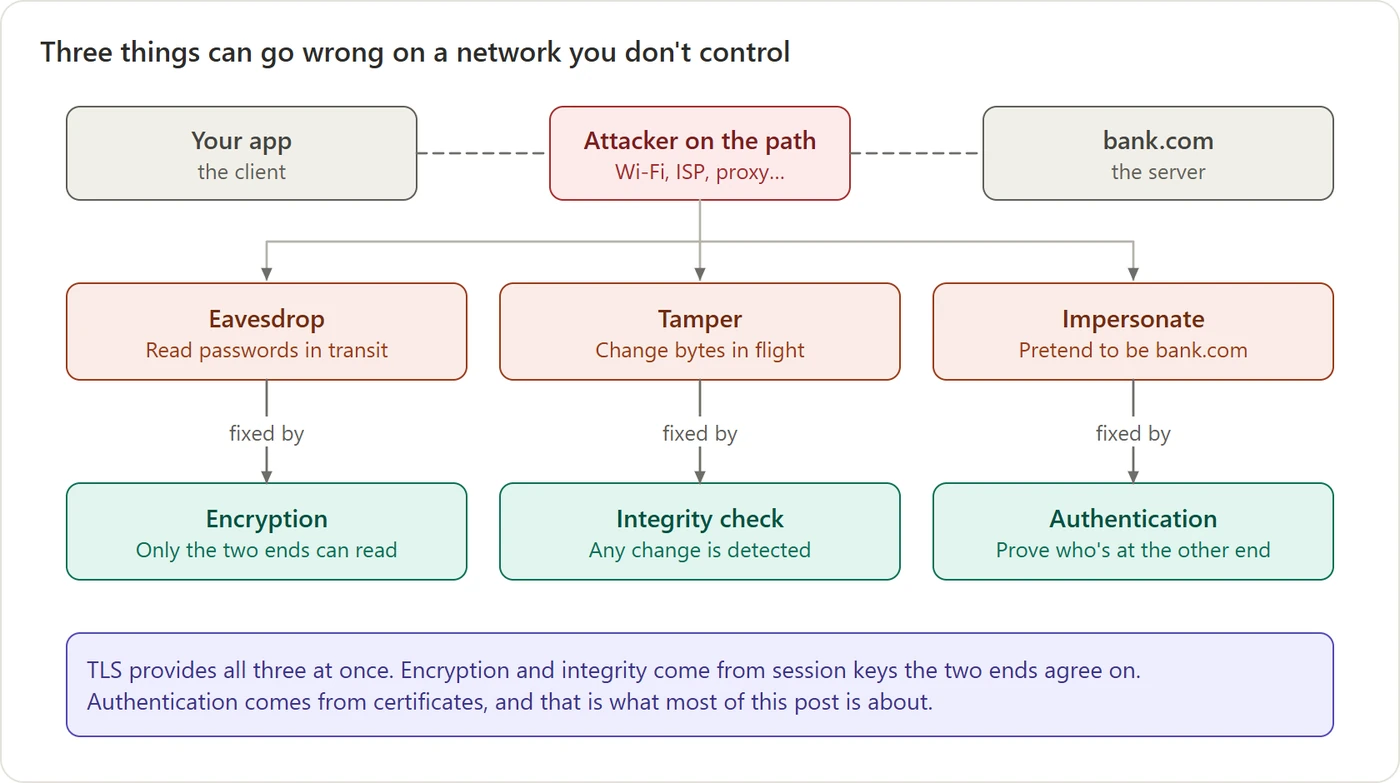 Figure 1. Three kinds of attack, three defences. TLS, the protocol behind HTTPS, bundles all three.
- Eavesdrop: read your password as it goes by. The fix is encryption.
- Tamper: change “pay 10” into “pay 1000” in flight. The fix is an integrity check, a cryptographic checksum that detects any change.
- Impersonate: pretend to be
bank.com. The fix is authentication, meaning proof of who is at the other end.
The third one is the easiest to underestimate. Encryption alone is useless if you’re encrypting your password to the attacker. You’d have a perfectly private conversation with the wrong person. So authentication comes first, and authentication is what certificates are for. Most of this post is about that.
2. Two kinds of keys
Everything rests on two kinds of cryptographic keys.
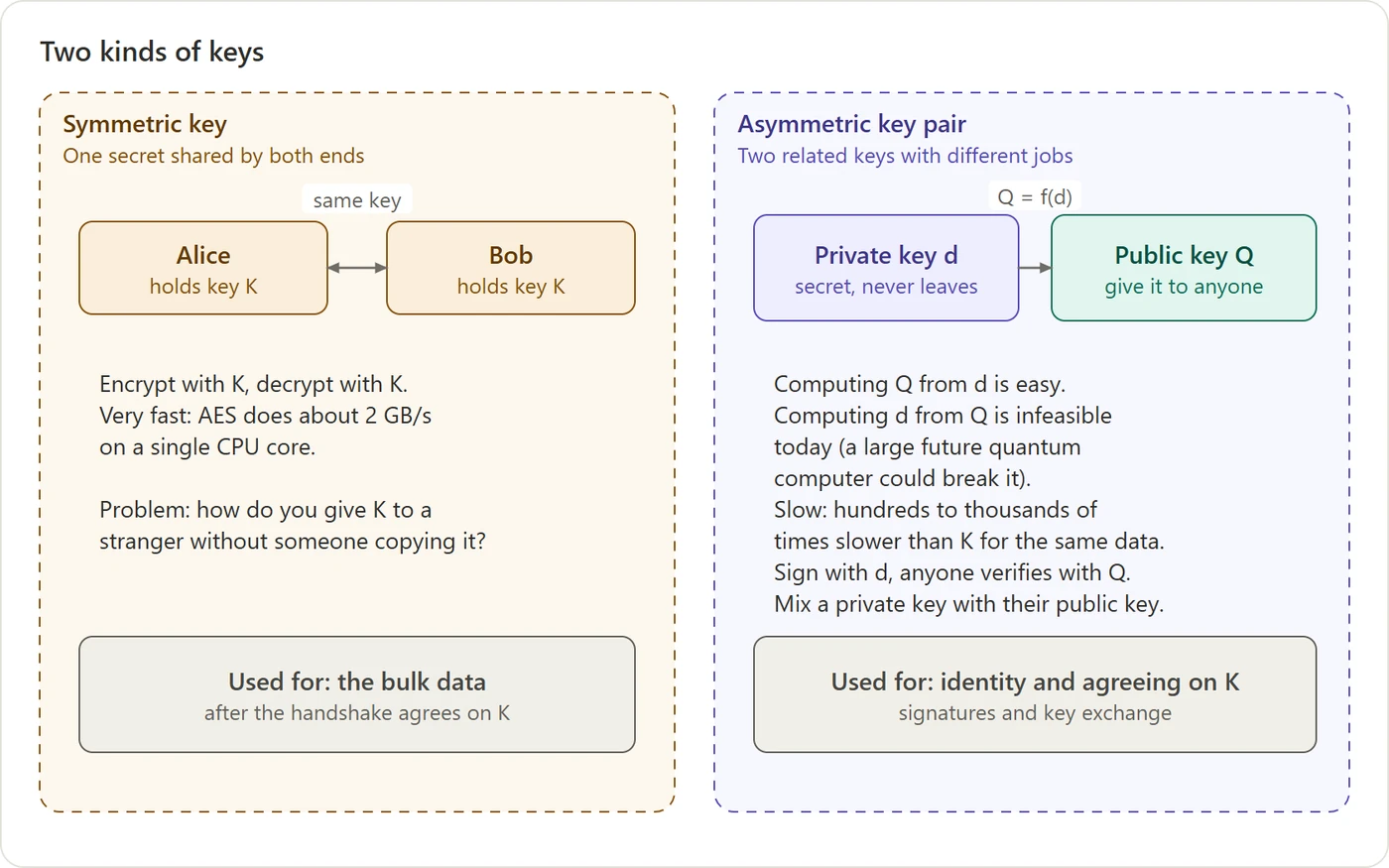 Figure 2. Symmetric keys are fast but must be shared. A key pair splits one key into a secret half and a public half, at the cost of speed.
A symmetric key is one shared secret. Both ends use the same key K to lock and unlock. It’s extremely fast: AES (Advanced Encryption Standard), the usual choice, encrypts about 2 GB per second on a single CPU core. That’s why it’s used for the actual data. Its weakness is a chicken-and-egg problem: to talk securely with a stranger you first need a shared secret, and you can’t send it over the very network you’re trying to protect.
An asymmetric key pair is two linked numbers:
- the private key, which we’ll call
d, is just a big random number that never leaves its owner; - the public key,
Q, is computed fromdand can be handed to anyone.
The whole design rests on one fact: going from d to Q is easy, but going back from Q to d would take longer than the age of the universe with today’s computers. (A large enough quantum computer could, in principle, do it. No such machine exists yet, but the industry is already adding quantum-resistant algorithms, as section 9 mentions.)
Key pairs pay for this with speed. Their operations are hundreds to thousands of times slower than symmetric encryption for the same amount of data. So nobody encrypts a whole conversation with a key pair. They use it only for the small jobs that need it, and that one-way property makes two such jobs possible:
- Signatures. Sign something with
d, and anyone holdingQcan check it, but nobody withoutdcan fake it. - Key agreement. Two sides can each combine their own private key with the other’s public key and arrive at the same shared secret, without ever sending it. That solves the chicken-and-egg problem above (section 9 shows how).
So the division of labour is: key pairs prove identity and set up the connection; a symmetric key then moves the data.
3. Signatures: a seal only one party can make
A digital signature is the basic building block of everything that follows. Certificates are signatures. So are revocation lists, and the identity tokens that clouds hand to their machines.
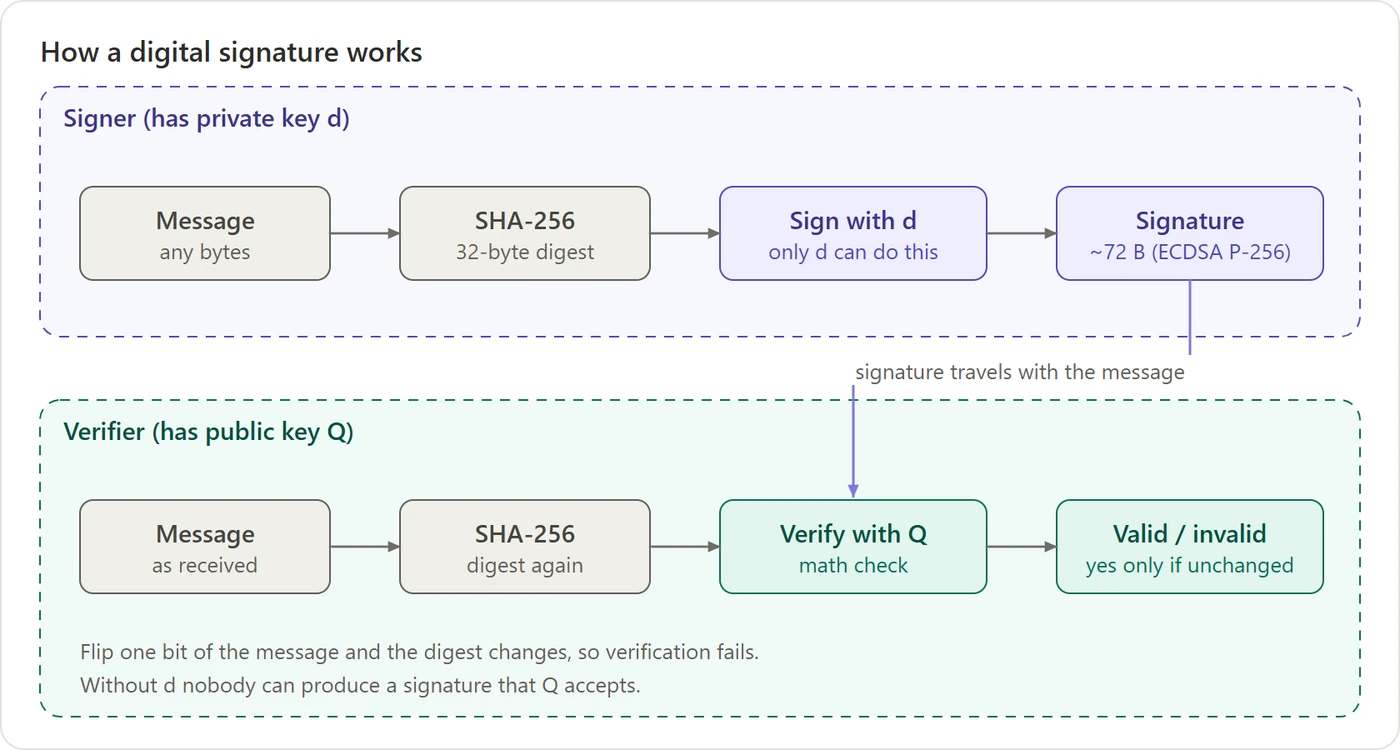 Figure 3. The signer signs a fingerprint of the message with
 d and sends the message and the signature together. The verifier recomputes the fingerprint and checks it with Q.
The message is first run through a hash function (SHA-256, Secure Hash Algorithm with a 256-bit output), which turns any input into a short fingerprint. Change one bit of the message and the fingerprint changes completely. The signer then uses d to turn that fingerprint into a signature. The verifier recomputes the fingerprint from what it received and asks a yes-or-no question using Q: does this signature fit this fingerprint?
Can two messages have the same fingerprint? Yes. There are infinitely many possible messages but only 2256 possible fingerprints, so such pairs (called collisions) must exist. What matters is whether anyone can find one. For SHA-256, finding any colliding pair takes around 2128 attempts, and matching a particular message someone else signed takes around 2256. Both are far beyond all the computers on Earth combined, and no SHA-256 collision has ever been found. Older hash functions weren’t so lucky. In 2008, researchers used an MD5 (Message Digest 5) collision to create a rogue CA certificate, and in 2017 Google published a SHA-1 collision. That’s why certificates moved from MD5 to SHA-1 to SHA-256: a hash function is retired as soon as finding collisions becomes practical.
Note that the signer sends both the message and the signature. Signing doesn’t hide anything: anyone on the path can still read the message, and hiding it is the job of encryption. That raises a practical question: if the two arrive together as one stream of bytes, how does the receiver know where the message ends and the signature starts?
The answer is that they’re never just glued together. Every format that carries a signature wraps each part with a label and a length, like a form with separate boxes:
- A certificate has three fields: the signed content, the name of the signing algorithm, and the signature. Each field starts with a type tag and its length in bytes. (This encoding is called DER, Distinguished Encoding Rules.)
- A TLS message starts with a short header that gives its type and its length.
- A JWT (JSON Web Token), the format many cloud identity tokens use, is three text parts separated by dots:
header.payload.signature. The parts are encoded so that they can never contain a dot themselves.
The receiver reads the lengths or separators, splits the bytes, and only then checks the signature. If an attacker moves the boundary, the content being hashed changes, and the signature fails.
A valid signature proves two things:
- The message hasn’t changed since it was signed.
- Whoever signed it held
d.
And it does not prove who holds d. The verifier learns “this was signed by the owner of Q”, but Q is just a number. A number doesn’t tell you whose it is. That gap is the reason certificates exist.
4. Certificates: someone vouches for the key
If bank.com sends you its public key, an attacker could just as easily send you their public key and claim to be bank.com. You need someone you already trust to vouch for the pairing “this key belongs to this name”.
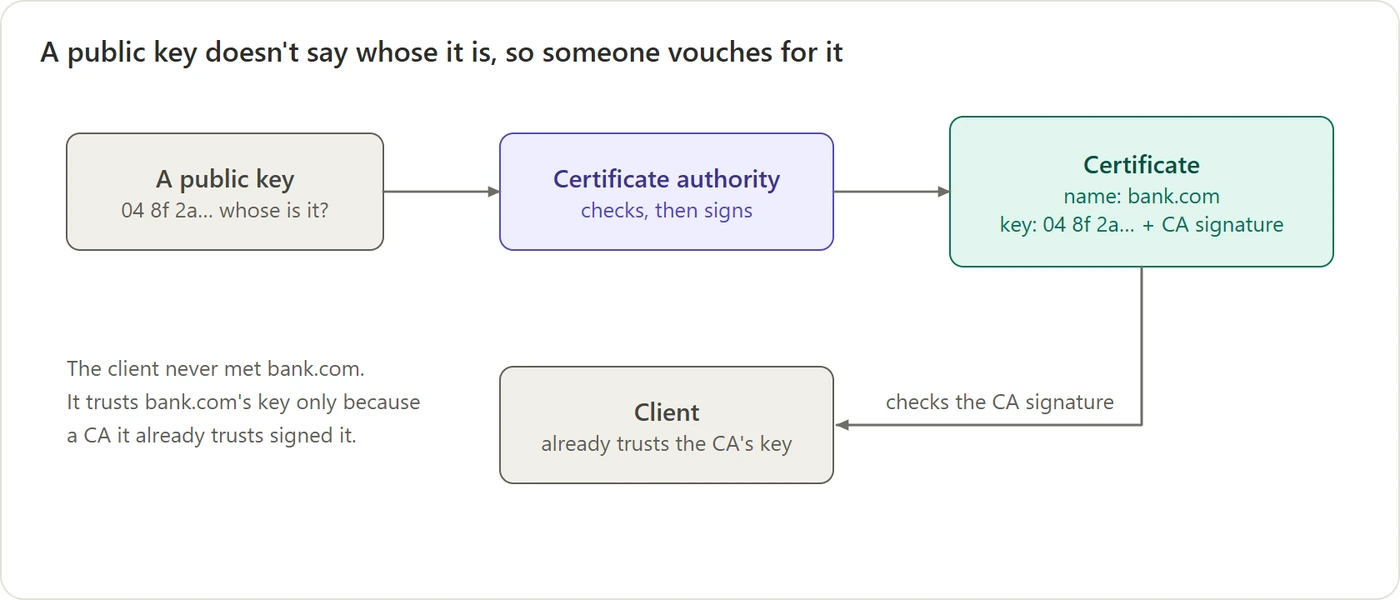 Figure 4. A certificate authority binds a name to a public key by signing the pair.
That someone is a certificate authority (CA). The CA checks that the requester really is bank.com (how it checks is the most interesting part, and we’ll get to it). Then it signs a small document that says, in effect, “the public key 04 8f 2a… belongs to bank.com“. That signed document is a certificate.
Your browser trusts bank.com’s key only because a CA whose public key is already on your machine signed that statement. Operating systems and browsers ship with about 150 such CA keys. That built-in list is called the trust store.
The passport analogy. A passport is a certificate. The government (the CA) checks who you are, then issues a document binding your photo (your public key) to your name, and seals it. A border officer (the client) has never met you, but trusts the government’s seal. Then they check that the face in front of them matches the photo. That second step matters just as much, and we’ll see its digital version in section 6.
A certificate is a short, structured document (the format is called X.509). Its primary fields are:
- who it’s for: one or more names, such as
www.example.com; - their public key
Q(never the private key); - who vouched for it: the issuing CA’s name;
- when it’s valid: a start date and an end date;
- what it may be used for: being a server, being a client, or signing other certificates;
- the CA’s signature over all of the above.
Because the CA’s signature covers everything, changing a single letter, say swapping in a different name or key, breaks the signature.
5. The chain of trust
You might expect that the 150 trusted CAs sign every website’s certificate directly. They don’t. There’s a small hierarchy, for a very practical reason.
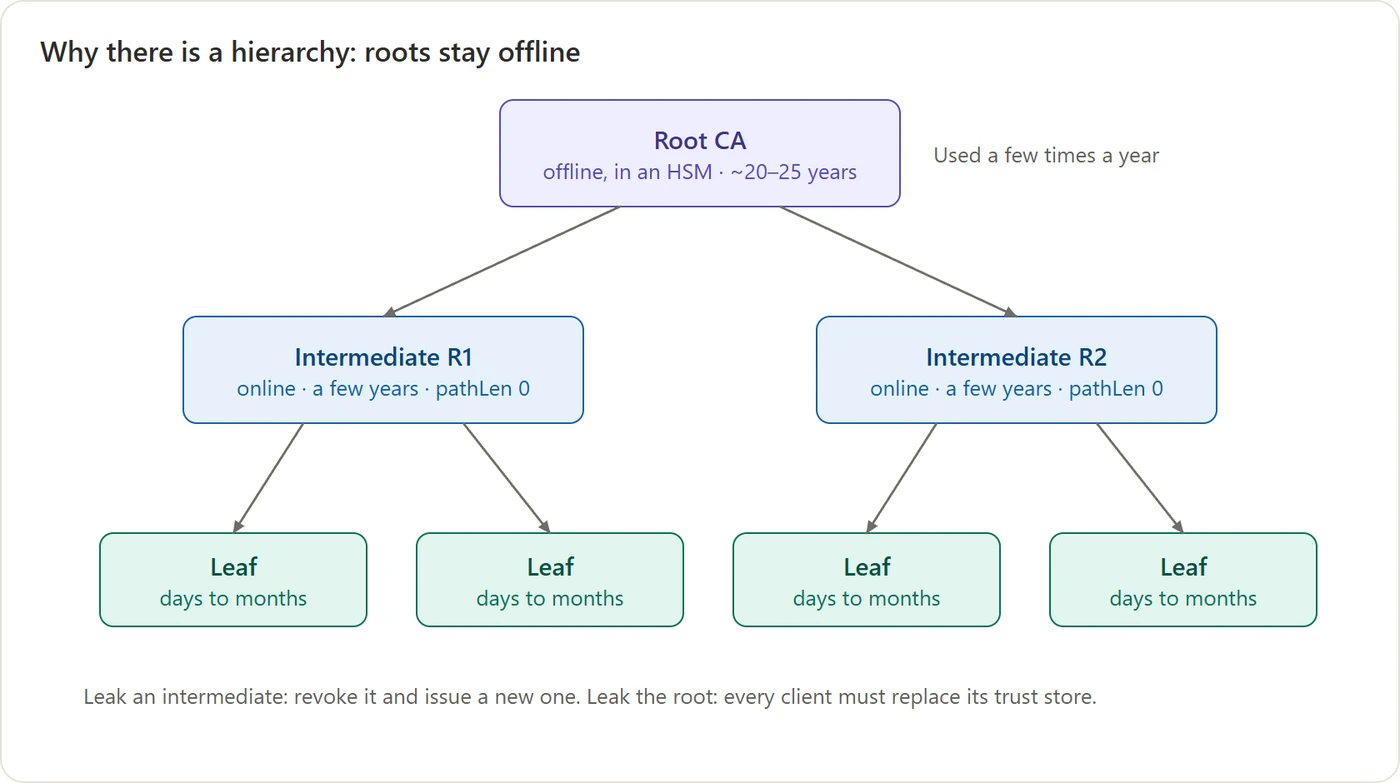 Figure 5. A rarely used root signs a few intermediates, and the intermediates do the daily work.
- The root CA sits at the top. Its certificate is self-signed: it vouches for itself, which proves nothing on its own. It’s trusted only because it’s in your trust store. Its private key is the most valuable secret in the system, so it’s kept offline in tamper-resistant hardware and used only a few times a year.
- Intermediate CAs are signed by the root. They’re online and sign certificates all day long.
- Leaf certificates are the ones servers actually use. They’re signed by an intermediate and last days to months.
Why bother to use a chain? If an intermediate’s key leaks, the CA throws that intermediate away and makes a new one, and the root survives. If a root key leaked, every phone, laptop and server in the world would need an update. Keeping the root offline makes the expensive disaster very rare.
Here’s the real chain for this blog, at the time of writing:
1
2
3
4
gemsofcoding.com        ← the leaf, for this site
  issued by  YR2        ← a Let's Encrypt intermediate
  issued by  Root YR    ← a newer Let's Encrypt root…
  issued by  ISRG Root X1  ← …vouched for by an older root already in your trust store
That third step is a nice detail. Let’s Encrypt’s newer root, Root YR, isn’t in every device’s trust store yet, so the older and widely trusted ISRG (Internet Security Research Group) Root X1 has signed it too. Old devices follow the chain up to X1; newer ones can stop at Root YR.
What the server actually sends
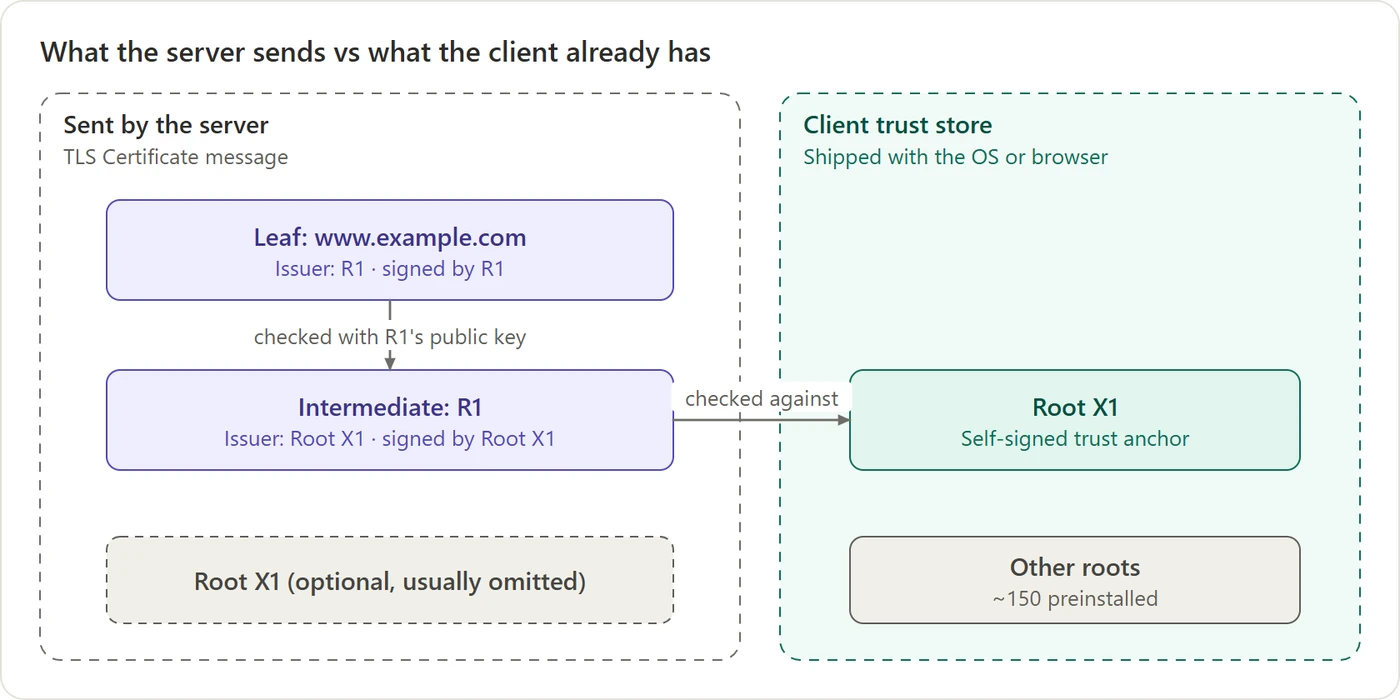 Figure 6. The server sends its leaf and intermediates. The client supplies the root from its own trust store.
When you connect, the server sends its leaf plus the intermediate(s). It doesn’t need to send the root, and sending one wouldn’t help anyway. Trust can’t come from the server’s word, since an attacker could send any root they like. The client accepts a chain only if it ends at a root it already has.
Two misconceptions are worth clearing up here:
- A certificate doesn’t contain its chain. It only carries a pointer to its parent, meaning the parent’s name and a fingerprint of the parent’s key. It works like a commit in git, which stores its parent’s hash rather than a copy of the parent. The “bundle” a server sends is just certificates placed one after another.
- Checking a chain isn’t slow. The client already has every certificate it needs in memory: the server sent the intermediates, and the root is local. Each link is one signature check, which takes a fraction of a millisecond of CPU. There’s no network call per certificate.
What the client checks
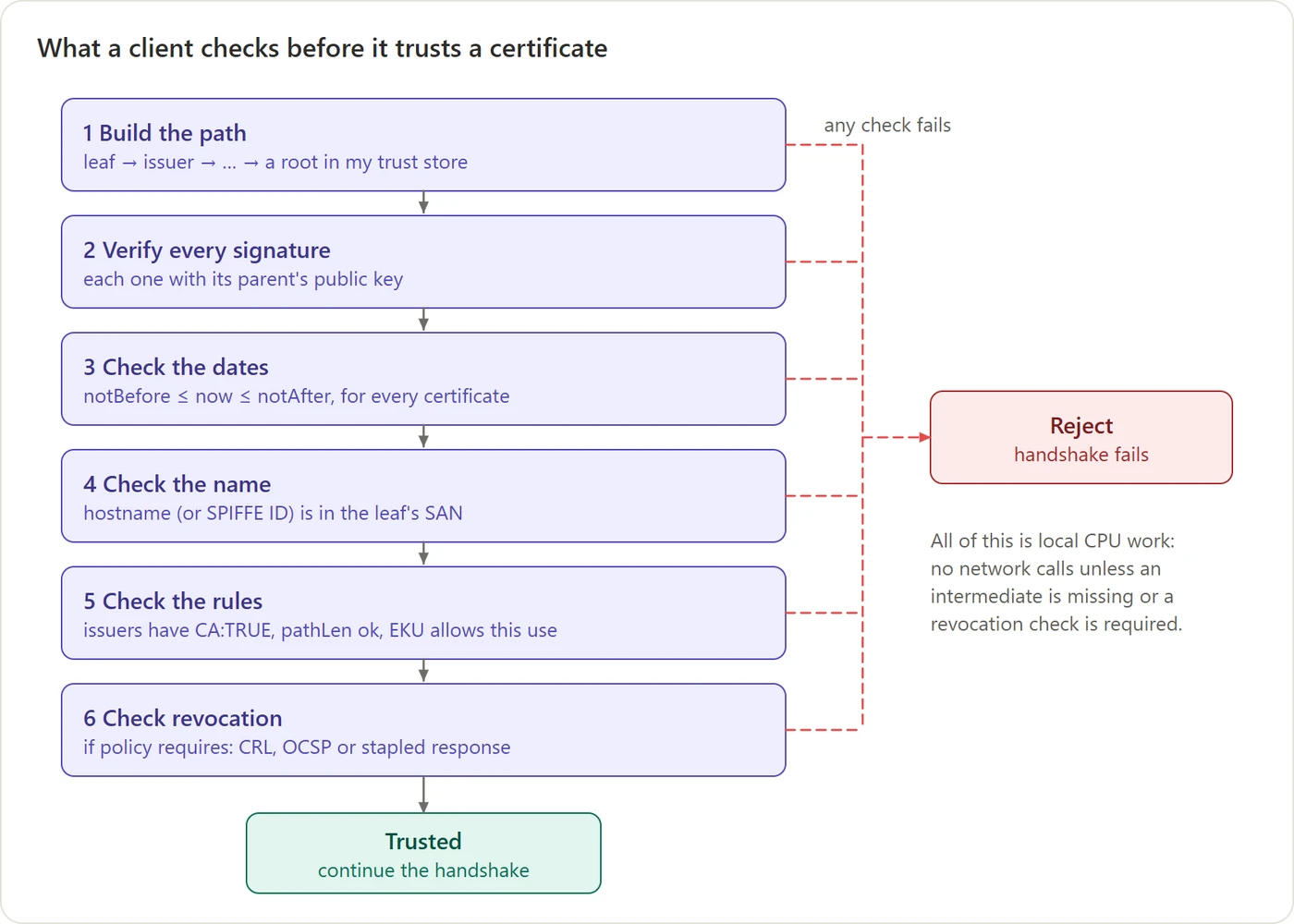 Figure 7. Before trusting a certificate, the client runs these checks. Any failure ends the connection.
The client builds the path up to a trusted root and verifies each signature. It checks that nothing has expired. It checks that the name you asked for is actually in the certificate, which stops an attacker who holds a perfectly valid certificate for a different site. It checks that each issuer was allowed to issue certificates. Optionally, it checks whether anything has been revoked (more on that in section 11).
There’s one more check, and it isn’t on this list because it isn’t about the certificate at all: the server must prove, live, that it holds the private key matching the certificate. That’s the face-matches-the-photo step, and it happens during the handshake.
6. Getting a certificate: your key, someone else’s word
This is where most people’s mental model breaks down, and it’s the heart of the whole subject. The confusion usually sounds like this: “Where does the private key come from? Does the CA give it to me? How does the CA know it’s really me asking for a new certificate, and not some impostor?”
The missing idea fits in one sentence: a key and an identity are two completely separate things, created by different parties.
You make your own key, and it has no identity
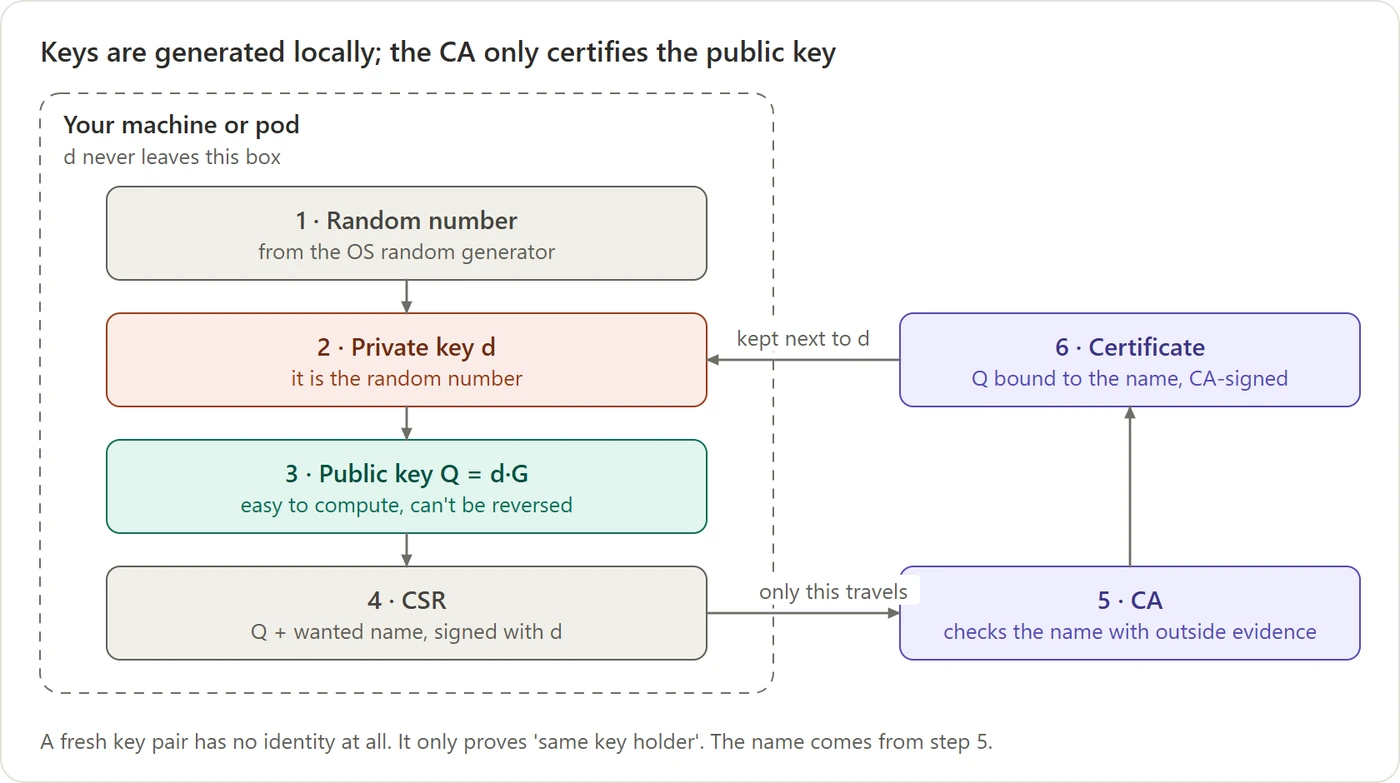 Figure 8. Everything inside the dashed box happens on your machine. Only the request leaves.
A private key is nothing more than a random number your own computer picks. Nobody approves it, nobody records it, and it takes microseconds. The public key is computed from it.
To ask for a certificate, you write a certificate signing request (CSR). It contains your public key Q and the name you want, and you sign it with d. Only the CSR leaves your machine. The private key is never sent to the CA, and the CA never needs it. It can check the CSR’s signature using the Q that’s written inside the CSR.
How does the CSR get to the CA? The CSR itself is a small file in a standard format (PKCS #10, Public-Key Cryptography Standards #10), usually seen as a block of text starting with -----BEGIN CERTIFICATE REQUEST-----. How it travels depends on the CA, but today it’s almost always sent over an ordinary TLS connection to the CA’s API:
- Public CAs like Let’s Encrypt use ACME: JSON messages over HTTPS (more on ACME in section 7).
- HashiCorp Vault takes it through its HTTPS API.
- Istio’s agent in each pod sends it to the mesh CA over gRPC (Google’s remote procedure call framework) on TLS.
The CSR holds nothing secret, so it wouldn’t matter if someone read it. The TLS connection is there for two other reasons. First, the requester checks the CA’s server certificate, so it knows it’s talking to the real CA; that’s ordinary one-way TLS, because the requester doesn’t have a certificate of its own yet. Second, the CSR usually travels with identity evidence, such as a platform token, and that evidence is secret.
When the certificate comes back, you keep it next to d. From then on you hold both halves: the certificate says “Q belongs to orders-api”, and d lets you prove you’re the holder of Q whenever someone asks.
Notice what a fresh key pair doesn’t have: a name. It’s just two numbers, and nothing in them says “orders-api”. An attacker can generate a key pair on their laptop and claim it belongs to orders-api, and the numbers can’t contradict them. All a key can ever prove is “I hold the private half of this key pair”. So the name has to be attached by someone else, someone the other side already trusts. That’s the CA’s job, and it’s why the CA must check the name separately.
The two checks every CA makes
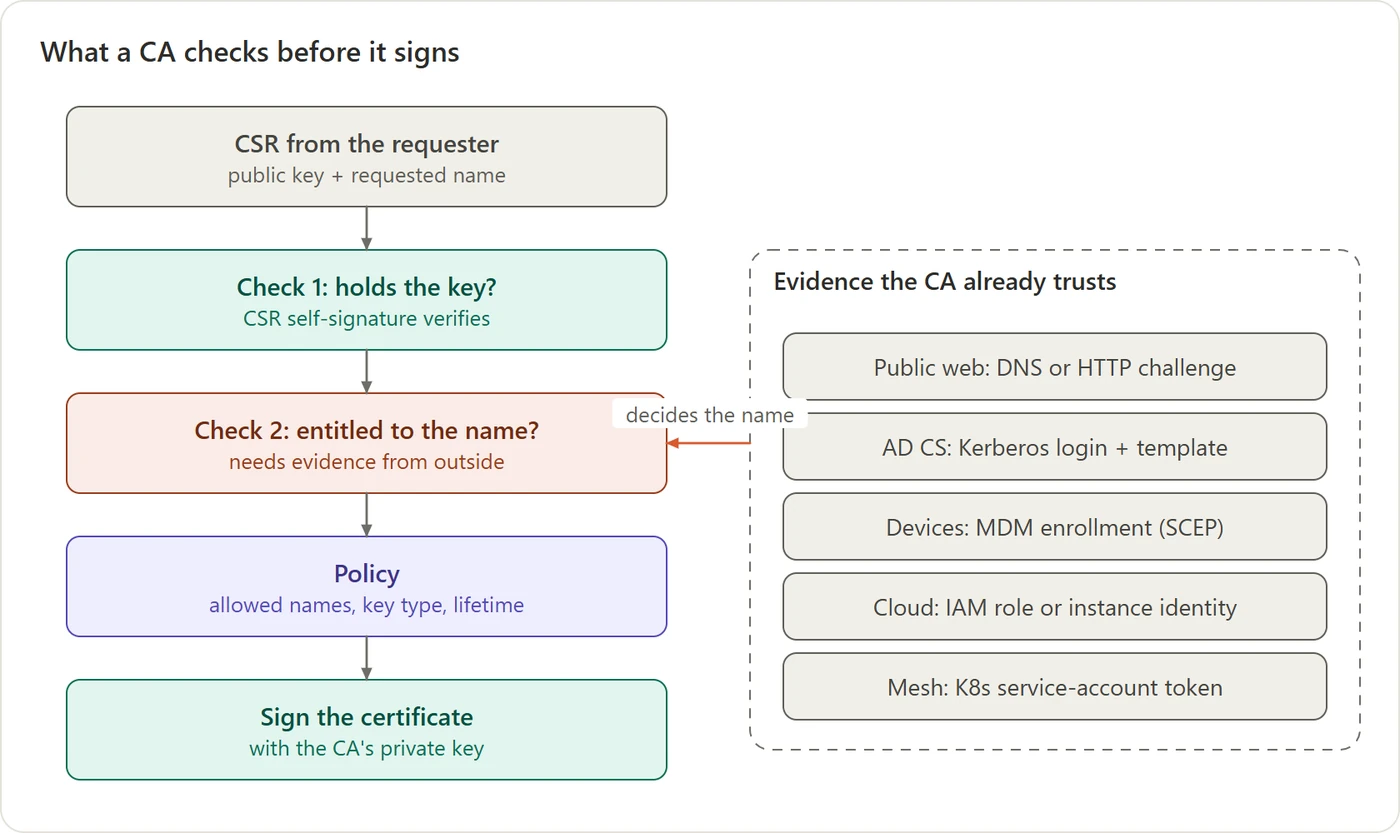 Figure 9. A certificate is the CA’s signed claim “this key belongs to this name”, so the CA must check both halves.
- Check 1: does the requester actually hold the private key? This one is easy: verify the CSR’s signature. It means you can only ever get a certificate for a key you really hold. Nobody can get your public key certified under their name.
- Check 2: is the requester entitled to the name it’s asking for? This is the hard one, because anyone can type any name into a CSR. A CSR claiming to be
bank.com, made on an attacker’s laptop, has a perfectly valid signature. So the CA must confirm the name using evidence from outside the request, from a system it already trusts.
Then policy limits what even a legitimate requester can get (which names, which key types, how long), and only then does the CA sign.
Where does Check 2’s evidence come from? That depends on who’s asking, and the next two sections cover the two most common answers: websites and machines.
Why a stolen certificate is useless on its own
Before that, one consequence that surprises many people: a certificate isn’t a secret. Your browser receives every website’s certificate in the clear, and public certificates are published in public logs. So what stops an attacker from copying bank.com’s certificate and presenting it?
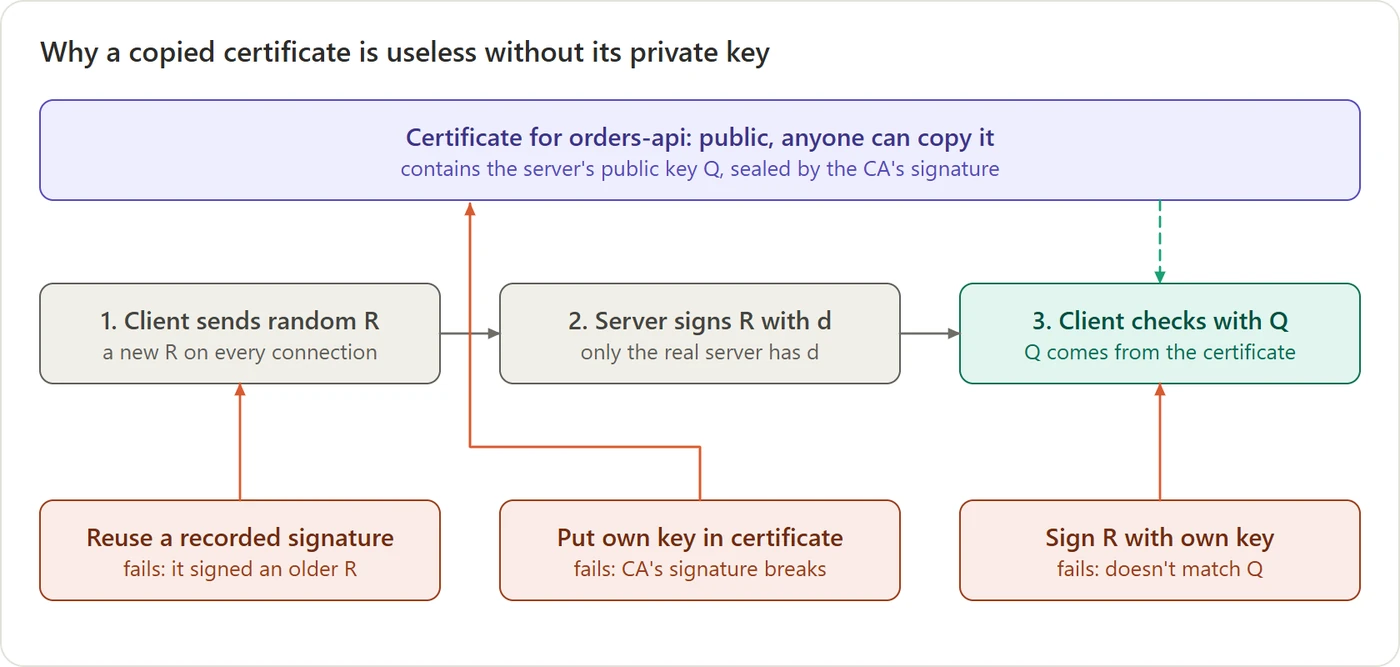 Figure 10. Showing a certificate isn’t enough. The server must also sign a random number the client just picked, and only the holder of the private key can do that.
Showing the certificate is only half of the job. The server must also prove, right now, that it holds the matching private key. It works like a challenge:
- The client picks a random number, call it
R, and sends it. Every connection gets a newR. - The server signs
Rwith its private keyd. - The client checks that signature using the public key
Qwritten in the certificate. If it matches, the server really holdsd.
Now picture a thief who copied the certificate but doesn’t have d. Each of their options fails:
- Reuse a signature recorded earlier. Say the thief watched yesterday’s connection and saved the server’s signature. That signature was over yesterday’s
R. Today the client sends a differentR, so the old signature doesn’t match and the check fails. (Resending a recorded message like this is called a replay attack, and the new random number is what stops it.) - Put their own public key into the certificate, so they can sign with their own private key. But changing even one byte of the certificate breaks the CA’s signature on it, so the client rejects the certificate itself.
- Sign
Rwith their own private key and leave the certificate alone. Then the signature doesn’t match theQin the certificate, and the check fails.
The real handshake is a bit richer than one number. In TLS 1.3, the server signs a fingerprint of all the handshake messages so far, which include random values from both sides. That’s the CertificateVerify message in section 9. But the idea is exactly this: sign something new that the other side chose, so no old signature can ever be reused.
That gives a handy way to think about credentials:
| Credential | Is holding it enough to be you? | So it must be… |
|---|---|---|
| Password or bearer token | Yes: whoever has it is you | kept secret everywhere |
| Certificate | No: you must also sign with the private key | fine to share publicly |
| Private key | Yes: everything rests on it | never leave your machine |
7. How a public CA checks a website: the GitHub Pages story
Public CAs such as Let’s Encrypt only ever verify one thing: that the requester controls a domain name. The protocol that automates this is called ACME (Automatic Certificate Management Environment), and it works like this: the CA hands the requester a random token, the requester publishes that token on the domain, and the CA goes and looks for it. If the token is there, the requester must control what that domain serves.
The clearest real example is a blog like this one, hosted on GitHub Pages with a custom domain. The owner adds a DNS record pointing the domain at GitHub, ticks a box, and a few minutes later HTTPS just works. Where did the certificate come from?
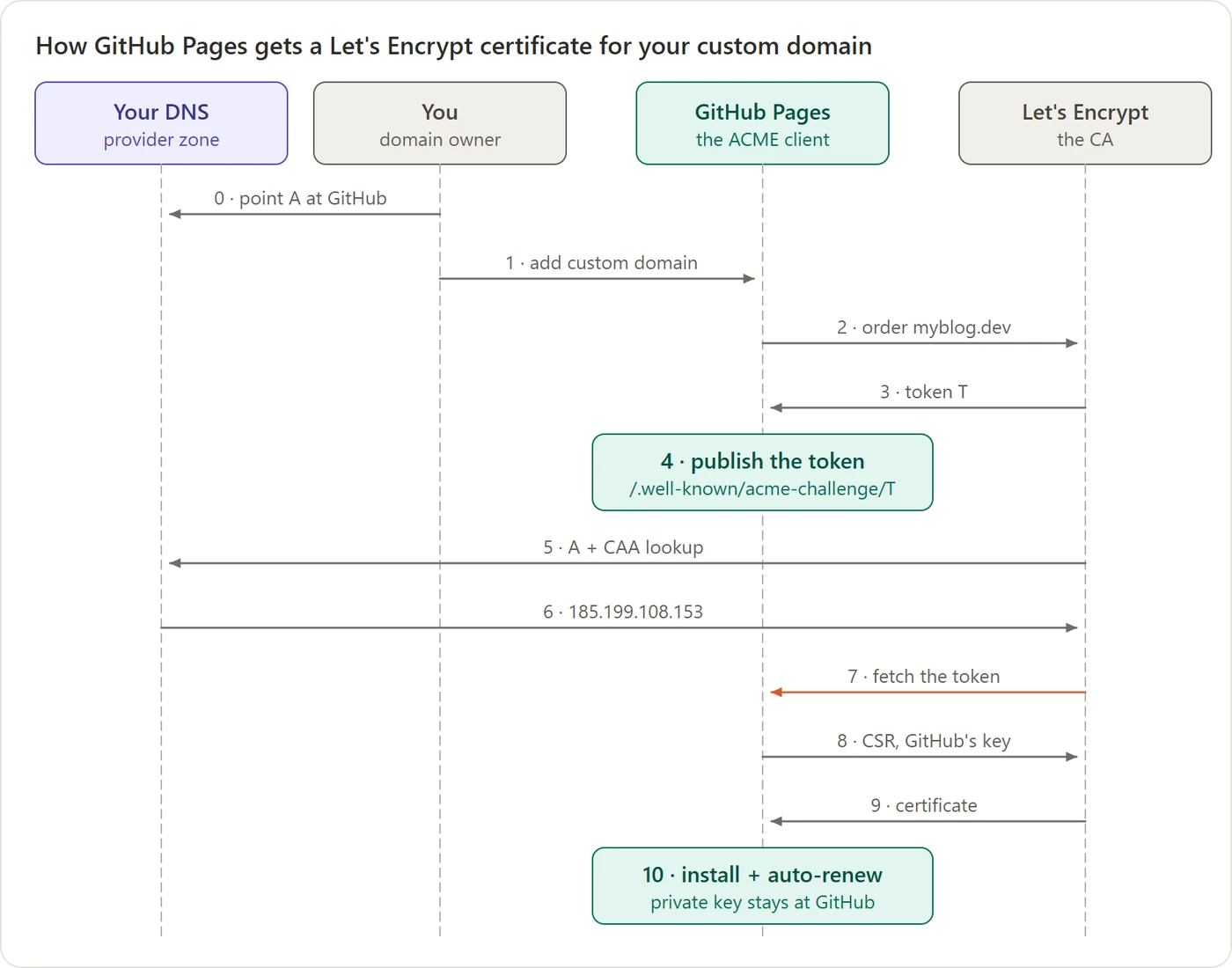 Figure 11. Your only actions are steps 0 and 1. GitHub does everything else.
The surprise is that you’re not the requester. GitHub is. You never talk to the CA, never make a key and never send a CSR.
- Steps 0–1 (you): point your domain’s DNS at GitHub, and tell GitHub the domain name.
- Steps 2–4: GitHub orders a certificate from Let’s Encrypt, receives a random token, and arranges for its servers to serve that token on your domain.
- Steps 5–7 are Check 2. Let’s Encrypt looks up your domain in your DNS, gets GitHub’s address because your DNS record says so, and fetches the token from there. It finds it. The evidence is that your DNS sent the CA’s request to GitHub.
- Steps 8–9 are Check 1. GitHub generates a key pair on its own servers and sends a CSR signed with it.
- Step 10: GitHub installs the certificate and renews it automatically before it expires, for as long as your DNS keeps pointing at GitHub.
So your DNS record doesn’t prove ownership to Let’s Encrypt directly. It hands control of what’s served at your domain to GitHub, and that lets GitHub pass the CA’s check on your behalf. The general rule: whoever your DNS points at, or whoever can edit your DNS, can get a certificate for your domain. Editing DNS records is how you authorize a certificate.
A practical consequence: remove DNS before you retire a site. If you delete your GitHub Pages site but leave the DNS record pointing at GitHub, someone else can claim your domain on GitHub, and Let’s Encrypt will happily issue them a certificate, because every check passes. GitHub’s domain-verification TXT record exists to prevent exactly this. Add it, and when you shut a site down, delete the DNS records first.
There’s a second way to pass the check, called DNS-01: instead of serving a file, the requester publishes the token as a DNS record. It’s the only way to get a wildcard certificate such as *.example.com.
You may wonder what happens if an attacker can redirect the CA’s traffic, for example by hijacking internet routing for a few minutes so that the CA’s request lands on the attacker’s server. This has happened. That’s why CAs now validate from several places around the world at once and refuse to issue unless they agree. An attacker would have to fool most of the internet at the same moment, not just one corner of it.
8. How machines prove who they are
Websites have domain names that a CA can check from the outside. But inside a company, a service called orders-api wants a certificate to talk to payments. There’s no public domain to look up. Who vouches for it?
The answer: the platform that launched it. AWS, Azure, Google Cloud or Kubernetes started that virtual machine or pod, so it knows exactly which one it is. This idea is called workload identity, and it works much like an office badge system.
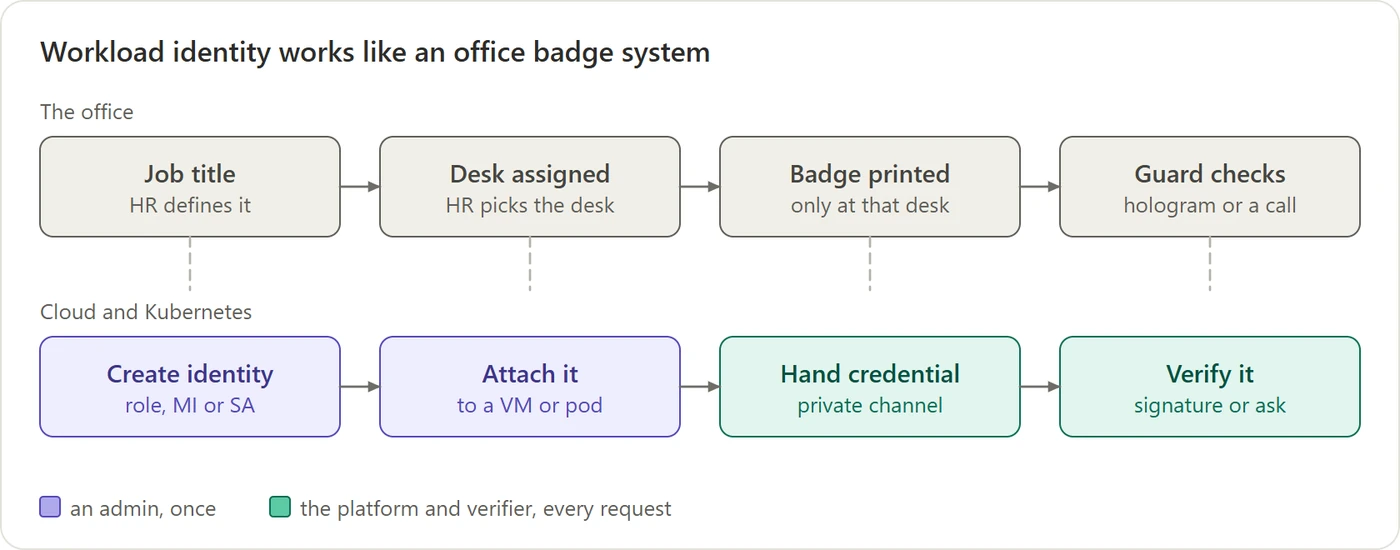 Figure 12. Workload identity is a badge system. The badge holder never says who they are; the badge does, and the front desk stands behind it.
- An admin creates an identity: an IAM (Identity and Access Management) role in AWS, a managed identity in Azure, a service account in Google Cloud or Kubernetes.
- The admin attaches it to a VM or pod. That’s a permission the admin needs; the workload can’t attach it to itself.
- The platform hands the workload a short-lived credential through a private channel only that VM or pod can reach: a special address on the VM, or a file mounted inside the pod. It refreshes the credential automatically.
- A verifier checks it, either by checking the platform’s signature on the credential, or by simply asking the platform “whose credential is this?”
Doesn’t handing this credential to the CA let the CA act as the workload? It would if the workload sent its real cloud credential, so well-designed systems never do. They send something that proves who the workload is but grants no access:
- A token addressed to the CA only. The workload asks the platform for a token stamped “valid only for the CA” (this is called the token’s audience). Kubernetes and the clouds reject a token that’s addressed to someone else, so the CA can’t use it anywhere. Istio works this way: each pod sends a Kubernetes token addressed to
istio-ca, valid for about an hour.- A signed “who am I?” request instead of a secret. On AWS, Vault’s login doesn’t receive the workload’s keys at all. The workload signs one specific request to AWS, “tell me who I am”, and hands the signed request to Vault. Vault forwards it to AWS and reads the answer. That signature can’t be reused for any other request, and it expires within about 15 minutes.
A short lifetime limits the damage further if a token does leak. And the CA is trusted with far more than this anyway: it can issue a certificate for any service name. That’s why the CA is one of the most tightly protected systems in the whole setup.
How does the platform know which workload is asking? It doesn’t have to take anyone’s word for it, because it sits physically between the workload and everything else.
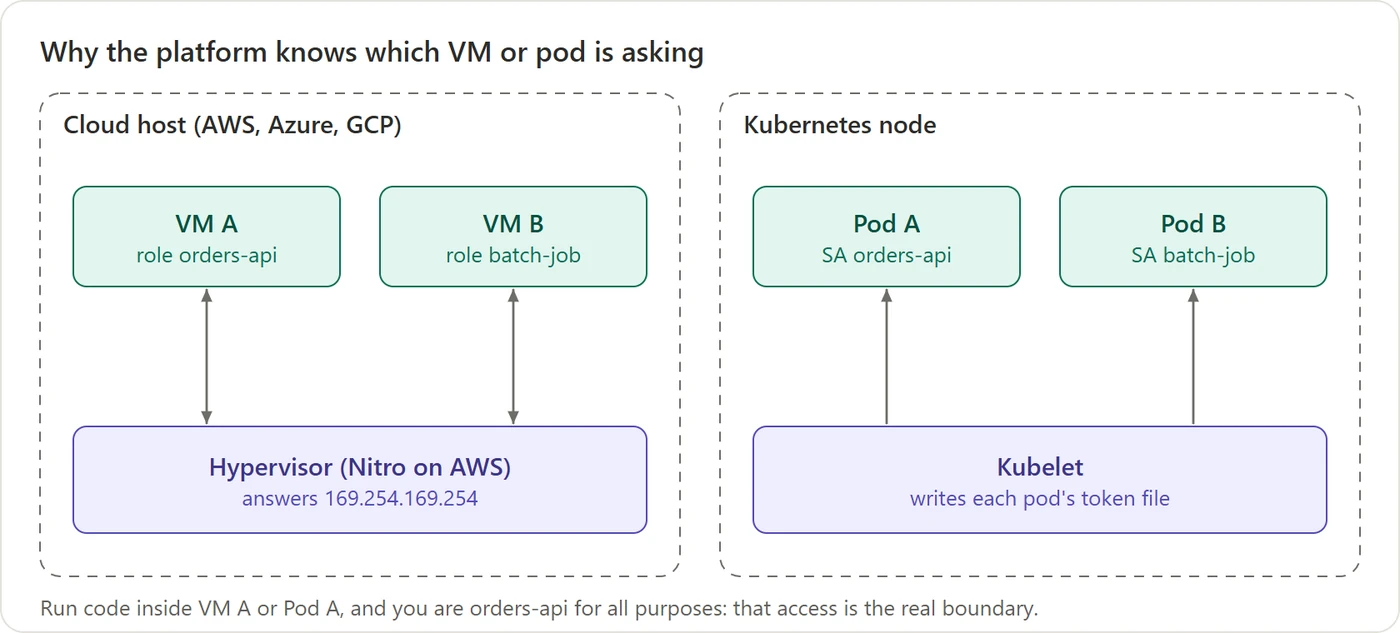 Figure 13. Where a request comes from is the proof. Nothing the caller says matters.
On a cloud VM, requests to the platform’s special metadata address never even reach the network. The host machine answers them itself, and it knows which VM sent each packet because it created that VM’s virtual network card. In Kubernetes, the node agent (the kubelet) writes each pod’s token into that pod’s own filesystem, and a pod can only read its own files.
Two things follow from this:
- When a mesh CA issues a certificate, it decides the name itself. In Istio, for example, a pod sends its CSR together with its Kubernetes token. The CA asks Kubernetes whose token it is, gets back “namespace
orders, service accountorders-api”, and writes that name into the certificate, ignoring whatever the CSR asked for. The requester never chooses its own name. - “Being orders-api” really means “being able to run code where orders-api’s credential is delivered.” So the real security boundary isn’t the certificate system at all. It’s who can deploy into that namespace, log in to that VM, or exec into that pod.
Which CA signs these certificates?
Note that the cloud or Kubernetes only provides the identity (the token). It doesn’t sign the workload’s certificate. That’s done by a CA you choose, and in practice there are three common choices, often combined:
- The mesh’s built-in CA. Istio and Consul each come with one. Out of the box, Istio even generates its own root at install time, which is fine for a demo but means nothing outside the cluster trusts it.
- A managed private CA from the cloud provider, such as AWS Private CA or Google Cloud Certificate Authority Service. The cloud runs and protects the CA’s keys; you decide what it issues.
- Your company’s own CA, such as HashiCorp Vault or Microsoft AD CS (Active Directory Certificate Services).
The usual production setup chains these together. The company keeps one offline root. That root signs an intermediate for each mesh or cluster, and the mesh CA uses that intermediate to sign the daily certificates. Every service, in every cluster and cloud, then trusts the same root. (Section 12 shows where each tool sits.)
What about a public CA like Let’s Encrypt? It’s the right choice for anything the public internet connects to, such as your website or the mesh’s ingress gateway. But it’s the wrong choice for service-to-service identity, for three reasons:
- It can’t check the name. A public CA can only verify domain names, from the outside. It has no way to confirm “service account
orders-apiin namespaceorders”, and mesh certificates carry exactly that kind of name (Istio writes it asspiffe://cluster.local/ns/orders/sa/orders-api). - It’s trusted by everyone. If your services trusted a public root, any certificate from that CA would pass the first check, including one an attacker got for their own domain. An internal mesh should trust only its own root.
- It publishes everything. Every public certificate is recorded in public logs, so the names of all your internal services would be visible to anyone.
9. Using the certificate: the handshake
Everything so far was about authentication. But TLS also needs a shared secret key to encrypt the conversation. A common belief is that the browser invents a key and encrypts it with the server’s certificate. That’s how it worked years ago. Modern TLS (version 1.3) doesn’t do that at all. It separates the two jobs:
- The session key comes from a fresh exchange that both sides do for this connection only.
- The certificate key only signs. It proves who you are and never encrypts anything.
Agreeing on a secret without ever sending it
How can two parties end up with the same secret when everything they send can be read? The classic picture is mixing paint.
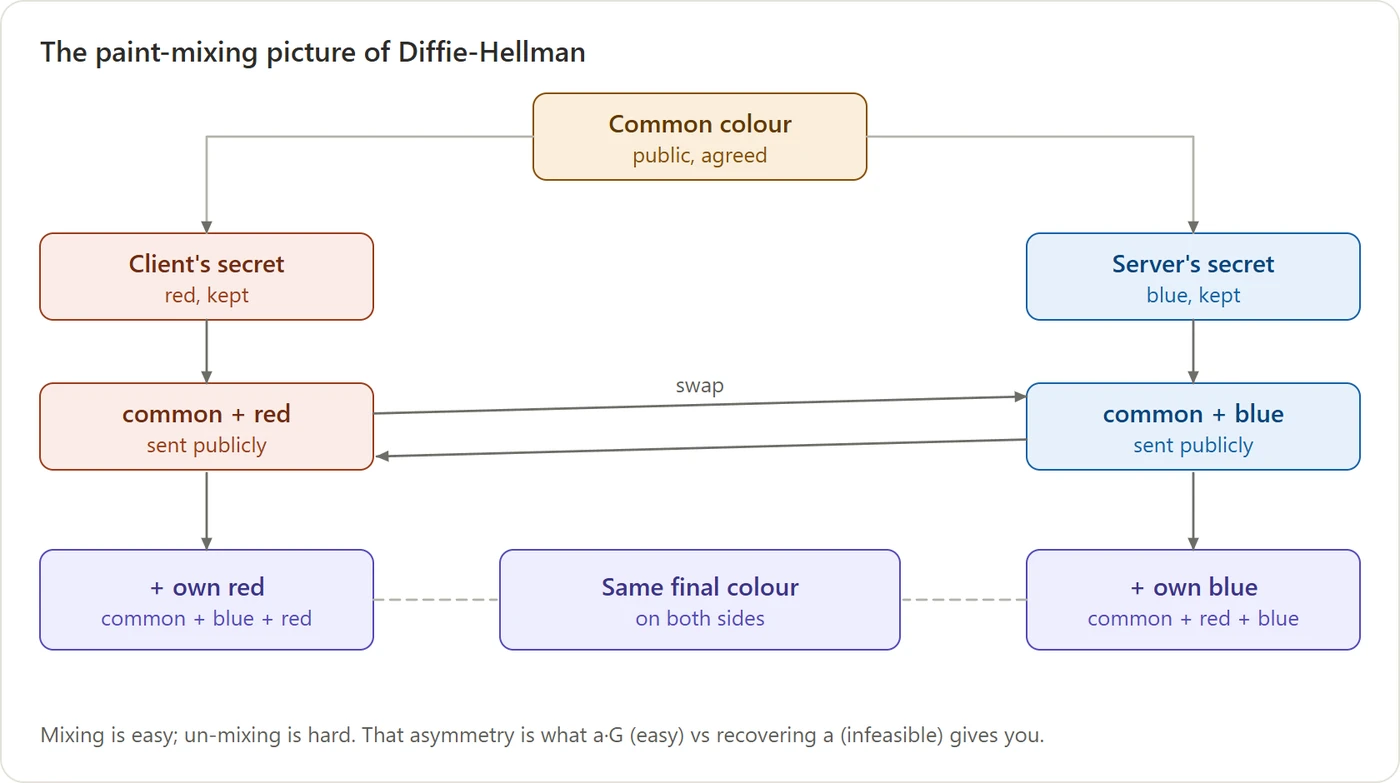 Figure 14. Mixing is easy; un-mixing is hard. Both sides end up with the same colour, which never travelled.
Each side keeps one secret colour and sends only a mixture. Each then adds its own secret to the mixture it received. Both end up with “common + red + blue”. Someone watching saw only the two mixtures, and can’t separate them back into colours.
The real version uses numbers. Here it is with numbers small enough to check on paper. “mod 23” means “the remainder after dividing by 23”, and the public values are 23 and 5:
| Client | Server | |
|---|---|---|
| Picks a secret | a = 6 |
b = 15 |
| Sends a public value | 5^6 mod 23 = 8 |
5^15 mod 23 = 19 |
| Combines its secret with what it received | 19^6 mod 23 = 2 |
8^15 mod 23 = 2 |
Both get 2, and 2 never crossed the wire. It always works, because both sides are really computing 5^(6×15), just in a different order. An eavesdropper sees 23, 5, 8 and 19, and would need to work out 6 or 15 from them. With numbers this small that’s trivial. With the sizes real TLS uses, it’s hopeless. This is the Diffie-Hellman key exchange. TLS uses a variant based on elliptic curves, and both secrets are thrown away when the connection ends.
Putting it together
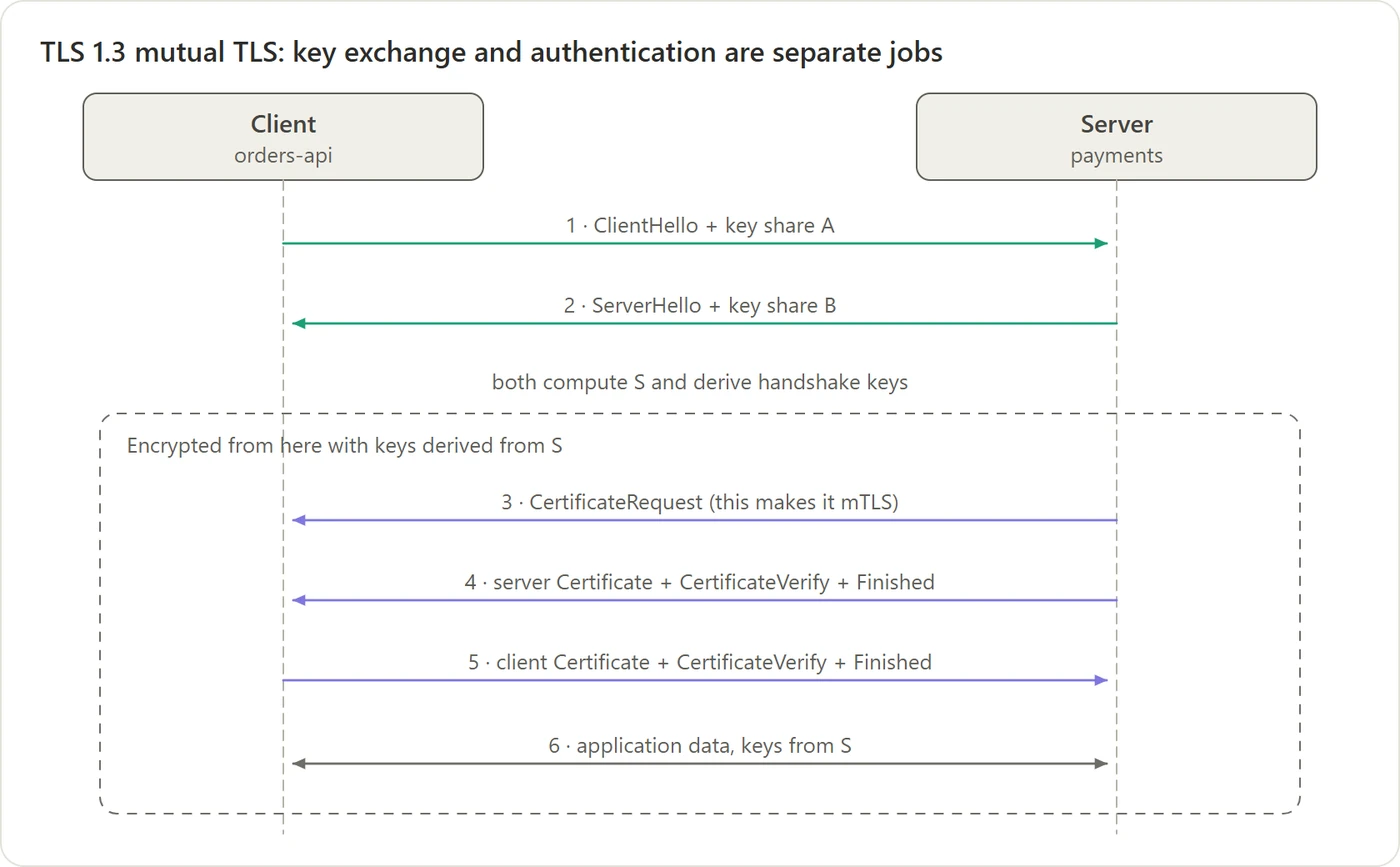 Figure 15. The TLS 1.3 handshake. Green arrows create the session key; purple arrows prove identity. Step 3 and step 5 appear only in mutual TLS.
- Steps 1–2: each side sends its public “mixture” (a key share). Both compute the same secret, and from then on everything, including the certificates, is encrypted.
- Step 4: the server sends its certificate chain, then a CertificateVerify message: a signature, made with its private key, over a summary of the whole handshake so far. That summary includes the two key shares.
- Step 6: encrypted application data flows.
Signing the key shares is what defeats a man in the middle. An attacker could run one key exchange with you and another with the server. But they can’t produce the server’s signature over your handshake without the server’s private key. The signature ties “who you are” to “the key we just agreed on”.
Why bother? Forward secrecy
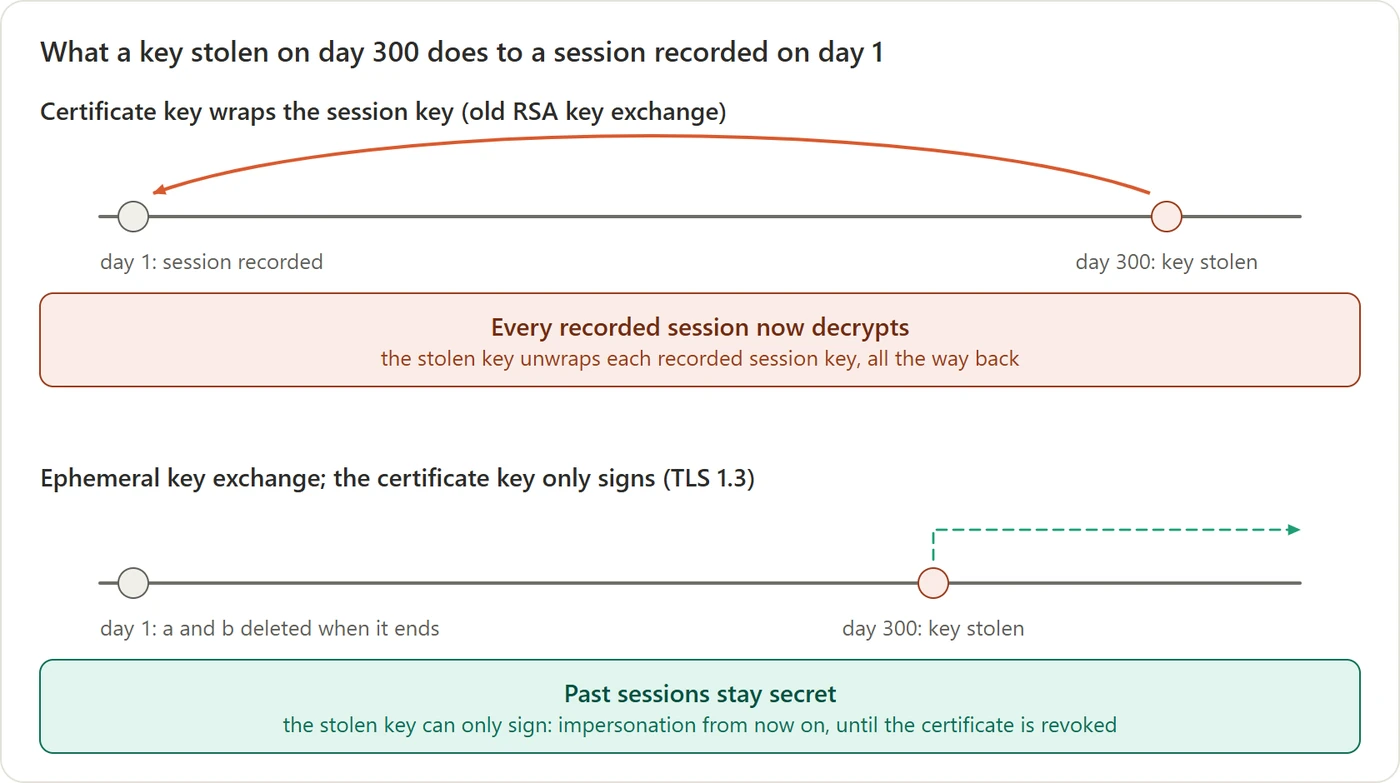 Figure 16. What a key stolen on day 300 can do to a conversation recorded on day 1.
Imagine an attacker who records all the encrypted traffic to a server for a year, without being able to read any of it, and then steals the server’s private key. The question is what that key unlocks in the recording.
In the old design, the client picked the session key itself, encrypted it with the public key from the server’s certificate, and sent it across. So every recorded connection contains the session key, encrypted under the certificate’s key. Once the attacker steals the private key, they decrypt that small encrypted blob, get the session key, and read the whole conversation. They can do this for every connection they ever recorded, because one long-lived key protected all of them.
In the modern design, the session key is never sent at all, not even encrypted. Look back at the small-number example: the recording contains only the public values 8 and 19. To compute the shared secret 2, you need one of the private numbers, 6 or 15. Those were made up for that one connection and deleted as soon as it ended, so they exist nowhere, not even on the server. And the certificate’s private key was only used to sign the handshake, never to protect the secret, so stealing it gives the attacker nothing to work with. Every past connection stays unreadable.
What the stolen key does allow is impersonating the server in new, live connections, until the certificate is revoked or expires. That’s bad, but it’s limited: the attacker has to actively sit in the path of each connection they want, which is far harder than passively recording and much more likely to be noticed.
This property is called forward secrecy: stealing a long-term key later doesn’t expose conversations from before.
(You may have heard of “post-quantum” TLS. A future quantum computer could, in principle, work backwards from those public key shares. Browsers now add a second, quantum-resistant exchange alongside the classic one, so recorded traffic stays safe even then. Because TLS 1.3 keeps key exchange separate from certificates, that upgrade needed no change to anyone’s certificate.)
10. mTLS: both sides show a certificate
On the web, only the server proves who it is. The client is usually proved some other way, such as a password. Between services inside a company, it’s useful for both sides to show a certificate. That’s mutual TLS (mTLS), and it doesn’t add any new kind of trust. It’s the same check run a second time with the roles reversed: in Figure 15, step 3 asks the client for a certificate, and step 5 is the client sending its chain and signing the handshake.
The server checks the client’s chain against its own list of trusted CAs. That’s usually the company’s private CA, not the 150 public roots. And because the server is now accepting connections from many different callers, there’s a third question to ask.
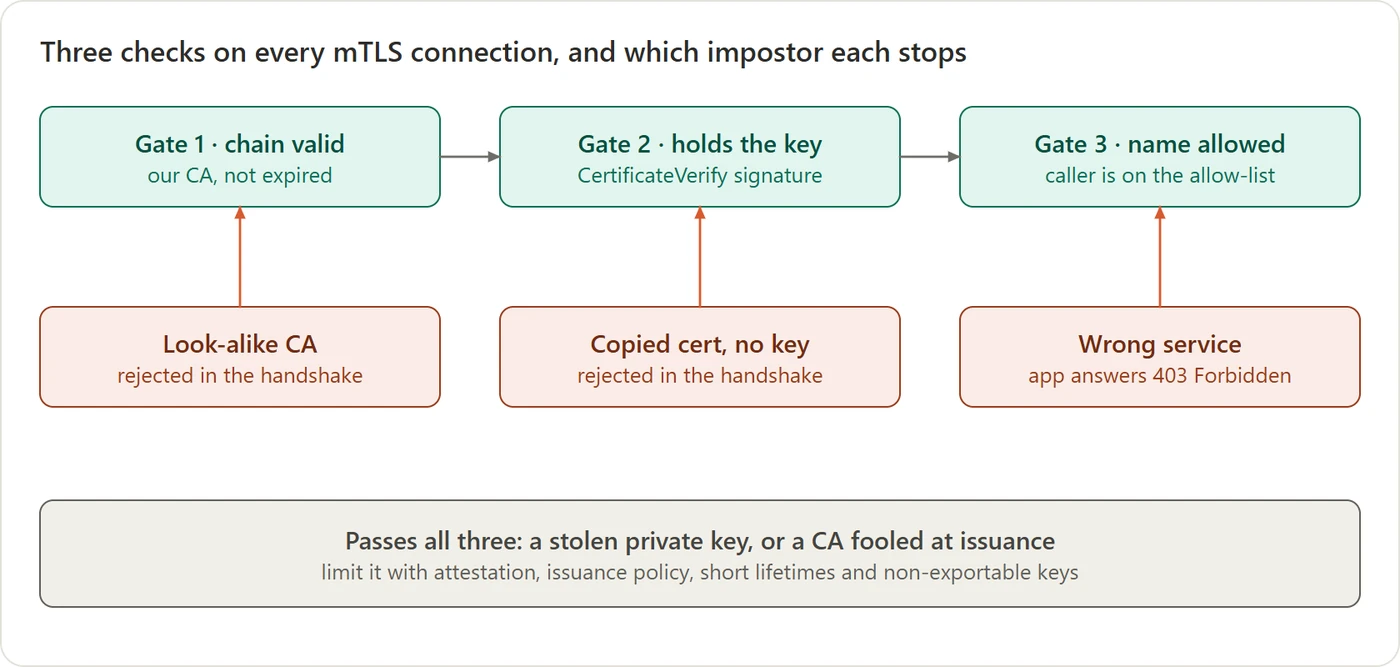 Figure 17. Three checks on every mTLS connection, and which impostor each one stops.
- Gate 1: does the chain lead to a CA I trust? This stops an attacker who builds their own CA, even one with exactly the same name as yours. Names don’t matter; keys do.
- Gate 2: does the peer hold the private key? This stops someone replaying a copied certificate.
- Gate 3: is this particular caller allowed to talk to me? This is the one people forget. A valid certificate only proves “our CA vouches for this caller”. If you stop there, any service in the company can call any other. The batch job has a perfectly good certificate too. The allow-list decides whether
batch-jobmay callpayments.
What gets past all three gates? Someone who stole the private key itself, or who fooled the CA at issuance. That’s why keys are generated where they’re used and never copied, why the platform rather than the requester decides the name, and why lifetimes are kept short.
11. Taking trust back: revocation and short lifetimes
A certificate checks itself. Once the CA has signed it, anyone holding the bytes can verify it, offline, until it expires. That’s what makes checking fast. It also means a CA can’t un-sign a certificate. If a server’s private key leaks, the certificate still verifies perfectly.
So “revoking” a certificate means publishing a second signed statement: “certificate number X, issued by me, should no longer be trusted.” That statement lives outside the certificate, and the verifier has to obtain it somehow.
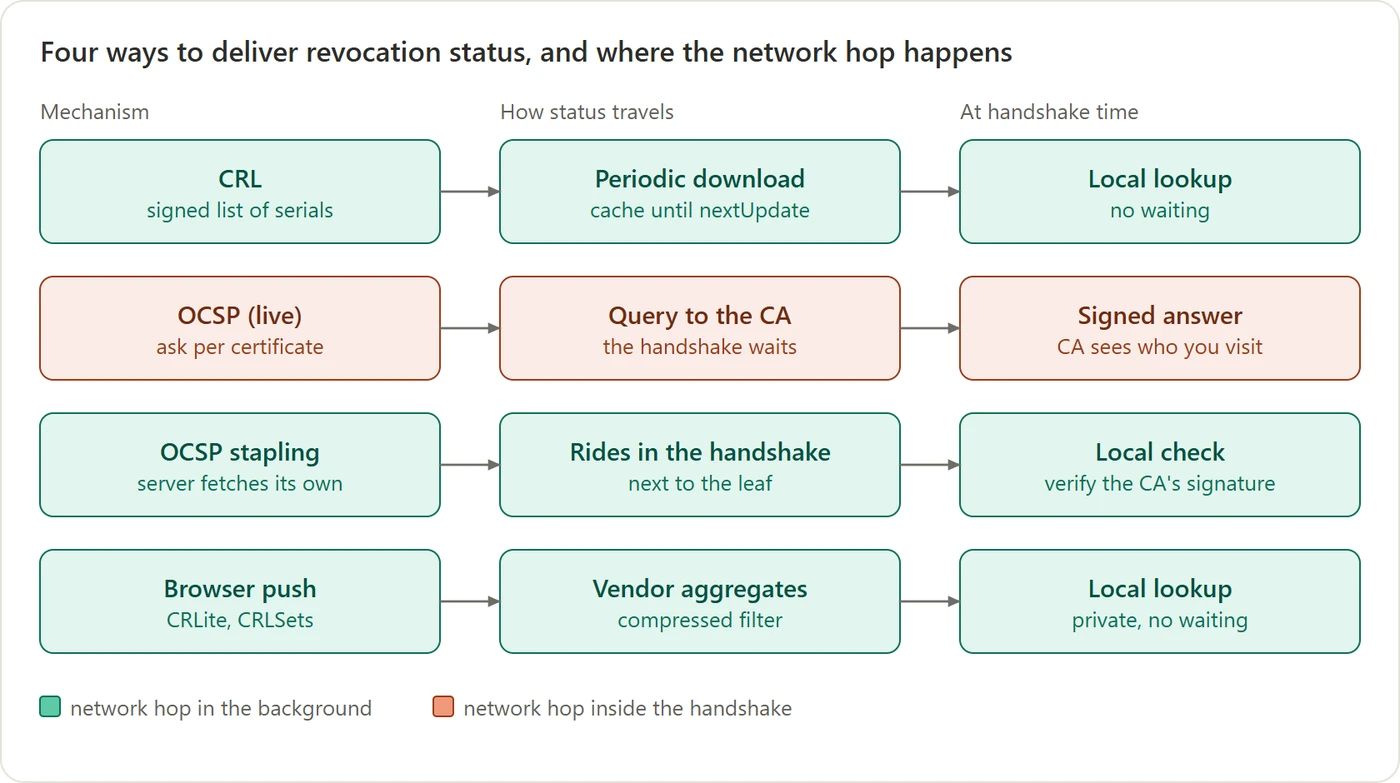 Figure 18. Four ways to get “is this still good?” to the verifier. What matters is whether anyone waits on the network during the handshake.
- Revocation lists (CRLs, Certificate Revocation Lists): the CA publishes a signed list of revoked certificates; verifiers download it in the background and look things up locally.
- Live checks (OCSP, Online Certificate Status Protocol): ask the CA about each certificate during the handshake. It’s slow, it tells the CA which sites you visit, and if the CA doesn’t answer, browsers carried on anyway, which made the check easy to block. It’s being retired: Let’s Encrypt switched its OCSP service off in 2025.
- Stapling: the server fetches its own fresh status from the CA and attaches it to the handshake.
- Browser push: the browser maker collects revocations and ships a compressed summary to every browser.
The bigger trend is to make revocation matter less by making certificates expire sooner.
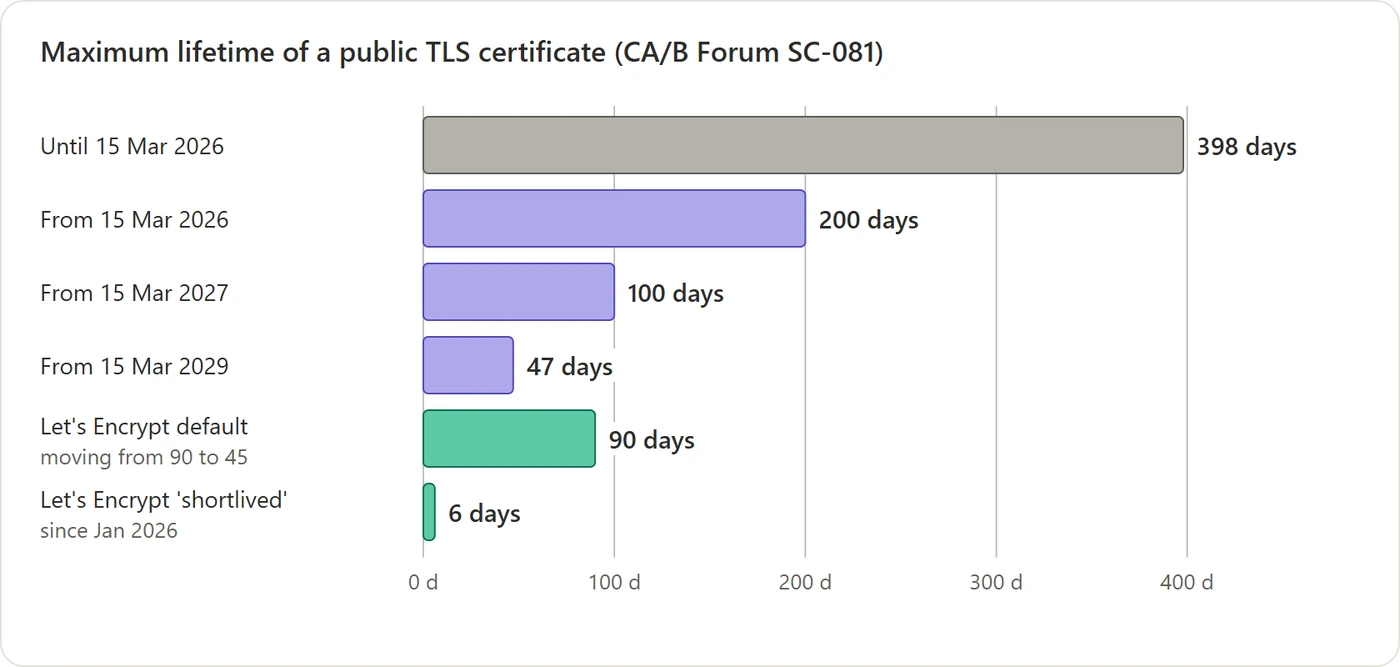 Figure 19. The browser and CA industry is shrinking the maximum lifetime of public certificates in steps, from 398 days down to 47.
A certificate that expires in six days hardly needs revoking. The catch is that nobody can renew certificates by hand every few weeks, so everything has to be automated, the way GitHub Pages does it.
Inside a company, the same logic goes further. Service-mesh certificates typically live about 24 hours and renew themselves. To “revoke” a service, you simply stop renewing it, for example by deleting its identity, and its certificate dies within a day.
12. Doing it for thousands of services
For a few public websites, Let’s Encrypt plus a web server covers everything. Now picture 3,000 internal services, written in five languages, each needing a fresh certificate every day, and each needing to run all three gates correctly on every connection. Asking every team to get that right in their own code is how holes appear.
So the industry split the work into two sides:
- The CA side checks identity, applies policy, signs certificates and renews them.
- The connection side does the handshake, runs the three gates and enforces who may call whom.
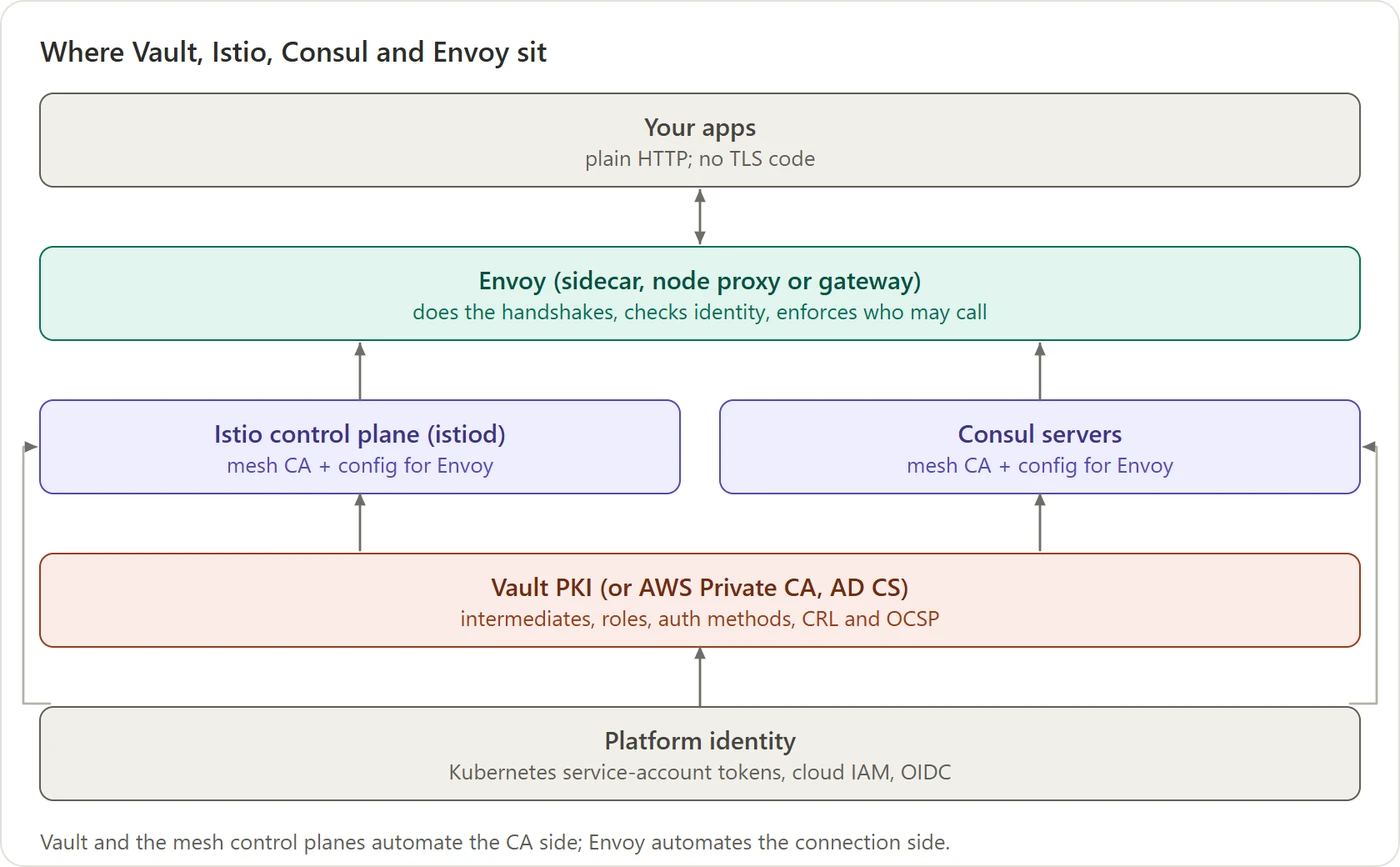 Figure 20. Read it bottom-up, the direction trust flows. None of these tools creates identity; they all consume the platform’s.
It’s easiest to read the figure as three separate jobs, with one tool for each:
| Job | Tool | Runs where |
|---|---|---|
| 1. Own the company’s CA keys and issue certificates for anything that needs one | Vault (or another company CA) | A few central, heavily protected servers |
| 2. Run the mesh: give every workload a short-lived certificate, and tell every proxy the rules (who may call whom) | Istio or Consul, specifically their control plane | A few central servers per cluster or datacenter |
| 3. Carry the traffic: do the handshake and run the three gates on every single request | Envoy | Next to every app, thousands of copies |
Istio and Consul are alternatives; a company normally picks one. Istio is built for Kubernetes, while Consul also covers plain VMs.
Why is Envoy needed if Istio or Consul already handles the workloads? Because Istio and Consul don’t touch the traffic themselves. They’re the brain (the control plane): they issue certificates and push configuration. The actual handshakes happen in Envoy, the hands (the data plane). Envoy isn’t an extra product you add next to the mesh. It is the part of the mesh that sits beside each app, and Istio and Consul both install it for you. If the brain went down, the Envoys would keep serving traffic with the certificates and rules they already have, at least until those certificates expire.
Why is Vault needed if the mesh has its own CA? Strictly, it isn’t: a mesh works fine on its own. Companies add Vault (or another company CA) for three reasons:
- A shared root. Each mesh’s built-in CA has its own root by default, so two clusters can’t verify each other’s certificates. If every mesh CA instead gets its intermediate from the company’s root, every cluster, in every cloud, trusts every other.
- Things outside the mesh. Databases, message queues, VMs, internal websites and build pipelines need certificates too, and they don’t run inside a mesh. Vault issues those, using the same workload login described in section 8.
- Better protection for the CA key. A mesh CA usually keeps its signing key in an ordinary Kubernetes secret. Vault is built to guard keys, and can keep them in dedicated hardware.
One more tool shows up in Kubernetes: cert-manager. It isn’t a CA either. It requests certificates from a CA (Vault, Let’s Encrypt or a cloud CA) for things outside the mesh, such as an ingress’s public HTTPS certificate, and renews them before they expire.
Do you have to pay for these? Mostly no, but two of them are no longer open source:
| Tool | License | Free to use? | Fully open-source alternative |
|---|---|---|---|
| Istio | Apache 2.0 (open source) | Yes | n/a |
| Envoy | Apache 2.0 (open source) | Yes | n/a |
| cert-manager | Apache 2.0 (open source) | Yes | n/a |
| Vault | BSL 1.1 (source-available) since 2023 | Yes, including in production, unless you sell a product that competes with HashiCorp. Some features (such as multi-datacenter replication and namespaces) need the paid Enterprise edition. | OpenBao, a community fork of Vault under the Linux Foundation, licensed MPL 2.0. Also step-ca by Smallstep (Apache 2.0), a simpler standalone CA. |
| Consul | BSL 1.1 (source-available) since 2023 | Same terms as Vault, with paid Enterprise features | Istio, or Linkerd (Apache 2.0 code; stable release builds now come from its vendor, Buoyant, and are free only for small companies) |
BSL is short for Business Source License. The code is public and you can run it in your own company, but it isn’t “open source” in the official sense, because it restricts competing commercial use. All of these projects also have paid support or managed versions from vendors, but none of that is required.
The neat trick is that the application itself doesn’t change at all.
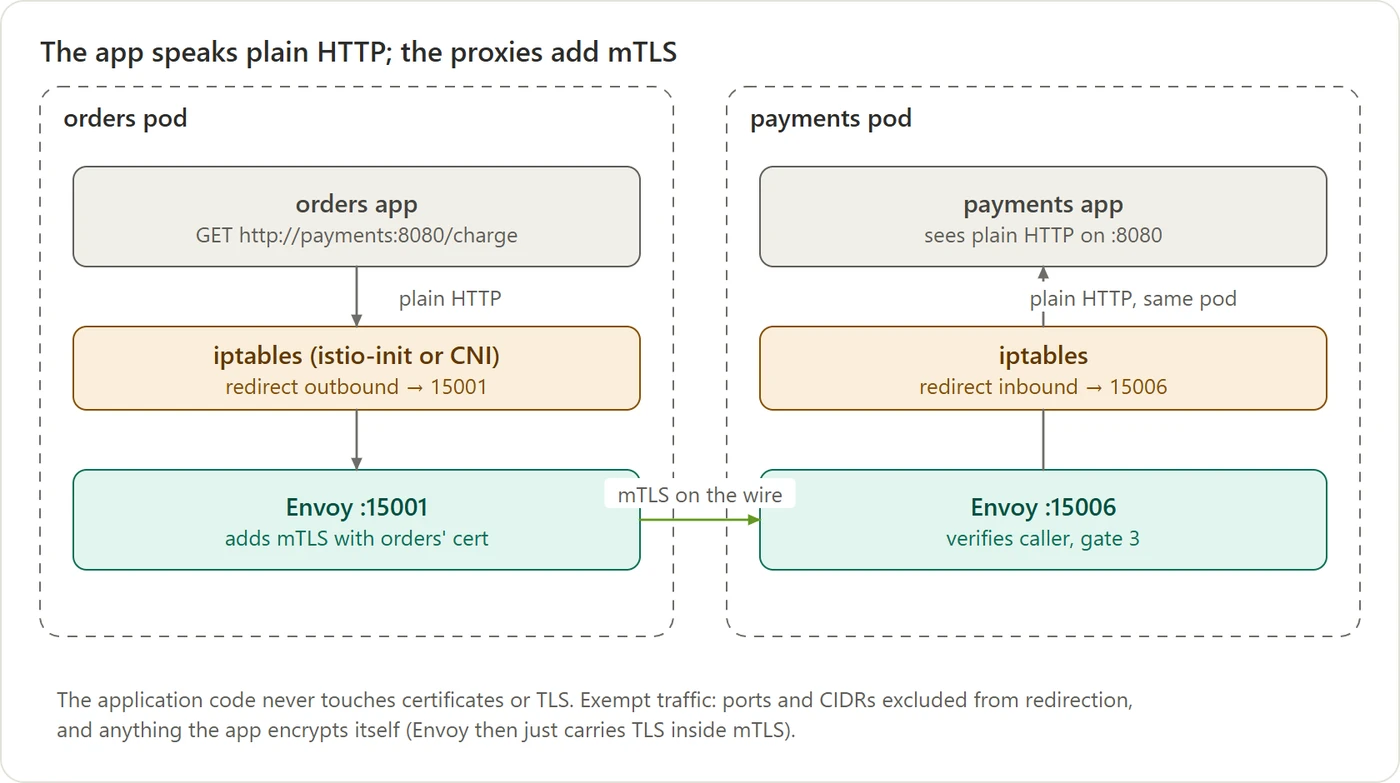 Figure 21. The app speaks plain HTTP. The proxies beside each app wrap it in mTLS. Plain HTTP never leaves the pod.
The orders app calls http://payments:8080 exactly as it would without a mesh. Network rules inside the pod quietly redirect that call to the Envoy next to it. That Envoy opens an mTLS connection to the Envoy next to payments, using a certificate the mesh issued and renews automatically. The receiving Envoy runs the three gates and hands the original plain request to the payments app. Neither app ever sees a certificate.
13. The whole story in one picture
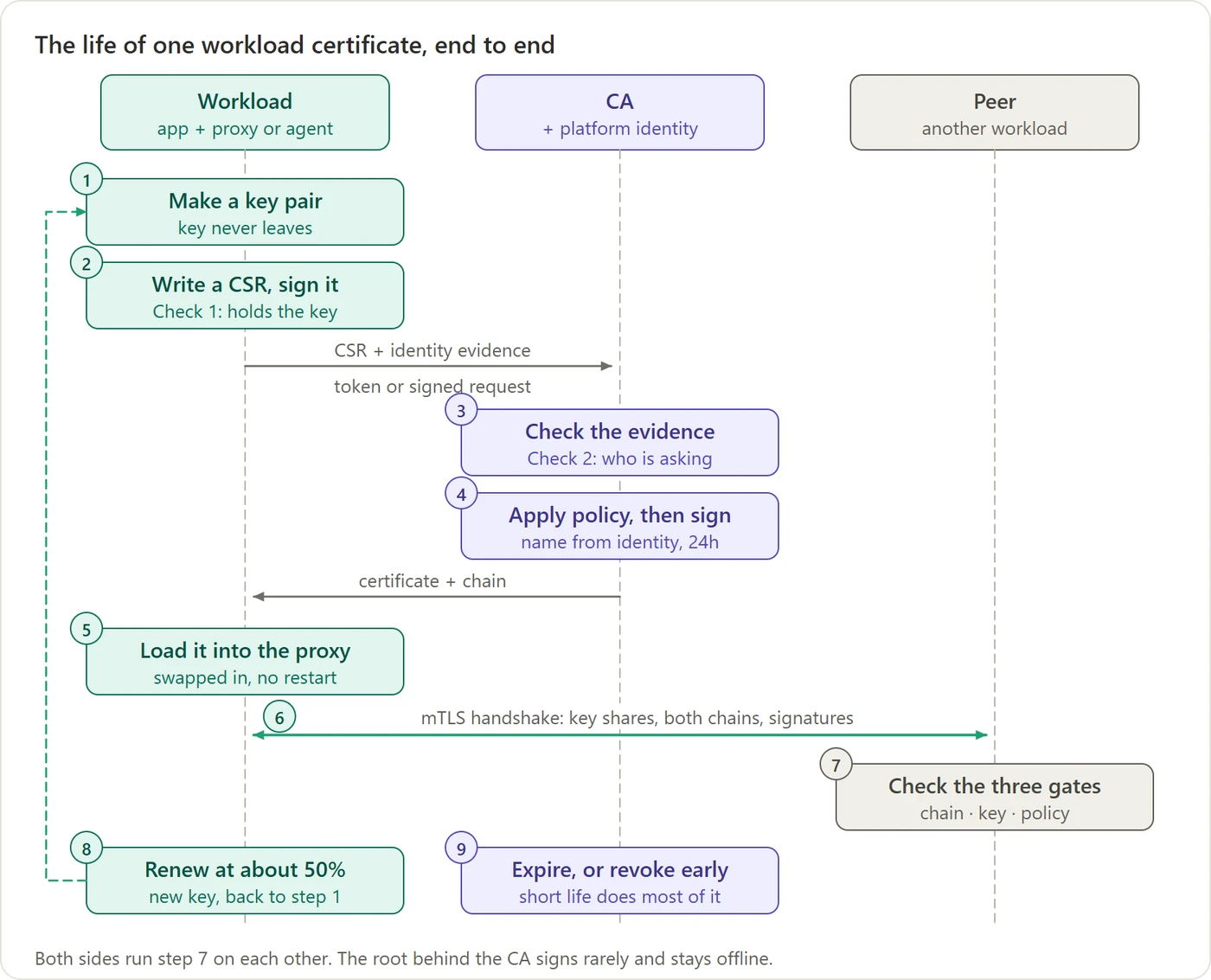
Here is everything above, as the life of one certificate.
Figure 22. The life of one workload certificate, end to end. The dashed arrow is the renewal loop.
- Make a key pair inside the workload. The private key never leaves.
- Write a CSR and sign it with that key. That’s Check 1: only the key’s holder could have produced it.
- Send the CSR with identity evidence, such as a token from the platform. The CA checks the evidence with the platform, never by believing the requester. That’s Check 2.
- Apply policy and sign. The CA writes the name the evidence proves and a short lifetime, and signs with its intermediate, whose chain leads up to the root.
- The certificate comes back and is loaded into the proxy without a restart.
- The handshake. Fresh key shares create the session key; each side sends its chain and signs the handshake.
- Three gates, run by both sides on each other: is the chain trusted, does the peer hold the key, and is this caller allowed?
- Renew at about half-life with a brand-new key, and start again at step 1.
- Expire, or be revoked early. With 24-hour certificates, expiry does most of the work.
A website works the same way, except that the evidence in step 3 is a token served on the domain, the CA is a public one like Let’s Encrypt, the lifetime is weeks instead of hours, and only the server shows a certificate.
Where exactly does the private key live?
Step 1 says the key is made “inside the workload”. Here’s what that means in practice, using Istio as the example.
Exactly where is it? Each pod gets a small helper (the Istio agent) running next to Envoy, in the same pod. When the pod starts, the agent generates the key pair, sends the CSR to the mesh CA, and hands the key and certificate to Envoy over a local channel inside the pod. By default the key is kept only in memory: it’s never written to disk, and never sent anywhere.
Does the control plane keep a copy? No. Istio’s or Consul’s central servers hold only the CA’s own signing key. They see each workload’s CSR (which contains the public key) and send back a certificate, but they never see a workload’s private key. They don’t need it, as section 6 explained.
What if there are 10 copies of the pod? Each copy makes its own key pair and gets its own certificate. All 10 certificates carry the same name, orders-api, because they share one service account. So the name identifies the service, and each key belongs to one running copy of it.
What if the pod restarts? The key disappears with it, and that’s on purpose. The new pod generates a fresh key and gets a fresh certificate within a few seconds of starting. Nothing needs backing up. The old certificate is still valid until it expires, but it’s useless without its private key, and that key no longer exists anywhere. The same happens on renewal (step 8): every renewal uses a brand-new key.
Is it always inside the pod? Not quite. In some setups a helper running once per machine generates the keys for all the workloads on that machine. Consul’s client agent and Istio’s newer “ambient” mode both work this way. The rule stays the same, though: the key is created on the machine where it’s used, and is never sent to the control plane.
14. Where trust really comes from
Keep asking “but why is that trusted?” and you always end up in the same place.
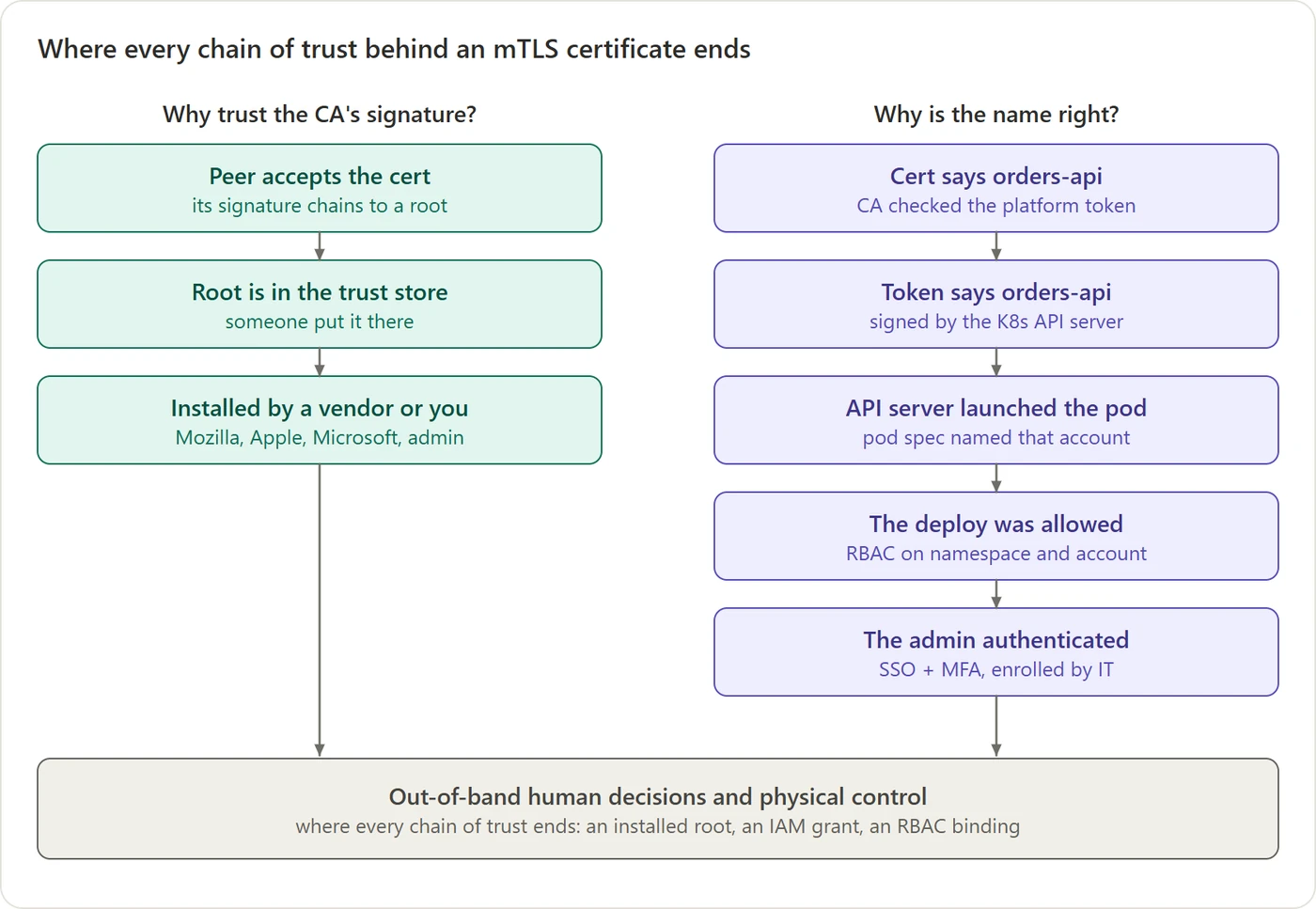 Figure 23. Each arrow answers “why is this trusted?” Both columns end in the same box.
- Why trust the CA’s signature? Because its root is in your trust store. It’s there because Mozilla, Apple, Microsoft or Google decided to include it after audits, or because your company’s admin installed your private root. That’s a human decision; nothing in the protocol proves it.
- Why is the name right? Because the CA checked a token the platform signed. The platform signed it because it launched that pod with that identity. It launched the pod because someone with the right permissions deployed it. That person got in with credentials IT gave them on their first day.
Every chain of trust ends the same way: somewhere, a person decided to trust a key, and installed it or granted a permission by hand. Cryptography doesn’t create trust. It carries trust forward from that starting decision, reliably, through as many automated steps as you like, without anyone being able to forge a step along the way.
Cheat sheet
| Question | Short answer |
|---|---|
| What does a signature prove? | The message is unchanged, and was signed by whoever holds the private key. Not who that is. |
| What is a certificate? | A CA’s signed statement: “this public key belongs to this name”. |
| Does the CA ever see my private key? | No. You generate it yourself; only the public key travels, inside the CSR. |
| Does a certificate contain the whole chain? | No. It points to its parent. The server sends leaf + intermediates; the root comes from your own trust store. |
| Is checking a chain slow? | No. It’s local CPU work, a fraction of a millisecond per link. |
| What does a CA check before signing? | Check 1: you hold the key (CSR signature). Check 2: you’re entitled to the name (outside evidence). |
| How does a public CA check a domain? | It hands you a token and looks for it on your domain (or in its DNS). |
| How does a machine prove its identity? | The platform that launched it vouches for it, through a credential only that machine can receive. |
| Can someone use a copied certificate? | No. Every handshake requires a fresh signature with the private key. |
| Does the certificate encrypt the session? | Not in TLS 1.3. The session key comes from a fresh exchange; the certificate key only signs. |
| What is mTLS? | Both sides show a certificate and run the same checks on each other. Plus: is this caller allowed? |
| How is trust taken back? | Revocation lists, or, increasingly, short lifetimes that make revocation matter less. |
Glossary
| Term | Meaning |
|---|---|
| Private key | A secret random number. Used to sign. Never leaves its owner. |
| Public key | Computed from the private key; safe to share. Used to verify signatures. |
| Signature | Proof that a message is unchanged and was made by the private key’s holder. |
| Certificate (X.509) | A document binding a name to a public key, signed by a CA. |
| CA (certificate authority) | An organisation or system that checks identities and signs certificates. |
| Root / intermediate / leaf | The top CA (offline, in trust stores), the CAs it signs (online), and the end certificates servers use. |
| Trust store | The list of root CAs your OS or browser already trusts. |
| CSR | Certificate signing request: your public key and wanted name, signed with your private key. |
| ACME | The protocol public CAs like Let’s Encrypt use to check domain control and issue certificates automatically. |
| TLS | The protocol behind HTTPS: encryption, integrity and authentication. |
| mTLS | Mutual TLS: both sides present certificates. |
| Diffie-Hellman | A way for two sides to compute the same secret without ever sending it. |
| Forward secrecy | Stealing a long-term key later doesn’t decrypt past sessions. |
| Revocation (CRL, OCSP) | Ways to announce that a certificate should no longer be trusted before it expires. |
| Workload identity | An identity the platform gives a VM or pod: an IAM role, managed identity or service account. |
| Service mesh | Infrastructure (Istio, Consul, Linkerd) that gives every service a certificate and adds mTLS through proxies. |
| Envoy | The proxy most meshes use to do the handshakes and enforce who may call whom. |