TLA+ and PlusCal from First Principles
Contents
Many programmers learn TLA+ through PlusCal, with a model checker that keeps telling them they’re wrong. The syntax is never the hard part. What takes time is the meaning underneath it. What exactly is a “step”? Why do labels decide what’s atomic? Why is CHOOSE not “pick any value”? How can a property hold in every single state and still be violated? And why does TLA+ make you write [][x' >= x]_x when any other language would happily accept [](x' >= x)?
This post answers those questions from first principles, with 44 diagrams along the way. It’s organized as a path:
- The landscape: what TLA, TLA+, PlusCal and TLC each are.
- Expressions: operators, bulleted lists,
LET,CHOOSE, quantifiers. - Data: sets, sequences, records, functions and
EXCEPT. - Modules: where definitions live, model values, parameterized modules.
- PlusCal’s execution model: steps, labels, nondeterminism, processes.
- Temporal properties: invariants vs step properties vs liveness, negation, leads-to, fairness, and the stuttering rule.
- Exercises that break a spec in four instructive ways.
- A cheat sheet of the rules worth remembering.
Most of the small examples follow Hillel Wayne’s excellent Learn TLA+ tutorial, and most of these questions come up while working through it. If you’re starting out, read it alongside this post: it teaches the language, and this post tries to explain why the language works the way it does.
Every complete spec in this post was run through the TLA+ tools (version 1.8.0), and the TLC results quoted here, from state counts to which properties fail, come from those runs.
Disclaimer. This post is drafted with assistance from large language models (Claude Opus 5.5 and DeepSeek V4.1) based on conversations exploring TLA+ and PlusCal. All content has been reviewed, edited, and verified.
1. Four names for four things: TLA, TLA+, PlusCal, TLC
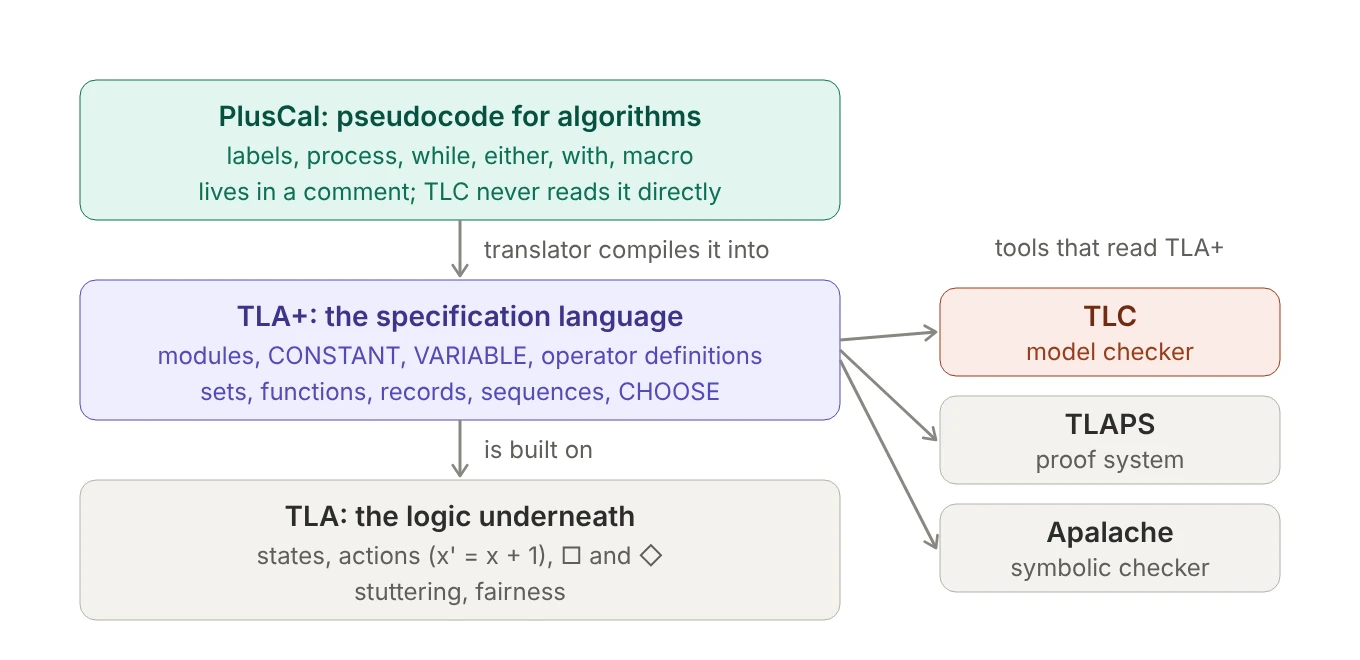
Before any syntax, it helps to know which layer you’re talking to. Each one owns different concepts, and each one produces different errors.
Figure 1. PlusCal compiles to TLA+, which is built on the logic TLA. TLC is one of several tools that read TLA+.
If you know TypeScript, here’s a rough analogy: PlusCal compiles into TLA+ the way TypeScript compiles into JavaScript. TLA is the formal semantics underneath, and TLC is the test runner that actually executes something and reports failures.
- TLA (the Temporal Logic of Actions) is Leslie Lamport’s logic for systems that change over time. It’s pure math. A behavior is an infinite sequence of states; an action like
x' = x + 1relates a state to the next one (the prime means “in the next state”);□(“always”) and◇(“eventually”) talk about whole behaviors; stuttering and fairness live here too. - TLA+ wraps that logic in a language: set theory for data (sets, functions, records, sequences,
CHOOSE) and a module system (MODULE,EXTENDS,CONSTANT,VARIABLE, operator definitions). A whole system is a single formula, typicallySpec == Init /\ [][Next]_vars, and a correctness claim is another formula thatSpecshould imply. TLA+ describes things; it never runs anything. - PlusCal is an algorithm language written inside a comment. The translator reads it and writes the equivalent TLA+ below it: labels become a
pcvariable and one action per label, andx := ebecomesx' = eplusUNCHANGEDfor every other variable (section 5 covers the rest). Once translated, PlusCal is just a comment as far as the tools are concerned. - TLC is a Java program that reads a TLA+ module plus a configuration file (
.cfg), computes every reachable state, and checks properties. It brings concepts of its own that aren’t part of the language:INVARIANTandPROPERTY, constant values and model values, symmetry sets, deadlock checking, error traces, and helpers likePrint,:>and@@from the standardTLCmodule.
TLA+ has no invariant declaration
Nothing in a TLA+ module marks TypeOK as an invariant. It’s an ordinary definition, a formula that is true or false in any given state, like every other definition. “Invariant” is a role, not a kind of formula: TypeOK becomes one only when something claims it holds in every state the system can reach.
TLA+ itself can only state that claim, as a theorem:
THEOREM Spec => []TypeOK \* every behavior of Spec satisfies TypeOK in every state
Writing the theorem down checks nothing; you’d prove it with the TLA+ proof system (TLAPS). TLC takes the practical route instead. The line INVARIANT TypeOK in its configuration file tells it to test the same claim on one finite model: evaluate TypeOK in every reachable state, and stop at the first state where it’s false.
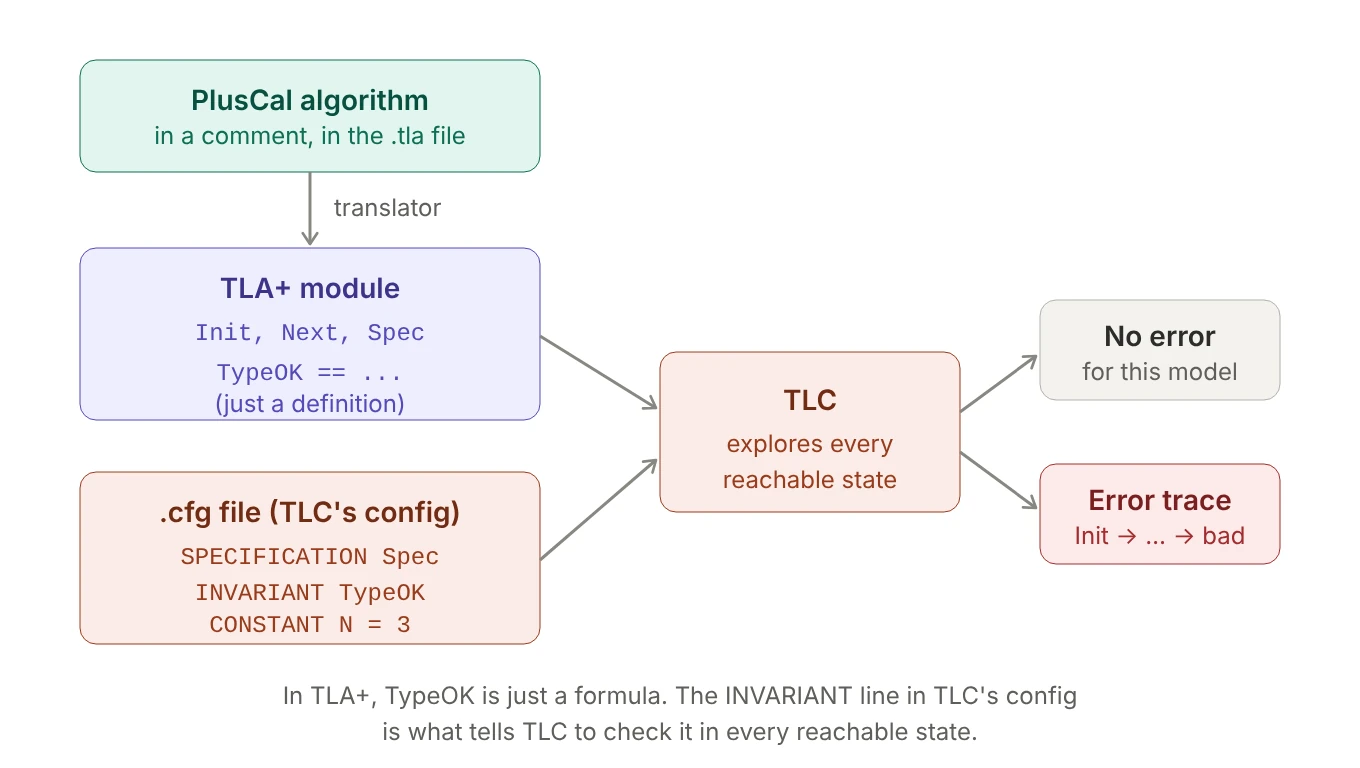 Figure 2. TypeOK is just a definition until the INVARIANT line in the configuration tells TLC to check it.
Deadlock is a TLC-only idea too. TLA+ always allows stuttering steps where nothing changes, so mathematically a behavior can never get stuck. “A state where no Next step is possible” only makes sense to a program that is executing steps. That’s why PlusCal translations include a Terminating action that lets a finished algorithm stutter (otherwise TLC would report “all processes finished” as a deadlock), and why the configuration file supports CHECK_DEADLOCK FALSE.
Knowing the layers pays off when something goes wrong, because the error message tells you which step failed:
| Error looks like | Comes from | Example |
|---|---|---|
Encountered "..." at line X |
the TLA+ parser (SANY) | writing ["key" \|-> val] in a record |
Missing label ... |
the PlusCal translator | a label inside an if with no label after it |
Attempted to check equality of integer 5 with non-integer ... or Shouldn't call isEmpty() on value "val" |
TLC, while running | 5 = "a", or [key: "val"] |
Invariant TypeOK is violated |
TLC, with an error trace | a real bug, in the system or in the property |
The VS Code extension and the Toolbox bundle the parser, the translator and TLC together, so they can feel like one tool. They’re three separate steps. (The messages above are from TLA+ tools 1.8.0; exact wording varies between versions.)
2. Expressions: operators, not functions
2.1 Operators are named expressions
EXTENDS Integers                  \* imports +, -, *, \div, %, <, .., Int, ...

MinutesToSeconds(m) == m * 60
In TLA+, anything defined with == is an operator, whether you wrote it or a standard module did.
MinutesToSeconds(5)means5 * 60: TLA+ substitutes the argument into the body, so an operator works more like a macro than a function call. Operators without parameters, likeTypeOK == status \in {...}, are everywhere; they read the spec’s variables directly.*is an operator too, but only afterEXTENDS Integers. Arithmetic isn’t part of the core language (it’s defined in the standardNaturalsandIntegersmodules), so without theEXTENDS,m * 60is an error.Integershas no/: integer division is\divand the remainder is%, while/lives inReals, which TLC can’t model-check.==means “is defined as”. Equality is a single=, itself an operator that returnsTRUEorFALSE.
TLA+ also has something it actually calls a function, and the two are easy to mix up (section 3.5 has the details):
| Operator | Function | |
|---|---|---|
| Definition | F(x) == x * 60 |
f == [x \in 1..10 \|-> x * 60] |
| Call syntax | F(5) |
f[5] (square brackets) |
| Domain | none: works on anything | fixed: DOMAIN f is 1..10 |
| Is a value? | no: can’t be stored in a variable | yes: can be stored, compared, passed around |
2.2 A small Boolean puzzle: Xor
What does Xor(A, B) == A = ~B mean? Read it with the parentheses made explicit: A = (~B). ~ is NOT, and = on Booleans means “these have the same truth value”, so it says “A equals the opposite of B”: a roundabout way of saying that exactly one of them is true. For Booleans it’s the same as A # B (# is “not equal”), ~(A <=> B) or (A \/ B) /\ ~(A /\ B), and A # B is the clearest.
2.3 Bulleted lists: indentation as parentheses
TLA+ lets us write conjunctions and disjunctions as aligned bullet lists, and this is the one place in the language where whitespace matters. The column a bullet sits in works like an invisible pair of parentheses:
/\ A
/\ \/ B
   \/ C
/\ \/ D
   \/ /\ E
/\ F
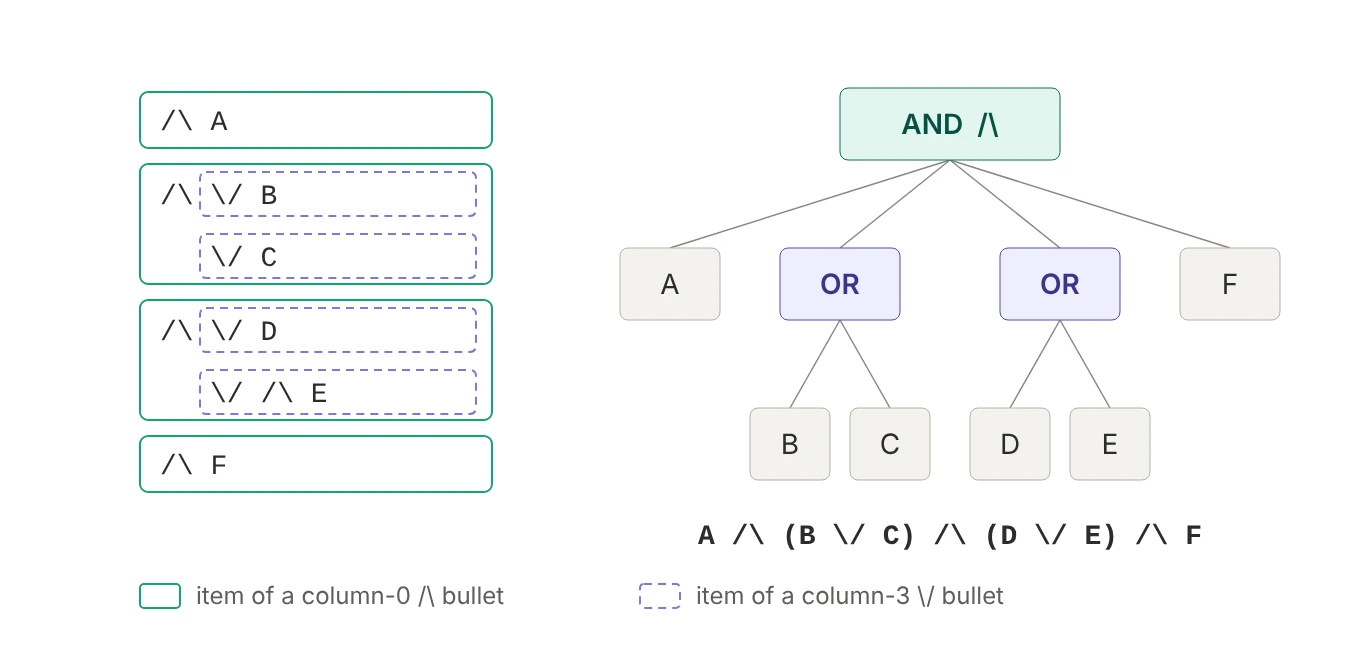 Figure 3. Four column-0 bullets make an AND of four items; the two column-3 lists inside them become ORs.
The rule: bullets that line up form one list, and anything indented under a bullet belongs to that bullet, as in Python, where indentation decides which block a line is in.
So the example reads:
- The four
/\at the left edge are one list, an AND of four things. \/ Cis indented under the second/\, so it belongs to it: the second thing isB \/ C.- In the same way, the third thing is
D \/ E(a one-item list like/\ Eis justE).
Result: A /\ (B \/ C) /\ (D \/ E) /\ F.
That makes indentation part of the meaning. If line 4 lost its /\ and its \/ D lined up under \/ B and \/ C, then D and E would join that list: A /\ (B \/ C \/ D \/ E) /\ F.
The leading /\ on the first item isn’t needed for the logic; it just keeps the items aligned. You’ll see this shape constantly in translated PlusCal, especially in Next: an OR of possible steps, each an AND of conditions.
Next == \/ /\ status = "Stopped"
           /\ status' = "Starting"
        \/ /\ status = "Starting"
           /\ status' \in {"Running", "Failed"}
Indent with spaces, not tabs: an editor that renders tabs differently can make a spec look like it groups one way while it actually groups another.
2.4 Naming pieces with LET … IN
LET … IN names parts of an expression: LET introduces local definitions, and the whole block is one expression whose value is whatever follows IN.
ToClock2(seconds) ==
  LET
    h      == seconds \div 3600
    h_left == seconds % 3600
    m      == h_left \div 60
    m_left == h_left % 60
    s      == m_left
  IN
    <<h, m, s>>
Read it like a Python function body, with LET as the local-variable lines and IN as the return.
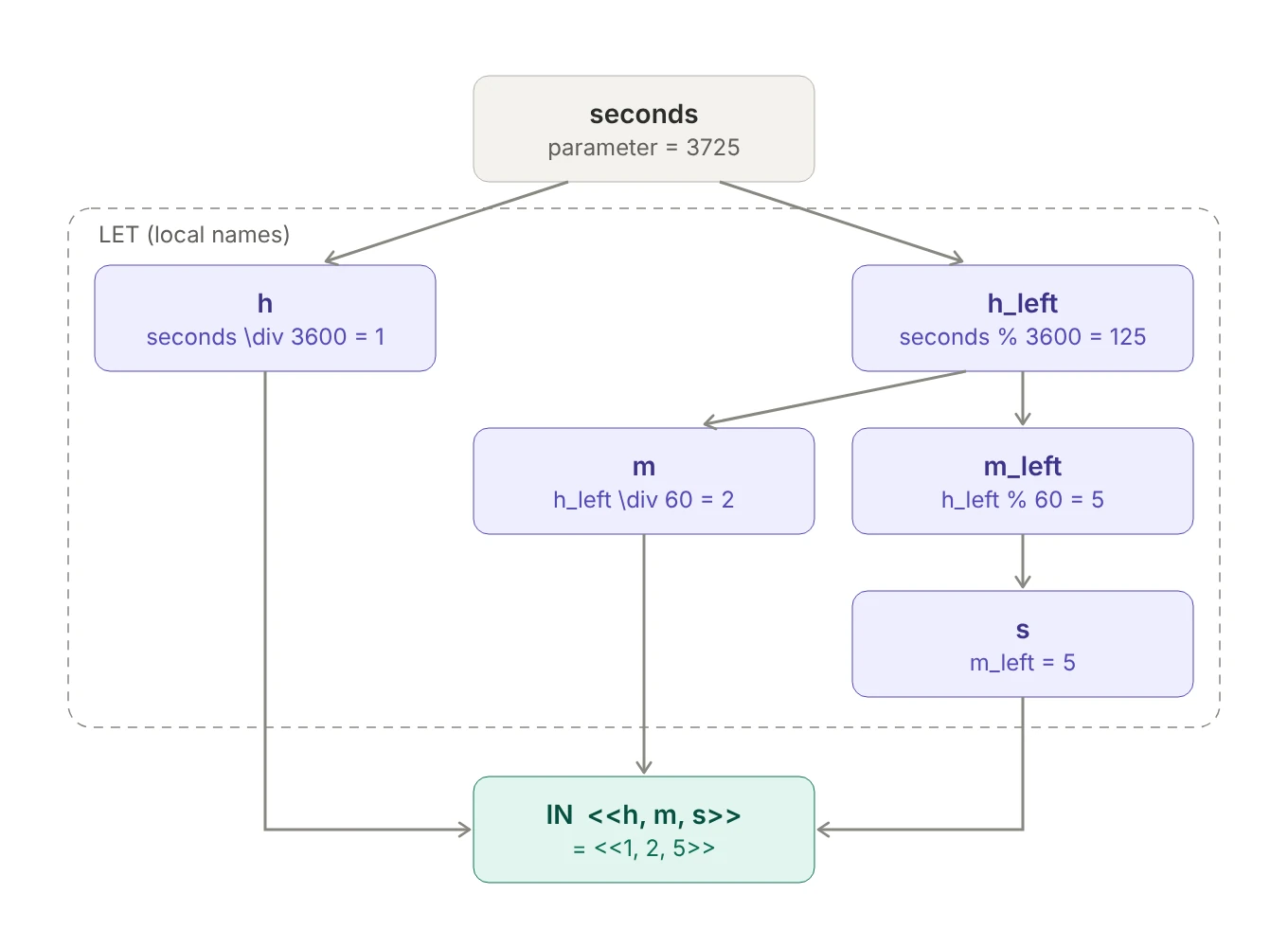 Figure 4. Each name is built from the parameter or from names defined above it; only
 h, m and s reach the result.
ToClock2(90000) is <<25, 0, 0>>: it counts hours without wrapping at midnight. Hold that thought for the next section.
The Python comparison stops at one point. In Python, h = seconds // 3600 runs and stores a value. In TLA+, h == seconds \div 3600 uses the same == as any definition (section 2.1): it only says “h is shorthand for seconds \div 3600”. Nothing runs line by line, and nothing is stored. So you can always replace a name with what it stands for:
ThreeMax(a, b, c) ==
  LET Max(x, y) == IF x > y THEN x ELSE y
      maxab     == Max(a, b)
  IN  Max(maxab, c)

\* maxab is shorthand for Max(a, b), so the result means exactly:
\*   Max(Max(a, b), c)
(Max also shows that a LET can define operators with parameters, private to ThreeMax.) Because these are definitions:
- No reassignment.
x == x + 1isn’t “increment x”; it’s a definition that refers to itself, which is an error. - No shadowing. A name in a
LETcan’t be a parameter, can’t already be defined in the module, and can’t be defined twice. - Order matters one way. A definition can use names above it, not below it.
- Scope ends with the expression, and layout is free: unlike bulleted lists, whitespace inside a
LETdoesn’t matter.
2.5 CHOOSE means “the”, not “any”
Here’s the other way to convert seconds to a clock time:
ClockType       == (0..23) \X (0..59) \X (0..59)          \* every <<h, m, s>> triple
ToSeconds(time) == time[1]*3600 + time[2]*60 + time[3]

ToClock(seconds) ==
  LET seconds_per_day == 86400
  IN  CHOOSE x \in ClockType : ToSeconds(x) = seconds % seconds_per_day
Read it aloud: “the clock time x whose ToSeconds equals seconds wrapped into one day.” Instead of computing the answer, it says what the answer is: the inverse of ToSeconds.
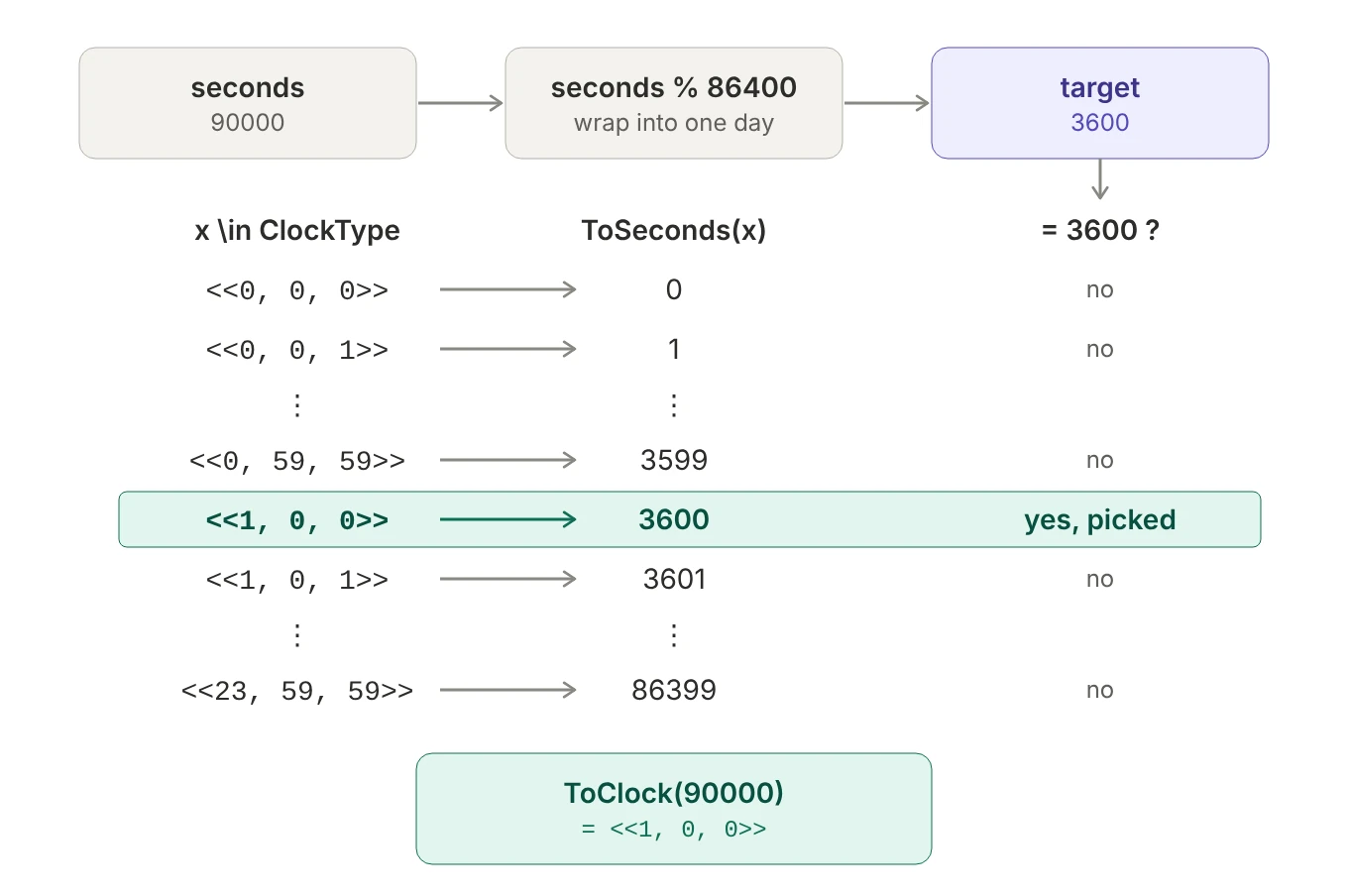 Figure 5. 90000 wraps to 3600; the only triple worth 3600 seconds is
 <<1, 0, 0>>.
CHOOSE x \in S : P(x) means “a value from S for which P is true”. Two details matter:
- It’s deterministic. The same
SandPalways give the same answer. If several values match, you get one of them, always the same one, but you don’t get to say which. - If nothing matches, the result is undefined and TLC stops with an error. That’s why
seconds_per_dayexists: without the%,ToClock(90000)would look for a triple worth 90000 seconds, and the largest one is worth 86399.
TLC evaluates CHOOSE by scanning the set: up to 86,400 checks per call here, fine occasionally and slow inside a big model. Compare ToClock2 from section 2.4: with its LET names substituted, it’s just four arithmetic operations, whatever the input:
ToClock2(s) = <<s \div 3600, (s % 3600) \div 60, s % 60>>
So ToClock is obviously correct but slow, while ToClock2 is fast but easy to get subtly wrong: one \div where a % belongs, and some results come out wrong. We want the speed of ToClock2 and the certainty of ToClock.
ASSUME gives us both. It’s a condition TLC evaluates once, before exploring any states; if it’s false, TLC stops with an error. That makes it a unit test, with the obvious version as the expected answer:
ASSUME \A s \in 0..500 : ToClock(s) = ToClock2(s) \* both agree for every s from 0 to 500
If they agree, checking goes ahead, and the rest of the spec uses only the fast ToClock2. If a bug makes them differ, TLC refuses to start, with an error like Assumption line 17, col 8 to line 17, col 49 of module Clock is false. The test pays the slow CHOOSE cost once, at startup, instead of in every state. Its range is a trade-off: every ToClock call is a scan, so testing all 86,400 seconds of a day would be slow. (The range also has to stay below one day, because only ToClock wraps at midnight.)
Determinism is the gotcha once you write actions:
x' = CHOOSE v \in {1, 2, 3} : TRUE      \* always the same single value: one next state
\E v \in {1, 2, 3} : x' = v              \* any of the three: three possible next states
TLC explores all three branches of the \E version and only one for CHOOSE. If you use CHOOSE where you mean “the system could do any of these”, TLC silently checks fewer behaviors, and bugs in the unexplored paths stay hidden.
CHOOSEdefines a value;\Emodels a choice.CHOOSEalways gives the same single value, so TLC follows one path.\E(or PlusCal’swith) lets the system take any of the options, so TLC explores every one.
2.6 Quantifiers: \A filters with =>, \E filters with /\
A classic first attempt at “a sequence has no duplicates”:
IsUnique(s) ==
  \A i, j \in 1..Len(s) :
    s[i] # s[j]                    \* wrong!
\A i, j \in 1..Len(s) ranges over every pair of positions, including pairs where i = j. For those, the body compares an element with itself, s[1] # s[1] is FALSE, and one FALSE makes the whole \A FALSE. So this returns FALSE for every non-empty sequence, unique or not.
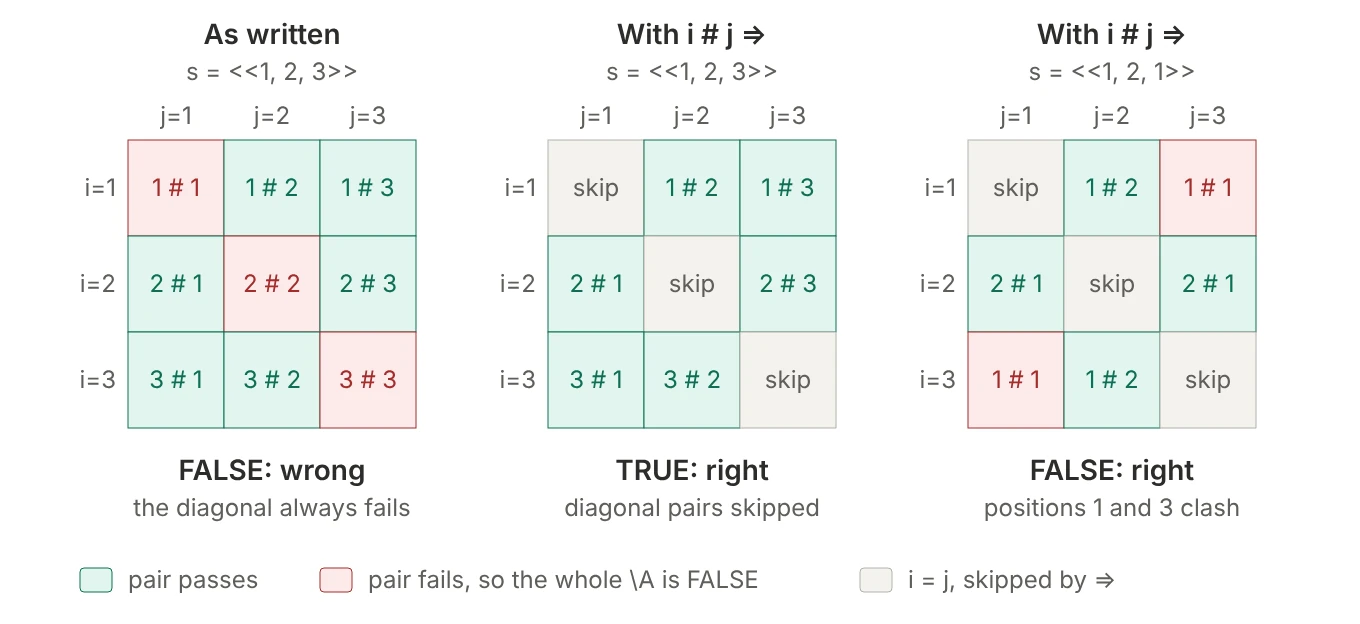 Figure 6. Left: the diagonal always fails. Middle and right: with
 i # j =>, diagonal pairs are skipped.
The fix needs an implication, not a conjunction:
IsUnique(s) ==
  \A i, j \in 1..Len(s) :
    i # j => s[i] # s[j]
The tempting i # j /\ s[i] # s[j] is still broken: for the pair (1, 1), FALSE /\ … is FALSE, which again sinks the whole \A. With =>, the pair (1, 1) gives FALSE => …, and an implication with a false premise is TRUE: “this rule doesn’t apply to this pair”.
Now flip it. “The sequence has duplicates”:
HasDuplicates(seq) ==
  \E i, j \in 1..Len(seq) :
    i # j => seq[i] = seq[j]       \* wrong!
\E only needs one pair that makes its body TRUE, and the pair (1, 1) provides one for free: 1 # 1 is FALSE, so the implication is TRUE, without ever looking at the values. This returns TRUE for every non-empty sequence.
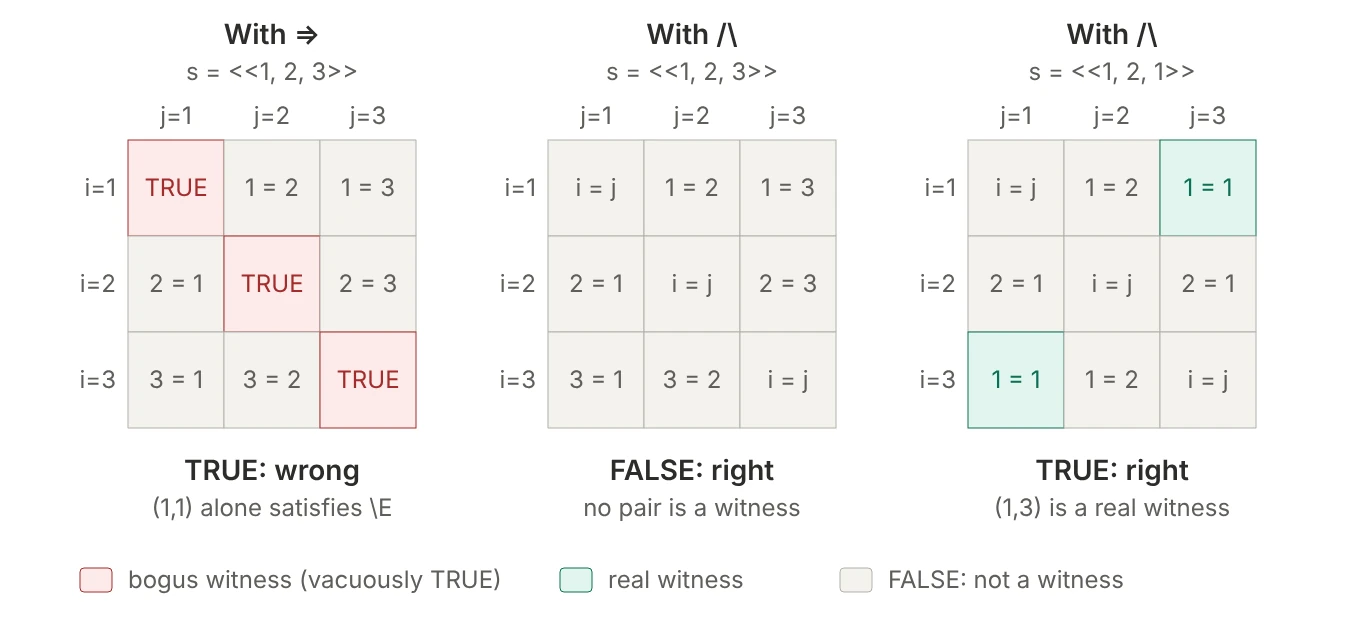 Figure 7. With
 =>, diagonal pairs become bogus witnesses. With /\, only genuine duplicates count.
HasDuplicates(seq) ==
  \E i, j \in 1..Len(seq) :
    i # j /\ seq[i] = seq[j]
Both rules come from one principle. Some cases are irrelevant (here, i = j), and they must produce whatever value doesn’t affect the answer:
| Quantifier | Looks for | Irrelevant cases must be… | Which gives that | Filter with |
|---|---|---|---|---|
\A |
a counterexample (one FALSE ruins it) | TRUE | FALSE => anything is TRUE |
=> |
\E |
a witness (one TRUE is enough) | FALSE | FALSE /\ anything is FALSE |
/\ |
It isn’t arbitrary, either: negating the correct IsUnique produces the correct HasDuplicates mechanically.
~IsUnique(s)
=   ~ \A i, j : (i # j => s[i] # s[j])
=     \E i, j : ~(i # j => s[i] # s[j])     \* "not for all" = "exists one where not"
=     \E i, j : (i # j /\ s[i] = s[j])      \* ~(P => Q) is P /\ ~Q
So once you have a correct IsUnique, HasDuplicates(s) == ~IsUnique(s) saves you from getting the connective wrong twice. Two other correct forms avoid the diagonal altogether: compare each pair once, with \A j \in (i + 1)..Len(s) nested inside \A i \in 1..Len(s), or compare sizes, Cardinality({s[i] : i \in 1..Len(s)}) = Len(s) (with EXTENDS FiniteSets).
2.7 Reading the colon
A colon in a quantifier separates “which values” from “what must be true of them”. Read it as “it holds that” for \A and “such that” for \E. Everything after a colon belongs to that quantifier, as far right as the expression goes, unless parentheses end it sooner. That rule has a gotcha:
\A x \in S : P(x) /\ Q       \* Q is INSIDE: for every x, P(x) and Q
(\A x \in S : P(x)) /\ Q     \* Q is OUTSIDE
The colon shows up in several constructs, with slightly different jobs:
| Construct | Read as | Python |
|---|---|---|
\A x \in S : P |
for every x in S, P holds | all(P for x in S) |
\E x \in S : P |
some x in S has P | any(P for x in S) |
CHOOSE x \in S : P |
the x in S with P | next(x for x in S if P) |
{x \in S : P} |
the x in S that satisfy P (filter) | {x for x in S if P} |
{e : x \in S} |
e, for each x in S (map) | {e for x in S} |
[field : Set] |
all records with field drawn from Set | (no direct equivalent) |
To tell the two set forms apart, look at which side of the colon \in is on: before the colon it filters, after the colon it builds. Several variables can share one quantifier: \A i, j \in S : body is \A i \in S : \A j \in S : body.
3. Data: sets, sequences, records and functions
3.1 Sets and sequences
{1, 2, 3} and <<1, 2, 3>> aren’t two spellings of the same thing. They’re different kinds of value.
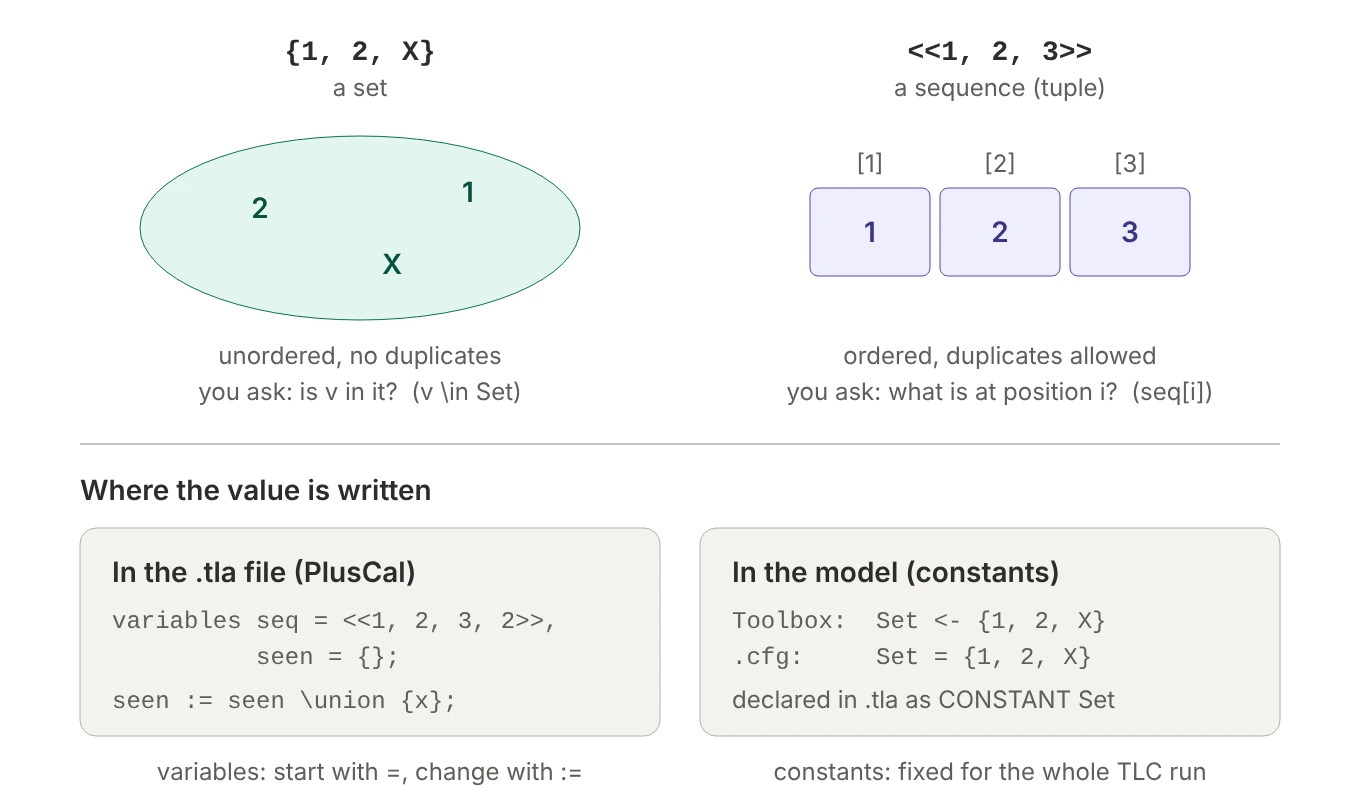 Figure 8. Sets vs sequences (top), and where variables and constants get their values (bottom).
Set {1, 2, 3} |
Sequence <<1, 2, 3>> |
|
|---|---|---|
| Order matters? | no: {2, 1} = {1, 2} |
yes: <<2, 1>> # <<1, 2>> |
| Duplicates | collapse: {1, 2, 2} = {1, 2} |
kept: <<1, 2, 2>> has 3 elements |
| How you read it | membership: 2 \in S |
position: seq[2] |
| Size | Cardinality(S) (needs FiniteSets) |
Len(seq) (needs Sequences) |
| Typical operations | \union, \intersect, \subseteq |
Append, \o, Head, Tail |
Sequences are 1-indexed: seq[1] is the first element, and the indices run 1..Len(seq).
The duplicate-check algorithm in section 4 uses both on purpose: seq = <<1, 2, 3, 2>> is a sequence because order and repeats are the whole point, and seen = {} is a set because the only question is “have I seen this value before?”.
Ranges are already sets: 0..9 is {0, 1, ..., 9}, inclusive at both ends, and 5..4 is empty. Don’t wrap them in braces: {0..9} is a set with one element, the set 0..9, so with x \in {0..9} would give a single choice, and sum + x would fail.
The bottom half of Figure 8 shows the other source of confusion: where a value is written. PlusCal variables get their values in the .tla file (= to start, := to change). Constants get theirs from the model: Set <- {1, 2, X} is the TLA+ Toolbox’s notation, and in a .cfg file you write Set = {1, 2, X}.
3.2 Sequence operators, and \o vs Append
EXTENDS Sequences gives you, with S == <<"a">>:
| Expression | Gives |
|---|---|
Append(S, "b") |
<<"a", "b">> |
S \o <<"b", "c">> |
<<"a", "b", "c">> |
Append(S, <<"b", "c">>) |
<<"a", <<"b", "c">>>>: one nested element |
S \o "b" |
error: "b" is a string, not a sequence |
Head(S) |
"a" |
Tail(<<1, 2, 3>>) |
<<2, 3>> |
Len(S) |
1 |
SubSeq(<<1, 3, 5>>, 1, 2) |
<<1, 3>> |
\o (also written \circ, the math symbol ∘) is concatenation, like + on Python lists. Append adds one element and \o joins two sequences; mixing them up, as in the third and fourth rows, is a classic bug. In PlusCal, the most common use is a FIFO queue or network channel: enqueue with queue := queue \o <<msg>> (the same as Append(queue, msg), but \o also takes a batch like <<m1, m2, m3>>), and dequeue with await queue /= <<>>; followed by Head(queue) and Tail(queue).
3.3 Cartesian products are sets of tuples
If S is a set, is S \X S \X S \X S a set or a sequence? A set, and every element of it is a 4-tuple. A \X B \X C is the set of all tuples you can build by picking one element from A, one from B and one from C, in that order: Python’s itertools.product, collected into a set.
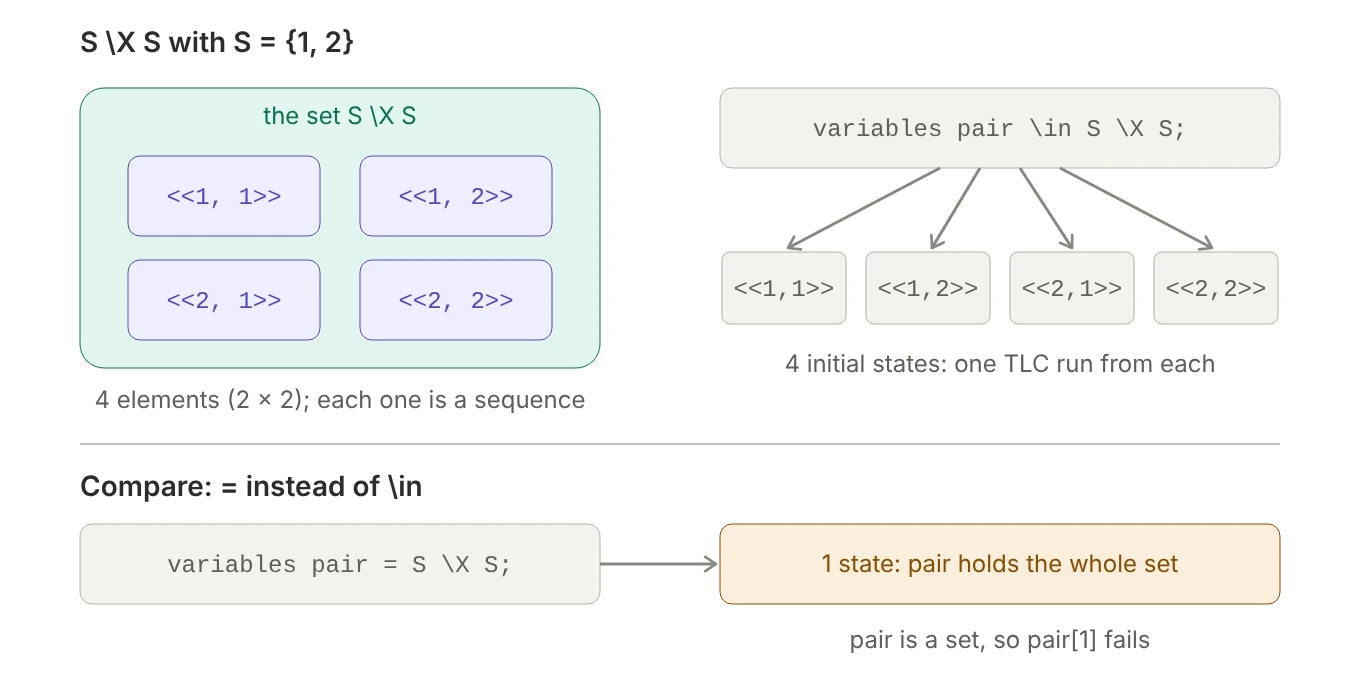 Figure 9.
 S \X S is a set of four tuples; \in and = use it differently.
To tell what you have, look at what builds the outermost value: { … } builds a set, << … >> builds one tuple, and A \X B always builds a set of tuples. A chain of \X is one flat product (<<1, 2, 1>>); parentheses nest it ((S \X S) \X S gives <<<<1, 2>>, 1>>).
In PlusCal, the difference between \in and = is the part that matters:
variables pair \in S \X S;makespairone tuple from the set, and TLC tries every one: one initial state per element. This is how you say “check the algorithm on all possible inputs”.variables pair = S \X S;makespairthe entire set: one initial state, andpair[1]fails becausepairis a set, not a sequence.
with makes the same kind of choice mid-algorithm. TLA+ has no tuple unpacking, so after with pair \in S \X S do you read pair[1] and pair[2], or you bind several names at once with with a \in S, b \in S do, to the same effect.
Related sets you’ll meet:
S \X S \X S \X S                  \* sequences of exactly length 4
[1..4 -> S]                       \* the same set, written as functions from 1..4 to S
UNION {[1..n -> S] : n \in 0..4}  \* all sequences of length 0 to 4
Seq(S)                            \* every finite sequence over S: infinite
Seq(S) is fine in a type invariant like seq \in Seq(S), because TLC only has to test membership, but it can’t be enumerated as an initial value. The UNION line is the usual finite replacement.
3.4 Records
A record (Learn TLA+ calls it a struct) bundles named fields into one value, like a Python dict with fixed string keys or a Go struct: struct == [a |-> 1, b |-> {}].
|->reads as “maps to”. A field’s value can be anything, including another record.struct.aandstruct["a"]are the same. The bracket form is for when the field name comes from a value.DOMAIN structis the set of field names.- Field names are written bare but are strings underneath. That’s why
["key" |-> val]is a syntax error: the constructor expects a bare name and turns it into a string for you. - Records are values, so they never change in place: PlusCal’s
struct.a := 2;becomes anEXCEPT(section 3.6).
The colon form builds something different: not one record but the set of all records whose fields range over given sets. That’s what you want in type invariants.
\* Accounts is a set of model values
BankTransactionType == [acct: Accounts, amnt: 1..10, type: {"deposit", "withdraw"}]
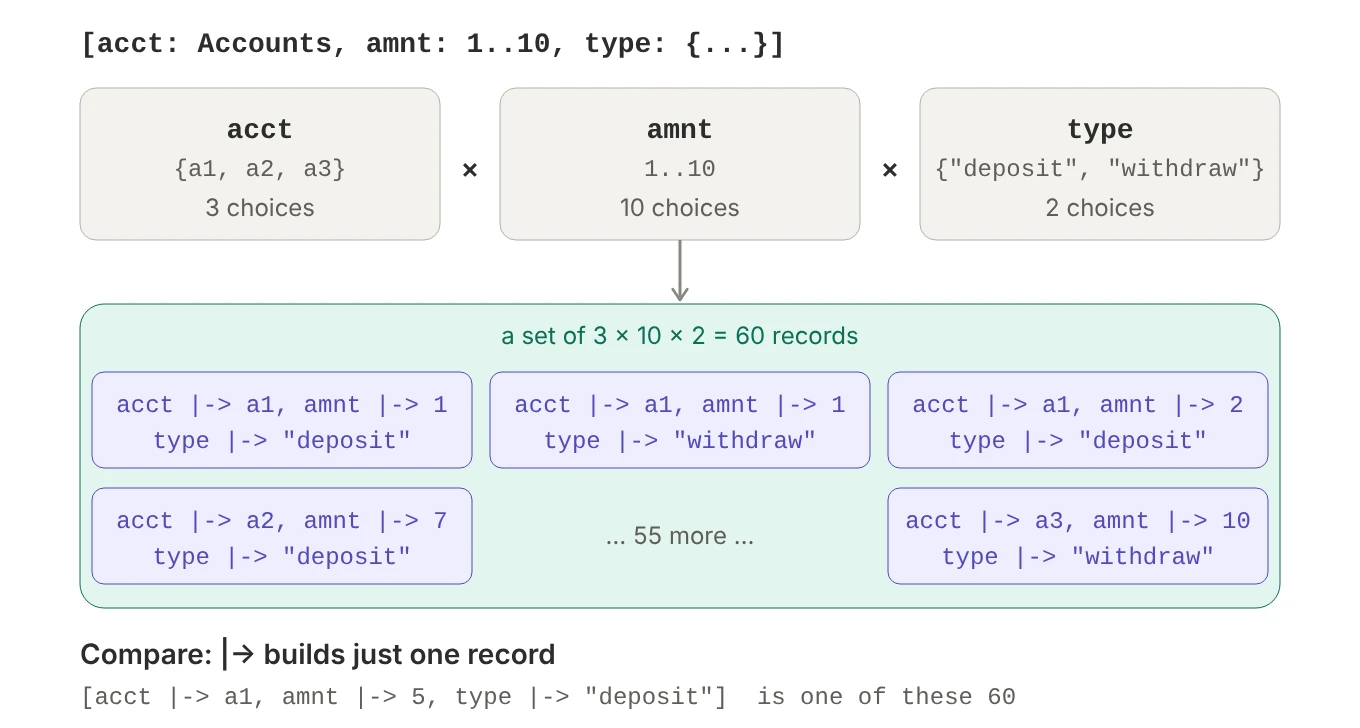 Figure 10. The colon form builds every combination of field values: 3 × 10 × 2 = 60 records.
It’s the same relationship as << >> versus \X, and functions (section 3.5) follow the same pattern:
| One value | The set of all such values | |
|---|---|---|
| Tuple (fields by position) | <<a1, 5, "deposit">> |
Accounts \X 1..10 \X {"deposit", "withdraw"} |
| Record (fields by name) | [acct \|-> a1, amnt \|-> 5, type \|-> "deposit"] |
[acct: Accounts, amnt: 1..10, type: {"deposit", "withdraw"}] |
| Function (keys from a set) | [a \in Accounts \|-> 0] |
[Accounts -> Int] |
The function row is the look-alike to watch. Both forms use |->, but they get their keys in different ways, much like a Python dict literal versus a dict comprehension:
[acct |-> a1]             \* record: one key, "acct"       like {"acct": a1}
[a \in Accounts |-> 0]    \* function: a key per account   like {a: 0 for a in accounts}
In the record, the word left of |-> is the key. In the function, a is a variable: it takes each value in Accounts in turn, and each value becomes a key. With Accounts = {a1, a2, a3}, that’s three keys, a1, a2 and a3, each mapped to 0. (Underneath, a record is just a function whose keys are strings; the two forms differ only in how the keys are given.)
In the colon form, every field must be followed by a set. [key: "val"] puts a string where a set belongs, and TLC fails with a confusing error about the string (TLA+ tools 1.8.0 says Shouldn't call isEmpty() on value "val"; older versions said “Attempted to compute the number of elements in the string”). Write [key: {"val"}].
The 60 in Figure 10 is also how many branches with t \in BankTransactionType makes TLC explore. Estimate set sizes regularly, because nesting multiplies fast: a queue holding up to 3 of these transactions can be in 1 + 60 + 60² + 60³ = 219,661 different states before you count anything else in the model.
3.5 Functions are lookup tables
A TLA+ function is a lookup table: every key in its domain maps to a value. [x \in S |-> e] builds one, f[k] looks up a key, and DOMAIN f is the set of keys. Sequences and records are special cases: a sequence is a function whose keys are 1..n, and a record is a function whose keys are field-name strings. That’s why seq[i], rec["a"] and pc[self] all use the same brackets.
When TLC prints a function whose keys are neither 1..n nor field names, it uses an “expanded form” built from two operators in the standard TLC module:
1
2
3
4
5
>>> TruthTable
( <<FALSE, FALSE>> :> TRUE @@
  <<FALSE, TRUE>>  :> TRUE @@
  <<TRUE, FALSE>>  :> FALSE @@
  <<TRUE, TRUE>>   :> TRUE )
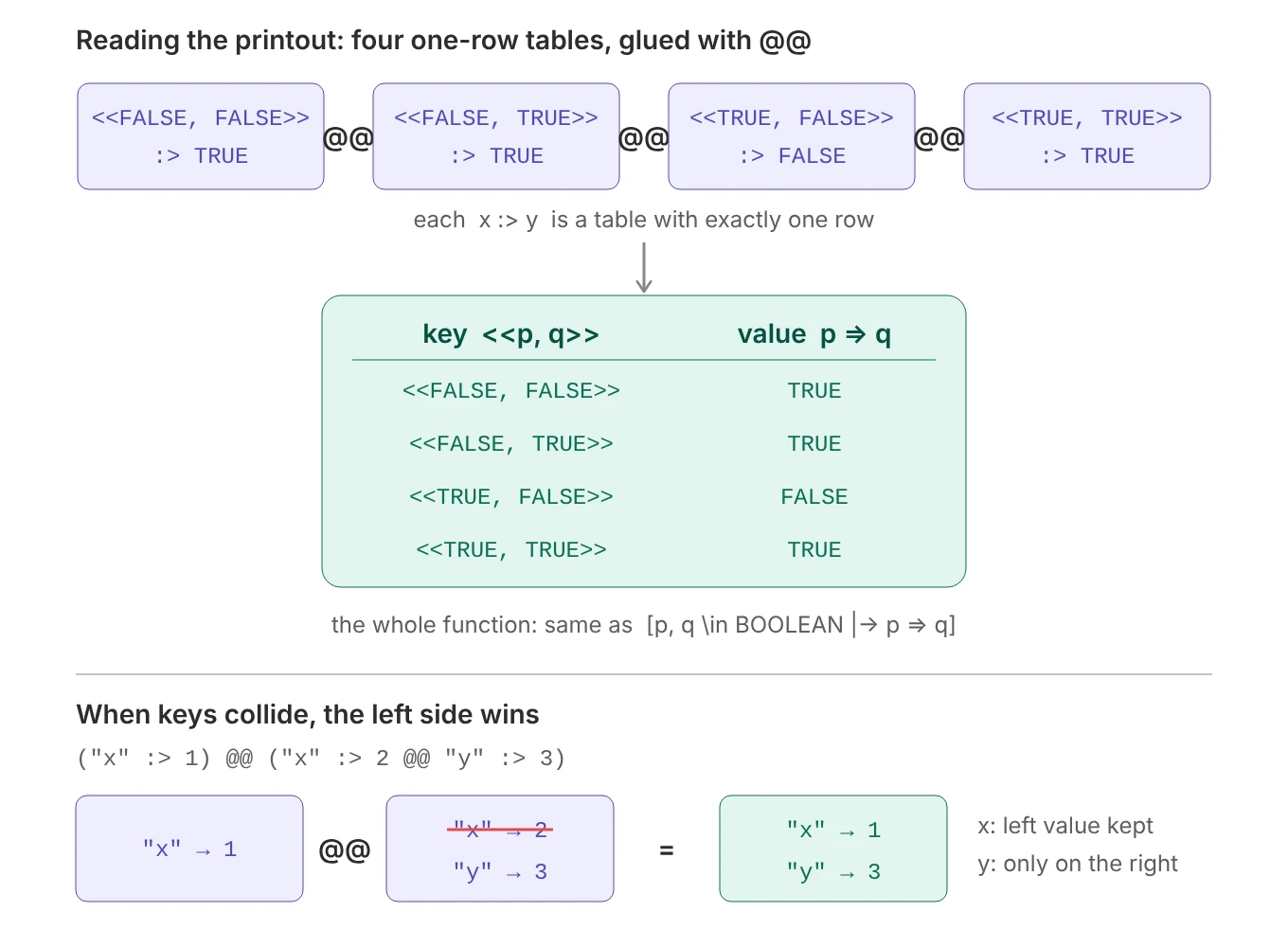 Figure 11.
 :> builds one-row tables, and @@ glues them together.
x :> y is a one-row table (Python: {x: y}), and f @@ g merges two tables, keeping the left value when a key appears in both (Python: {**g, **f}). :> binds more tightly than @@, so the printout reads as four rows: the truth table of =>, and a valid TLA+ expression you can paste back into any spec that extends TLC. Their definitions explain the “left wins” rule:
d :> e == [x \in {d} |-> e]

f @@ g == [x \in (DOMAIN f) \cup (DOMAIN g) |->
             IF x \in DOMAIN f THEN f[x] ELSE g[x]]
They’re handy in your own specs too: Cost == "read" :> 1 @@ "write" :> 5 @@ "delete" :> 10 writes a small table by hand, and (k :> v) @@ f sets key k whether or not f already has it. Mind the order: f @@ (k :> v) keeps an existing k unchanged.
Function definitions and recursion
Square brackets on the left of == define a function rather than an operator:
Double[x \in 1..10] == x * 2          \* same as  Double == [x \in 1..10 |-> x * 2]
Factorial[x \in 0..10] == IF x = 0 THEN 1 ELSE x * Factorial[x - 1]
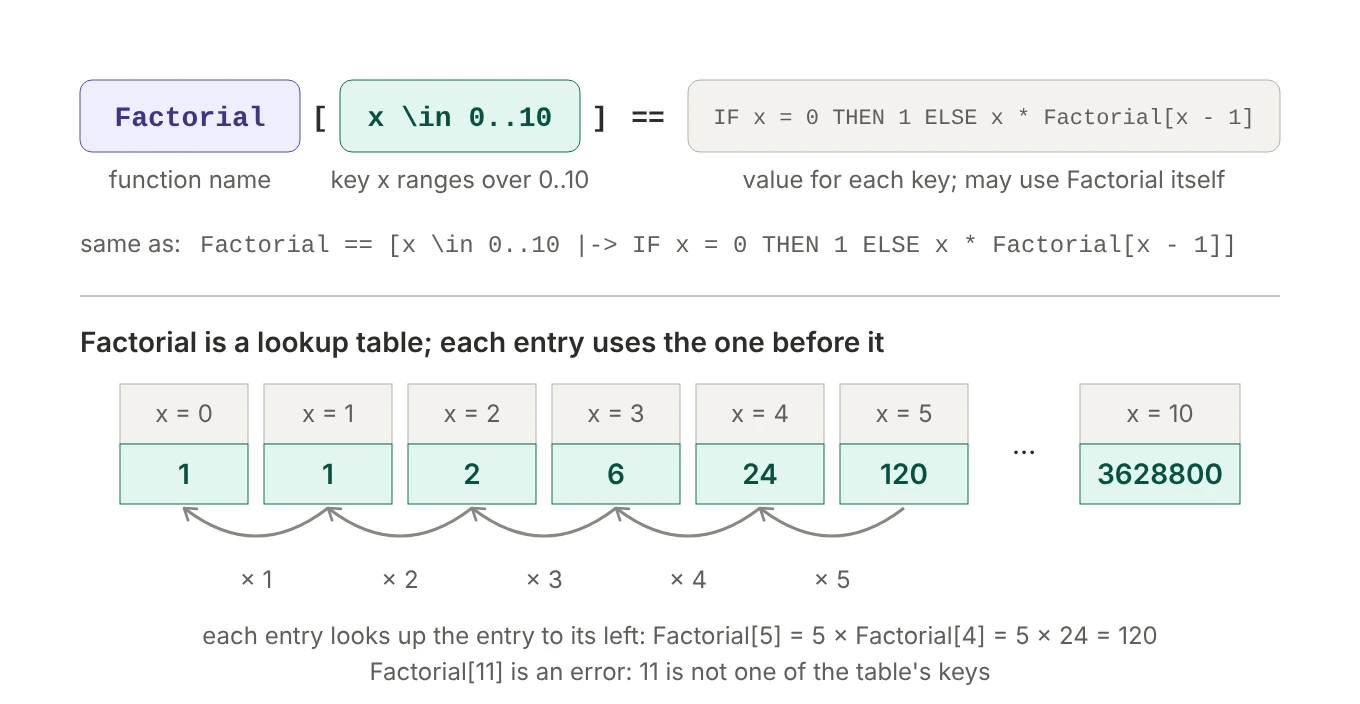 Figure 12. The bracket form names a function, the range of its key, and a body that may look up the function itself.
This form exists mainly for recursion. Normally a definition can’t mention itself (in Factorial == [x \in 0..10 |-> … Factorial[x - 1] …] the name is used before it’s defined), but the bracket form may, with no declaration needed. Two things keep it well-defined: every recursive lookup stays inside the domain (for x in 1..10, x - 1 is in 0..9), and x = 0 is a base case. A key outside the table, like Factorial[11], is an error, so use a recursive function when there’s a natural, small, finite set of inputs, or when you want the table as a value. Functions can take several keys too: Add[a \in 0..3, b \in 0..3] == a + b, looked up as Add[2, 1].
Recursive operators and private helpers
A recursive operator accepts any argument, but needs a RECURSIVE declaration before its definition:
RECURSIVE SumSeq(_)
SumSeq(s) == IF s = <<>> THEN 0 ELSE Head(s) + SumSeq(Tail(s))
The recursion can also live in a LET. (In Learn TLA+’s version, the helper is identical to SumSeq, with its parameter renamed s_ only because the no-shadowing rule forbids reusing s, so the LET just demonstrates the syntax.) The pattern pays off when the helper needs a different shape from the public operator:
SumSeq(s) ==
  LET RECURSIVE Helper(_, _)
      Helper(i, acc) ==
        IF i > Len(s) THEN acc
        ELSE Helper(i + 1, acc + s[i])     \* s comes from SumSeq; no need to pass it
  IN Helper(1, 0)
The helper’s extra parameters, i and acc, stay an implementation detail: callers just write SumSeq(<<3, 1, 4>>). Its name stays private too: top-level definitions share one namespace, but a LET helper exists only inside its operator, so every operator can have its own Helper.
Recursion in specs often computes a fixed point, repeating a step until nothing changes, as in “which nodes can I reach from here?”:
Reachable(start, Edges) ==
  LET RECURSIVE Expand(_)
      Expand(seen) ==
        LET next == seen \cup {edge[2] : edge \in {x \in Edges : x[1] \in seen}}
        IN  IF next = seen THEN seen ELSE Expand(next)
  IN Expand({start})
Each round adds every node one edge away from what’s been found so far, and it stops when a round adds nothing. With Edges as a state machine’s allowed transitions, Reachable("Stopped", Edges) returns every status reachable from Stopped.
3.6 Updating a function: EXCEPT
What’s wrong with this spec?
VARIABLE s
Init == s = <<TRUE, FALSE>>
Next == s[1]' = FALSE              \* wrong
Spec == Init /\ [][Next]_s
TLC fails with “the identifier s is either undefined or not an operator”, which is confusing, because s is right there. The problem is that an action must pin down the entire next value of every variable, and s[1]' = FALSE doesn’t. Priming an expression primes the variables inside it, so s[1]' means s'[1]: “entry 1 of the next s”. It’s a fact about s', not a statement of what s' is.
![Starting from s equal to TRUE, FALSE: the formula s[1]' = FALSE only fixes the first entry, so infinitely many next values satisfy it, such as FALSE, FALSE or FALSE, TRUE or FALSE, 186 or just FALSE, and TLC can't pick one. The formula s' = [s EXCEPT ![1] = FALSE] fixes exactly one next value: FALSE, FALSE.](/images/tla-pluscal/13-except-vs-partial-assignment.webp) Figure 13.
Figure 13. s[1]' = FALSE is satisfied by infinitely many next values; EXCEPT pins down exactly one.
TLC computes next states by looking for formulas of the shape x' = expression (or x' \in Set) and treating them as “this is what x' is”. s[1]' = FALSE isn’t that shape. It’s a condition that uses s' before s' has a value, hence “undefined”.
The fix:
Next == s' = [s EXCEPT ![1] = FALSE]
[f EXCEPT ![k] = v] is a new function with the same keys and values as f, except that key k now holds v. Spelled out, it’s [x \in DOMAIN f |-> IF x = k THEN v ELSE f[x]]. Read the syntax as: ! is “the copy being made”, [1] is which key to change, and = FALSE is its new value.
![Top: counter maps c1 to 3, c2 to 5, c3 to 0. EXCEPT at c2 equals at-sign plus 1 copies every entry and replaces c2: the at-sign is the old value 5, so the new value is 6. Bottom: s is a tuple whose first element is a record with x equal to TRUE and whose second element is FALSE. EXCEPT at 1 dot x equals not at-sign follows the path into s[1].x and flips TRUE to FALSE, copying everything else.](/images/tla-pluscal/14-except-mechanics.webp) Figure 14.
Figure 14. @ is the old value, and a path like ![1].x reaches into nested values.
Three conveniences:
[s EXCEPT ![1] = FALSE, ![2] = 17]      \* several keys at once
[counter EXCEPT ![c] = @ + 1]           \* @ is the old value at that spot
[s EXCEPT ![1].x = ~@]                  \* a nested path, into s[1].x

\* the long way for the last one:
[s EXCEPT ![1] = [s[1] EXCEPT !.x = ~s[1].x]]
EXCEPT only replaces keys that already exist: if k isn’t in DOMAIN f, you get f back unchanged, with no error. To add a key, use @@.
In PlusCal you almost never write EXCEPT yourself; the translator writes it whenever you assign to part of a function or record:
| PlusCal | Translated TLA+ |
|---|---|
counter[c] := counter[c] + 1; |
counter' = [counter EXCEPT ![c] = counter[c] + 1] |
counter[c] := @ + 1; |
counter' = [counter EXCEPT ![c] = @ + 1] |
state.status := "Running"; |
state' = [state EXCEPT !.status = "Running"] |
s[1] := FALSE \|\| s[2] := 17; |
s' = [s EXCEPT ![1] = FALSE, ![2] = 17] |
The last row matters because PlusCal doesn’t let us assign the same variable twice in one step, and s[1] and s[2] are both parts of s. Joining them with || makes them one assignment.
The rule underneath all of this: TLA+ makes you say exactly what the whole next state is. At the variable level, that’s UNCHANGED x for every variable an action doesn’t touch. Inside a single function, it’s EXCEPT: “all the other keys stay the same”.
4. Modules, constants and model values
4.1 Where definitions live
Here’s the start of the duplicate-check spec, after a change that makes it check many inputs instead of one:
---- MODULE dup ----
EXTENDS Integers, Sequences, TLC

S == 1..10

(*--algorithm dup
variables seq \in S \X S \X S \X S;
          index = 1;
          seen = {};
          is_unique = TRUE;
begin
  \* ...
end algorithm; *)
====
Why is S defined above the algorithm instead of inside it? Because S isn’t part of the algorithm’s state. It’s a fixed value describing which inputs TLC should try.
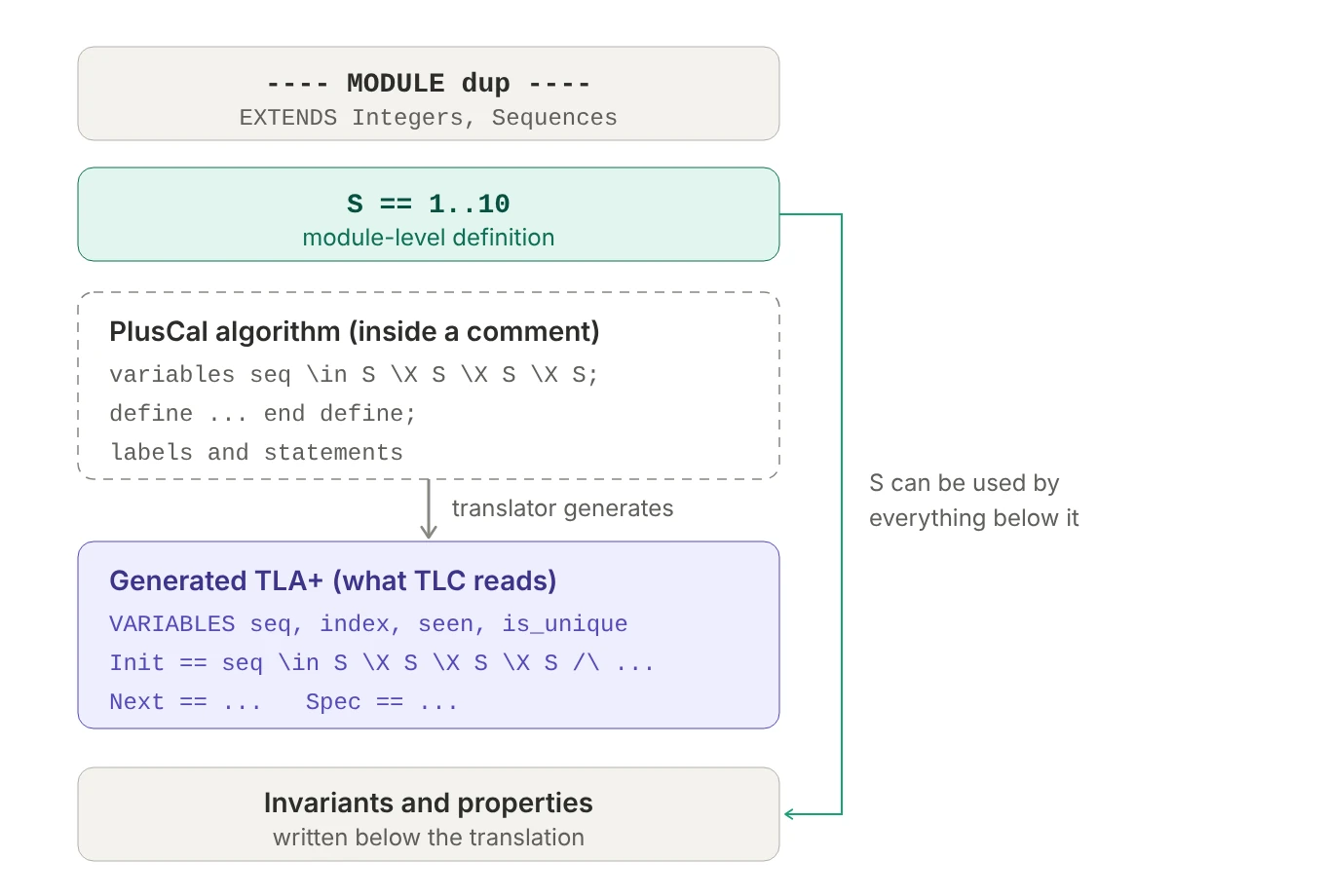 Figure 15. The PlusCal block is a comment; TLC reads only the translation below it.
A definition above the comment is an ordinary module-level definition: everything below can use it, and it’s one small step away from becoming a configurable constant. As a PlusCal variable, S would become state: it would appear in every state of every error trace, join every UNCHANGED clause, and could be assigned by mistake. In a define block it works, but goes against convention: define is for operators that read the algorithm’s variables, which is why the translator places it after VARIABLES.
The practical payoff is control over model size. seq \in S \X S \X S \X S starts TLC from 10⁴ initial states when S == 1..10, and TLC runs the whole algorithm from each. Make the bound a constant:
CONSTANT MaxValue
S == 1..MaxValue
1
CONSTANT MaxValue = 3
Start small (3 gives 81 initial states and finishes instantly), then scale up to 10 for a thorough run, without editing the spec.
4.2 Model values
A model value is a value TLC invents for you. It has a name and exactly one property: it’s equal to itself and unequal to everything else. You can’t add it, compare it with <, or look inside it. Think of it as a unique token, like Python’s MISSING = object() sentinel.
That sounds useless until you see how TLC treats comparisons between different kinds of values:
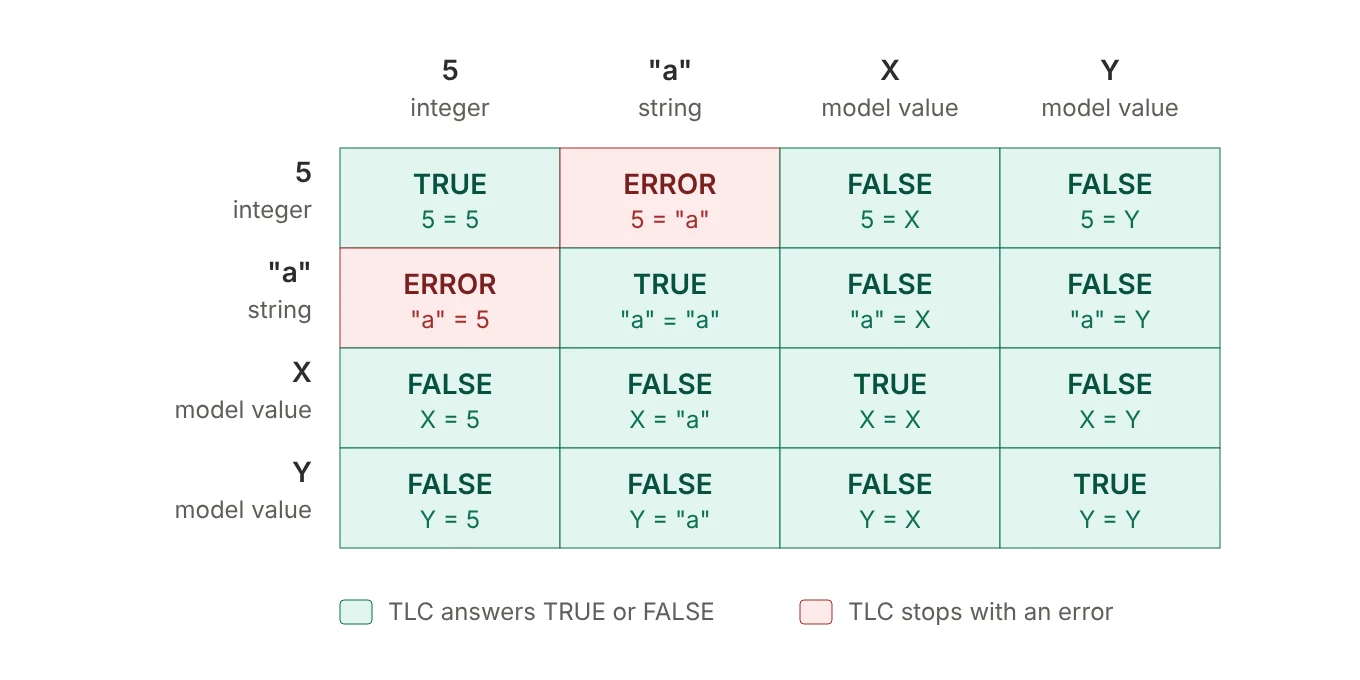 Figure 16. Which comparisons TLC allows.
5 = "a" doesn’t give FALSE; it stops the whole run, because comparing different kinds of values is almost always a bug in the spec. A model value, safe to compare with anything, is exactly what a “nothing here” marker needs. Consider a nullable last_access_time, either “never accessed” or an integer timestamp, and three candidate markers:
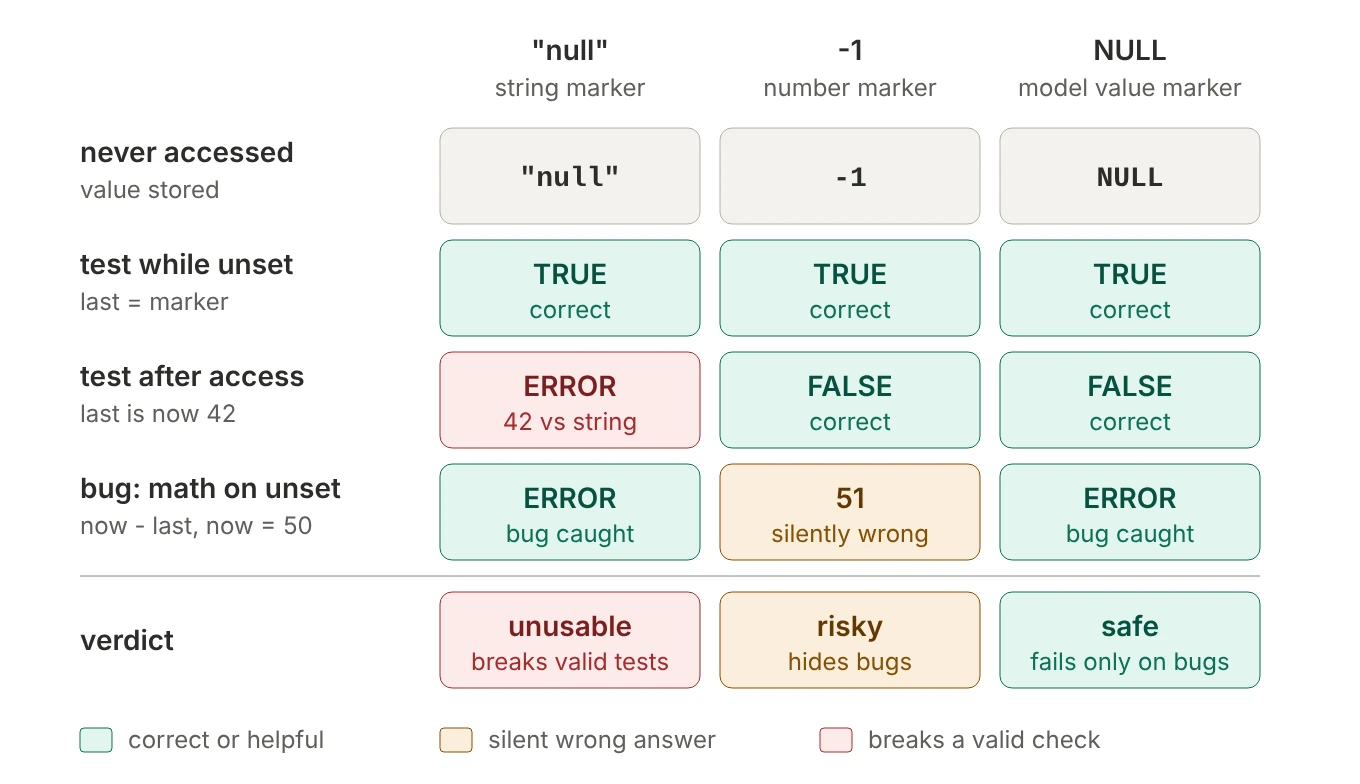 Figure 17. Three candidate “never accessed” markers.
- The string
"null"breaks as soon as the variable holds a real timestamp:last_access_time = "null"then compares an integer with a string, and TLC stops. - The number
-1never causes a comparison error, but it’s a real number, so arithmetic with it silently succeeds. Forget a check, andnow - last_access_timegives50 - (-1) = 51: a plausible, wrong duration. - A model value
NULLanswers both legitimate tests correctly, and50 - NULLis an error, so TLC points straight at the bug.
With CONSTANTS NULL, Timeout declared and last_access_time = NULL to start, the timeout check guards the arithmetic: last_access_time # NULL /\ now - last_access_time > Timeout. /\ is evaluated left to right and stops at the first FALSE, so the subtraction only runs when the value is a number. The type invariant TypeOK == last_access_time \in Nat \cup {NULL} is how you write a nullable type: “a natural number, or NULL”. In the .cfg file:
1
2
3
CONSTANTS
  NULL = NULL
  Timeout = 2
NULL = NULL reads oddly, but it means “make NULL a model value named NULL”: a bare name on the right-hand side is always read as a model value. That’s also what the X in Figure 8’s Set = {1, 2, X} is: two numbers and a placeholder, useful for things like “a register holds 1 or 2, or is empty”.
4.3 Sets of model values and symmetry
A set of model values gives you distinct identities, perfect for process IDs, nodes or clients:
CONSTANT Workers                  \* in the .cfg:  Workers = {w1, w2, w3}

(* --algorithm workers
process w \in Workers
\* ...
Compared with Workers == 1..3, there’s no accidental meaning (writing self < other or self + 1 is an error, which flags an ordering the real system doesn’t have), error traces read w2 instead of a bare 2, and it enables symmetry. If the spec treats every worker the same way, “w1 holds the lock” and “w2 holds the lock” are mirror images, and TLC only needs to explore one of each group:
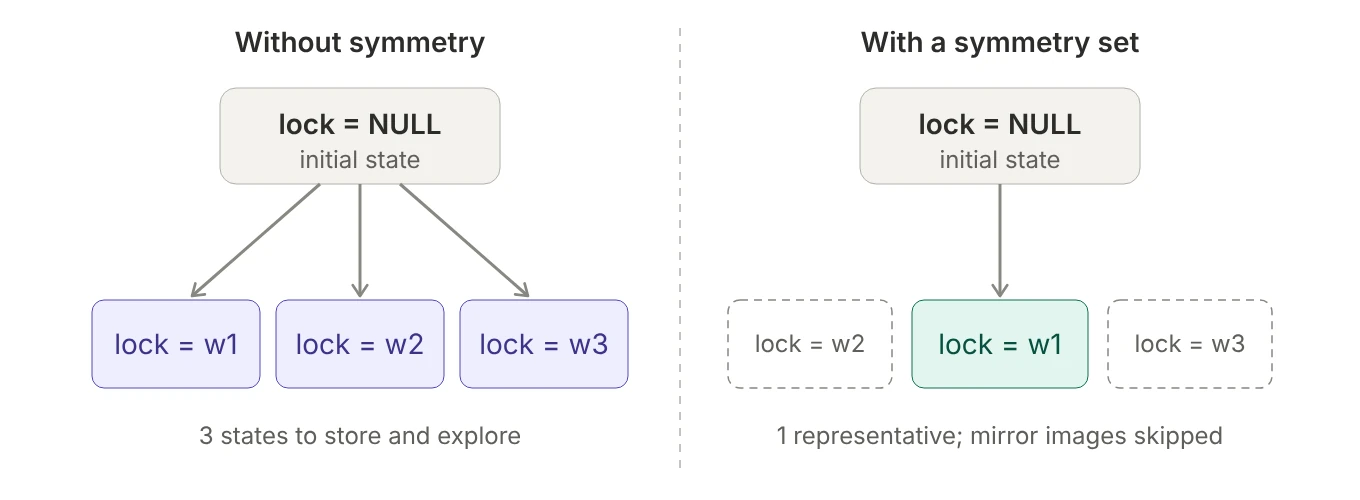 Figure 18. With a symmetry set, TLC keeps one representative and skips states that differ only by renaming workers.
With n interchangeable values, groups of up to n! states collapse into one. To declare it when using a .cfg file:
EXTENDS TLC
Symm == Permutations(Workers)
1
2
CONSTANT Workers = {w1, w2, w3}
SYMMETRY Symm
Symmetry is a promise that names don’t matter, and breaking that promise lets TLC skip states that actually behave differently. Don’t use it if the spec singles out a specific element, if it uses CHOOSE over the set (which always picks the same specific element), or when checking liveness, where symmetry can make TLC miss violations. A common workflow is symmetry on while iterating on invariants, and off for the final run and for liveness checks.
4.4 Parameterized modules
A module with CONSTANTS is a template, and its constants are parameters:
---- MODULE Point ----
LOCAL INSTANCE Integers           \* use Integers privately; don't re-export it
CONSTANTS X, Y
ASSUME X \in Int /\ Y \in Int     \* a precondition on the parameters

Repr == <<X, Y>>
Add(x, y) == <<X + x, Y + y>>
====
INSTANCE … WITH fills in the parameters and gives the result a name:
Origin == INSTANCE Point WITH X <- 0, Y <- 0
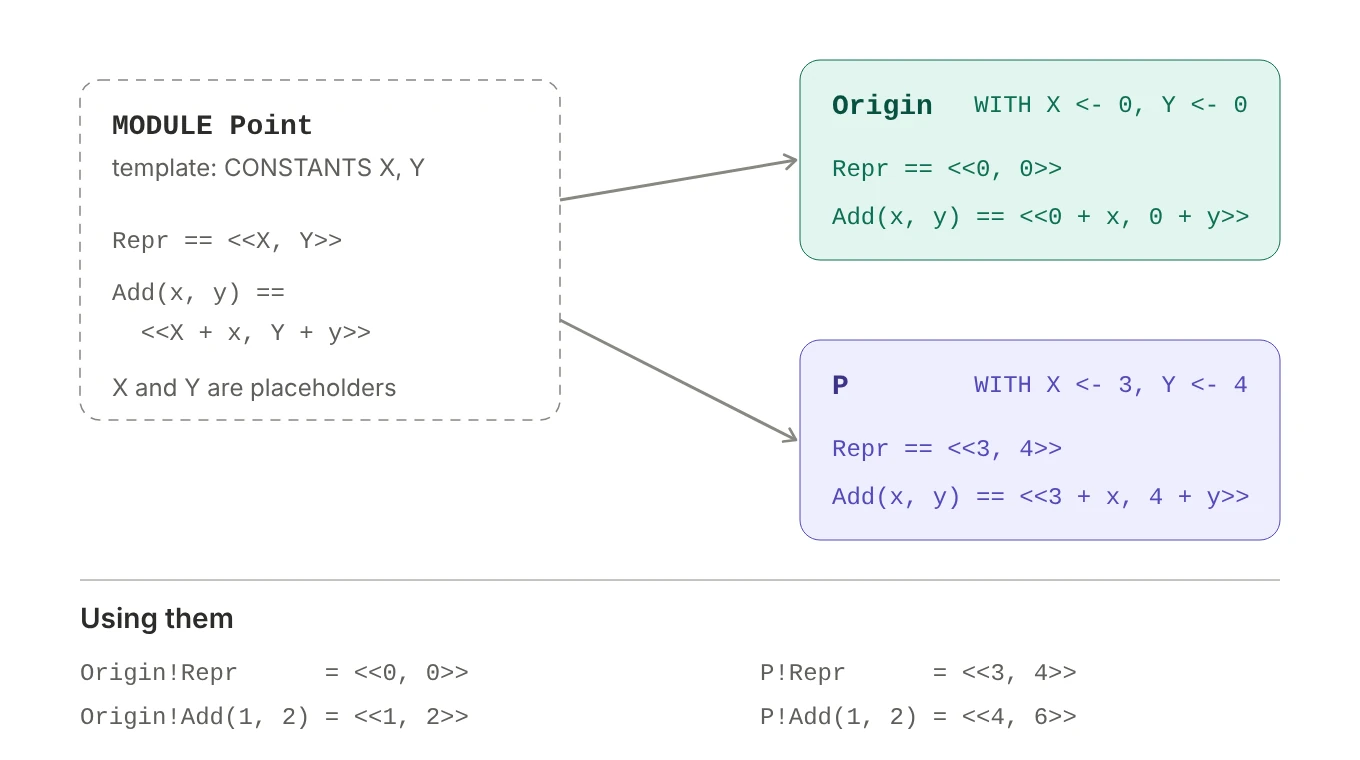 Figure 19. Each instance is the template with its parameters substituted;
 ! reaches the operators inside.
<- reads as “substitute”, and Origin!Add(1, 2) means “the Add inside Origin”, which is <<0 + 1, 0 + 2>>: in Python terms, a factory call, Origin = Point(0, 0). (The lowercase x, y in Add are Add’s own arguments, separate from the module parameters X, Y.) LOCAL INSTANCE Integers lets Point use + without passing all of Integers on to whoever instantiates it, which EXTENDS would.
For each parameter, TLA+ decides the value like this:
| Situation | What X becomes |
|---|---|
you wrote X <- something in the WITH |
something |
you didn’t, but your module also defines something named X |
your X, automatically |
you didn’t, and your module has nothing named X |
error |
So M == INSTANCE Module with no WITH doesn’t mean “no parameters”. It means “match every parameter to my own definition with the same name”, and you can still override any of them. Leaving off the name (INSTANCE Point WITH X <- 0, Y <- 0) imports the operators directly, without a prefix, which you can only do once per module without clashes.
The bigger use is that variables can be substituted too, and that’s how you check that a detailed spec implements an abstract one:
---- MODULE DetailedClock ----
VARIABLES h, m
\* ...
HC == INSTANCE HourClock WITH hr <- h     \* the abstract clock's hr is my h
====
1
PROPERTY HC!Spec
This asks TLC to check that every behavior of the detailed clock, viewed through the mapping hr <- h, is a valid behavior of the hour clock (section 6.11 explains why the minute ticks don’t break this). The same pattern scales to real systems: an abstract lifecycle spec with only a status variable can be checked against a detailed provisioning flow, with a WITH that computes the abstract status from the detailed state.
5. PlusCal’s execution model: steps and labels
5.1 A step is one transition
A step is one jump from a state to the next state. The translator turns all the PlusCal code inside a step into a single formula relating the values before the jump (x) to the values after it (x'). Think of two snapshots, before and after, with nothing in between.
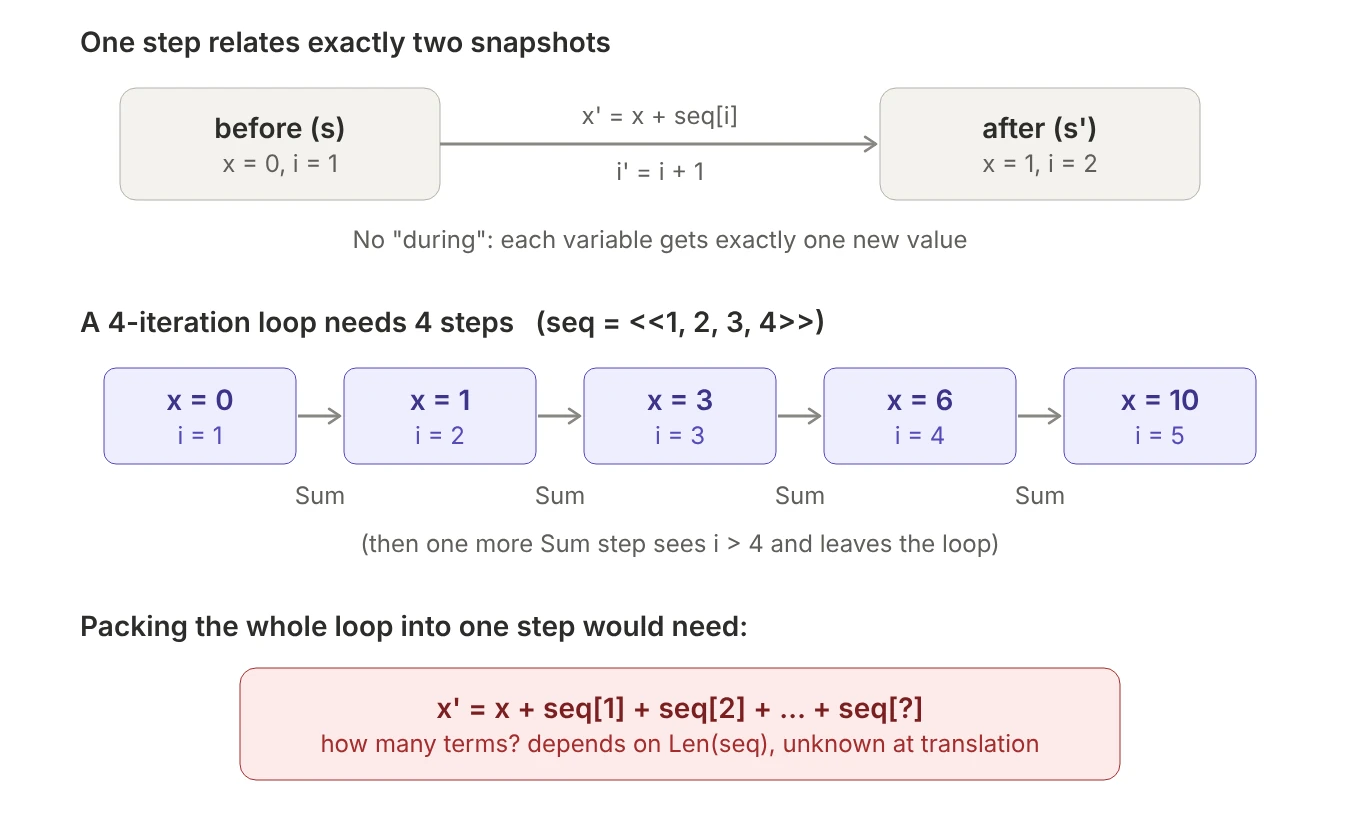 Figure 20. A step is one before/after pair. A loop with an unknown number of iterations can’t be folded into one.
Straight-line code in one step works because the translator can fold it into a single formula:
A:
  x := x + 1;
  y := x * 2;
\* becomes:   x' = x + 1  /\  y' = (x + 1) * 2
There’s only one “after” snapshot, so each variable gets one new value per step, and assigning the same variable twice requires a label in between. A loop assigns the same variable over and over, and unrolling it would need a formula whose length depends on Len(seq), which the translator can’t know: it works on your code text before TLC ever runs. So every while begins at a label, and each pass through the body is its own step. (A single-process algorithm with no labels at all is the exception: the translator adds the labels it needs. Once an algorithm has a label of its own, or any process, a while without a label is a “missing label” error.)
This doesn’t limit expressions. x := SumSeq(seq) is one assignment, x' = SumSeq(seq): the repetition lives inside an expression TLC evaluates, not in repeated statements. Expressions can be as complex as you like; it’s the statements in a step that must be a fixed list of assignments, each variable assigned at most once.
5.2 while loops are not atomic
Sum:
  while i <= Len(seq) do
    x := x + seq[i];
    i := i + 1;
  end while;
A label doesn’t mark a block of code that runs atomically; it marks a point in the control flow. A step runs from a label until execution reaches a label again, including the same label. The last thing a loop body does is jump back to the test at Sum, so every iteration ends a step.
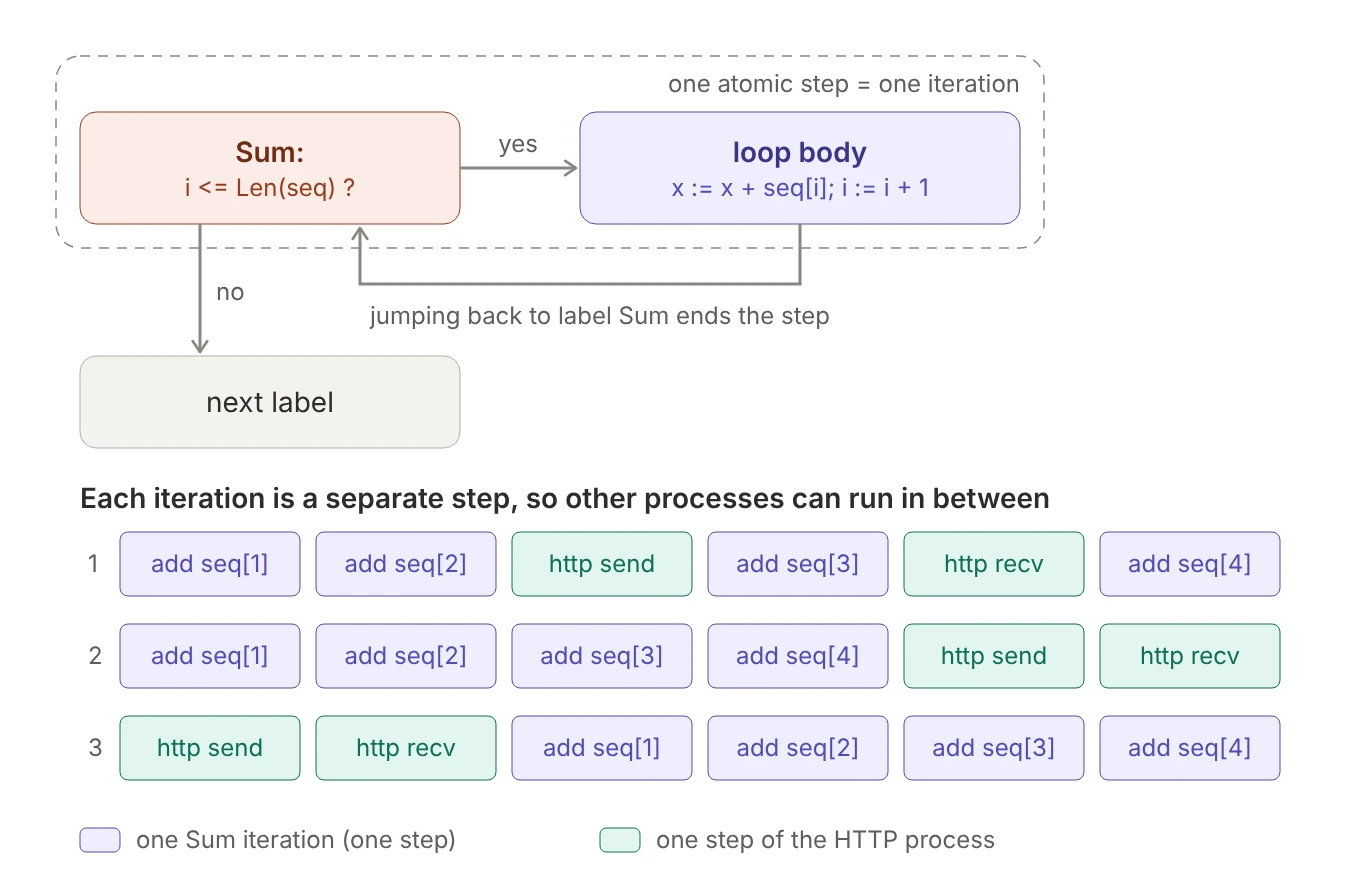 Figure 21. The test and one pass of the body form one atomic step. Other processes can interleave between iterations.
You can see it in the translation:
Sum == /\ pc = "Sum"
       /\ IF i <= Len(seq)
             THEN /\ x' = x + seq[i]
                  /\ i' = i + 1
                  /\ pc' = "Sum"          \* back to the same label
             ELSE /\ pc' = "Done"
                  /\ UNCHANGED << x, i >>
       \* (plus UNCHANGED for the other variables)
The THEN branch does one addition and sets pc' = "Sum". That doesn’t loop inside the action; it just makes Sum enabled again in the next state. Between this state and the next Sum step, TLC is free to run any other process’s action, and it checks every such ordering.
Two consequences follow. Other processes can see a half-finished sum. And invariants are checked in every state, including the intermediate ones: x = SumSeq(seq) fails after the first iteration even in a single-process algorithm. Guard invariants about results: pc = "Done" => x = SumSeq(seq). If the real computation is effectively instant from everyone else’s point of view, compute it in one expression (x := SumSeq(seq)) and keep the state space small; if the real code sums a list while other threads run alongside it, the loop is the honest model.
5.3 Labels inside if
You can put labels inside an if, and the branches don’t need to be balanced. But if any branch has a label, the statement after the if must have one too:
A:
  if bool then
    B:
      skip;
  else
    skip;
  end if;
  x := 1;          \* invalid without a label here
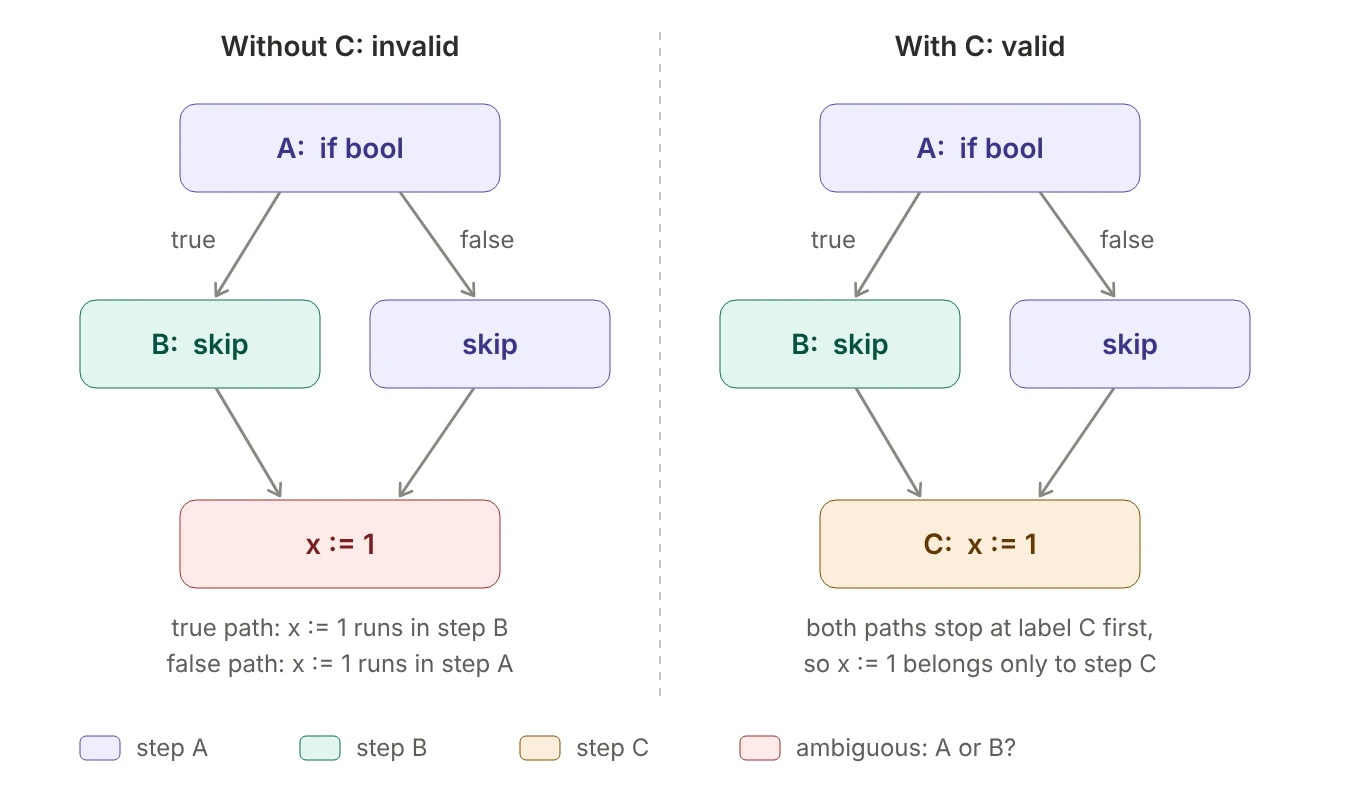 Figure 22. Without label C,
 x := 1 would belong to step B on one path and to step A on the other.
Follow each path and ask where each step ends:
boolis true: step A takes the true branch and reachesB:, so step A ends. Step B runsskip, leaves theif, and reachesx := 1with no label in the way:x := 1is part of step B.boolis false: step A takes the else branch, finds no label, and keeps going all the way tox := 1: now it’s part of step A.
The translator writes each label as one action, and every statement must go into exactly one of them. With C: in front of x := 1, both paths stop at C first, and x := 1 always belongs to step C:
A == /\ pc = "A"
     /\ IF bool THEN pc' = "B" ELSE pc' = "C"
     /\ UNCHANGED << x, bool >>
B == /\ pc = "B"
     /\ pc' = "C"
     /\ UNCHANGED << x, bool >>
C == /\ pc = "C"
     /\ x' = 1
     /\ pc' = "Done"
     /\ UNCHANGED bool
The true path takes three steps (A, B, C) and the false path two (A, C), so the true path has one extra point where other processes can interleave. That’s usually why you’d label one branch: it models something that takes several steps in the real system. The same rule applies to either: if any or branch contains a label, the statement after end either needs one.
A common misconception is that B: is nested inside A:. It isn’t: at any moment a process is at exactly one label (that’s what pc tracks), and reaching B: ends step A.
5.4 Labels can’t go inside with
with doesn’t create a variable. It creates a name that exists only inside one step’s formula:
with x = 1 do ... end with;       \* becomes   LET x == 1 IN ...
with x \in S do ... end with;     \* becomes   \E x \in S : ...
A label inside a with would split its body across two actions, but the name only exists in the first:
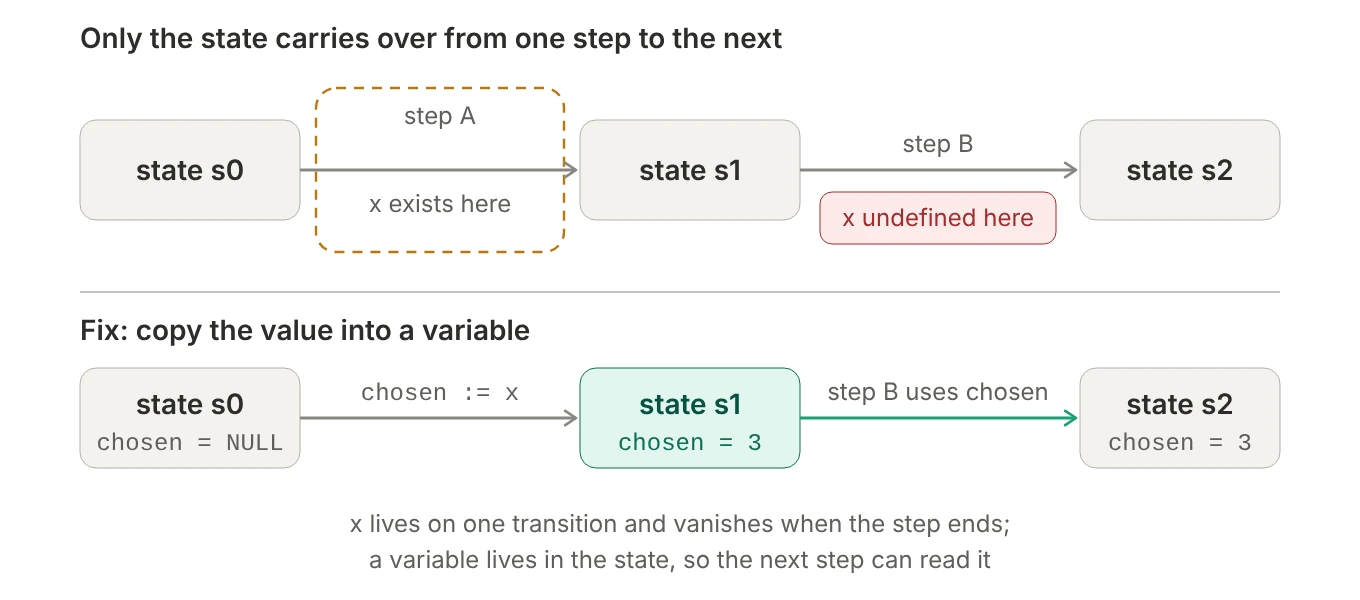 Figure 23. A
 with binding lives on one transition. Only variables survive into the next step.
Pick:
  with t \in Tasks do
    inbound := inbound \ {t};
  Work:                        \* not allowed
    done := done \union {t};   \* step Work is a separate formula, with no t in it
  end with;
Repeating \E t \in Tasks inside Work would make a new, independent choice, possibly a different task from the one removed from inbound. There’s no faithful translation, so PlusCal forbids it. The only thing that connects one step to the next is the state. Anything you need in a later step must be stored in a variable:
process worker \in Workers
variables chosen = NULL;          \* process-local: one per worker
begin
Pick:
  with t \in inbound do
    inbound := inbound \ {t};
    chosen := t;                  \* remember the choice in the state
  end with;
Work:
  done := done \union {chosen};
  chosen := NULL;                 \* reset so otherwise-identical states can merge
end process;
A process-local variable becomes a function indexed by process ID in the translation, just like pc: chosen := t turns into chosen' = [chosen EXCEPT ![self] = t]. The reset at the end matters for state-space size, as section 5.6 shows.
All of PlusCal’s label rules come from one fact: one step is one formula.
- A
whileneeds a label, because each pass has to be its own step. - A macro can’t contain labels, because it’s pasted into a single step.
- A label inside an
iforeitherneeds a label after it, so every statement belongs to exactly one step. - A label can’t go inside a
with, because thewith’s name only exists inside one step’s formula.
5.5 Nondeterminism: either and with
macro request_resource(r) begin
  either
    reserved := reserved \union {r};
    failure_reason := "";
  or
    with reason \in {"unauthorized", "in_use", "other"} do
      failure_reason := reason;
    end with;
  or
    \* some other error
    skip;
  end either;
end macro;
Does this macro pick only one branch when it’s called? In any single behavior, yes. But TLC doesn’t run single behaviors:
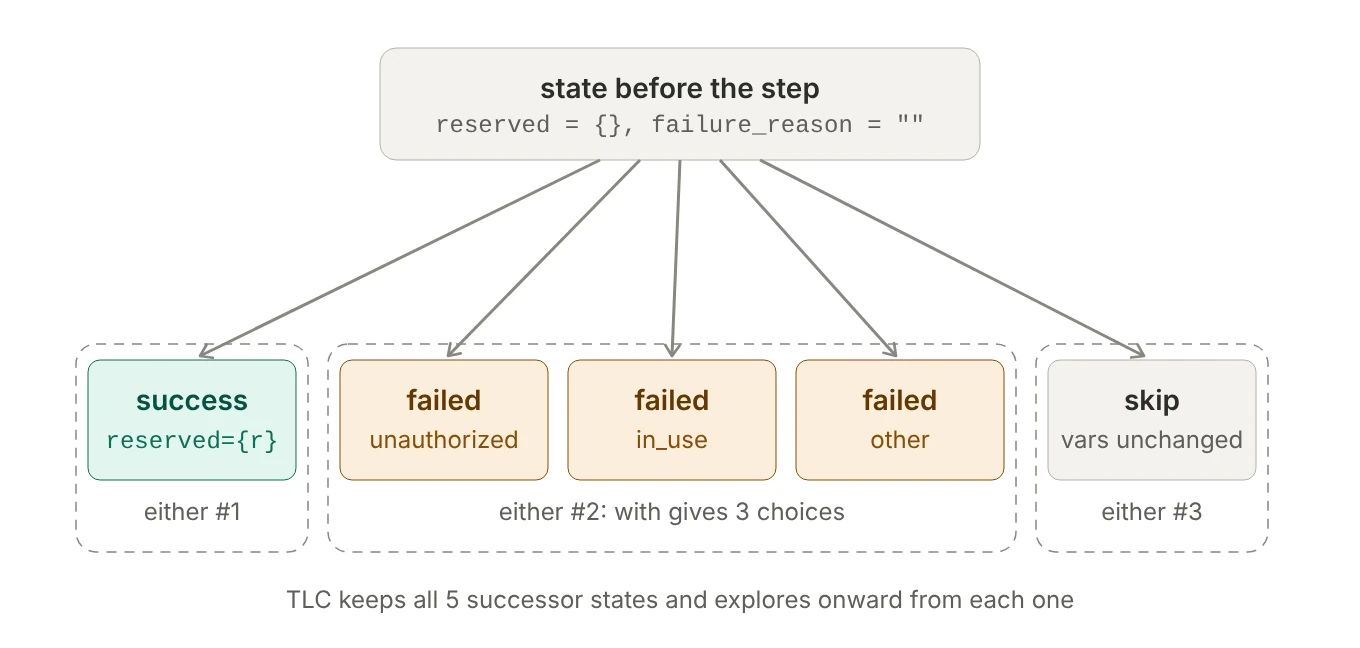 Figure 24. One call fans out into five successor states, and TLC explores onward from every one of them.
- A macro is copy-paste. The translator pastes its body wherever you call it, so the
eitherlands inside whatever step contains the call. -
eitherandwithbecome “or” and “there exists”:TLA+\/ /\ reserved' = reserved \union {r} \* either #1 /\ failure_reason' = "" \/ /\ \E reason \in {"unauthorized", "in_use", "other"} : failure_reason' = reason \* either #2 /\ reserved' = reserved \/ /\ UNCHANGED << reserved, failure_reason >> \* either #3 (skip) - TLC finds every way to satisfy the formula. An “or” is true if any branch is true, and a “there exists” is true for any choice, so this step has 1 + 3 + 1 = 5 successor states. TLC queues all of them for exploration, and stores any duplicates once.
So within one behavior, exactly one branch happens at that step, and across all behaviors, every branch happens in some behavior, with your invariants checked on all of them. Practical consequences:
- This is how you model failures. Every failure mode you list gets explored; one you leave out never gets tested.
skipmatters. It models a request that does nothing at all, such as a lost message or a timeout with no response.- A branch can switch itself off.
await <condition>;at the start of a branch makes it produce a successor only when the condition holds.
5.6 Paths vs states
---- MODULE calculator ----
EXTENDS Integers, TLC
CONSTANT NumInputs
Digits == 0..9

(* --algorithm calculator
variables i = 0, sum = 0;
begin
  Calculator:
    while i < NumInputs do
      with x \in Digits do
        sum := sum + x;
      end with;
      i := i + 1;
    end while;
end algorithm; *)
====
Every iteration makes a fresh 10-way choice, so the number of paths is 10^NumInputs. But TLC stores states, not paths, and many paths lead to the same state:
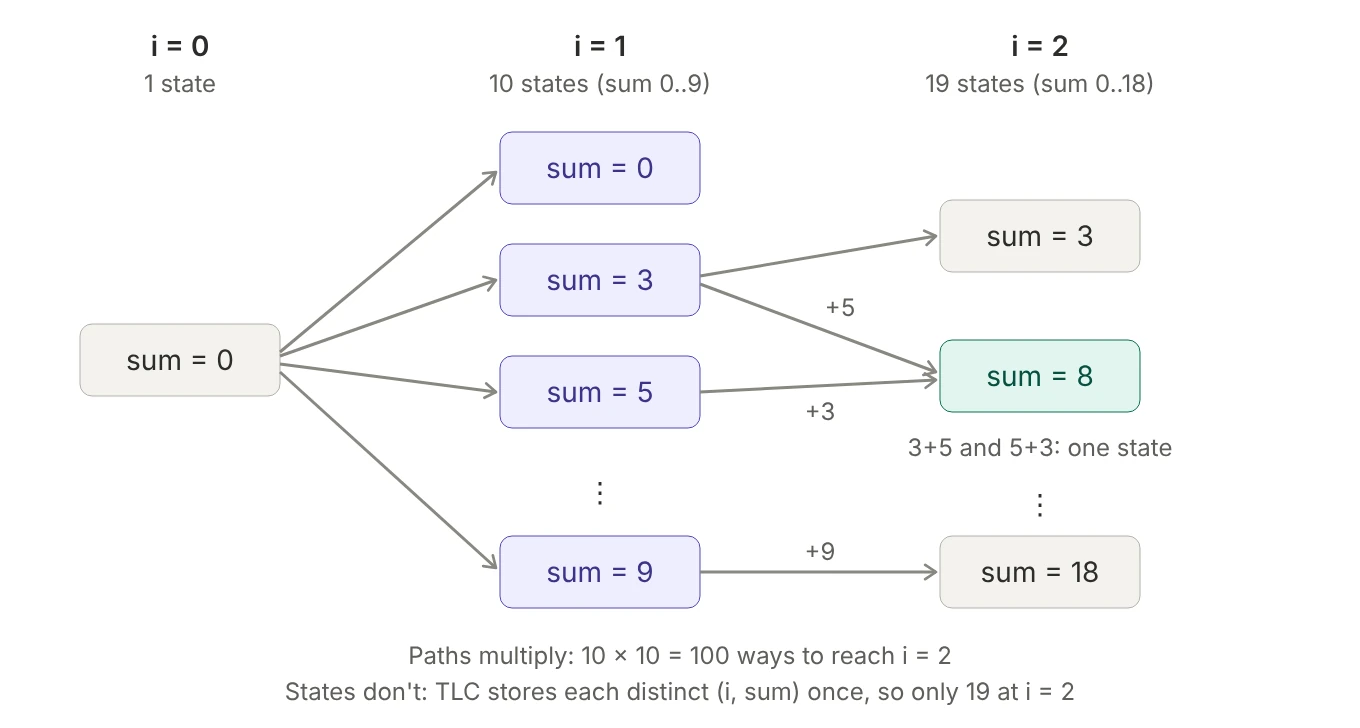 Figure 25. 3 + 5 and 5 + 3 reach the same state, which TLC explores only once.
A state is just the variables’ values: here i, sum and the hidden pc. When TLC reaches a state it has already seen, it doesn’t explore it again, because everything that can happen from there has already been explored. At i = k, sum ranges over 0..9k, so:
NumInputs |
Paths (10^N) | Distinct states TLC stores |
|---|---|---|
| 1 | 10 | 21 |
| 2 | 100 | 49 |
| 3 | 1,000 | 86 |
| 5 | 100,000 | 187 |
| 10 | 10,000,000,000 | 597 |
Paths grow exponentially; states grow quadratically. But the merging only happens because the variables forget how they got there. Keep the history, and it stops:
variables i = 0, sum = 0, inputs = <<>>;
\* ...
  sum := sum + x;
  inputs := Append(inputs, x);     \* now every path is a different state
Now <<3, 5>> and <<5, 3>> are different values, and the state count climbs back to roughly 10^N. The number of states TLC explores depends on what you keep in your variables, not on how many choices you make. Store only what your properties need. TLC’s final report shows both numbers: “states generated” (every successor computed, duplicates included) and “distinct states found”. A big gap between them means lots of paths are merging, which is what you want.
To watch the exhaustive search work, set NumInputs = 3 and add an invariant that’s false for some combination of digits, like SumBelow20 == sum < 20. TLC reports the violation along with the exact digits it picked (in one run: 2, 9 and 9).
5.7 Processes and pc
---- MODULE threads ----
EXTENDS TLC, Sequences, Integers
NumThreads == 2
Threads == 1..NumThreads

(* --algorithm threads
variables counter = 0;

define
  AllDone == \A t \in Threads : pc[t] = "Done"
  Correct == AllDone => counter = NumThreads
end define;

process thread \in Threads
begin
  IncCounter:
    counter := counter + 1;
end process;
end algorithm; *)
====
If pc is the program counter, how can pc[t] be indexed like a sequence? In a multi-process algorithm, each process is at its own place in the code, so pc holds one label per process, as a function from process ID to label name:
Init == /\ counter = 0
        /\ pc = [self \in ProcSet |-> "IncCounter"]   \* all start at IncCounter

IncCounter(self) == /\ pc[self] = "IncCounter"
                    /\ counter' = counter + 1
                    /\ pc' = [pc EXCEPT ![self] = "Done"]  \* only this entry changes

thread(self) == IncCounter(self)

Next == (\E self \in Threads : thread(self)) \/ Terminating
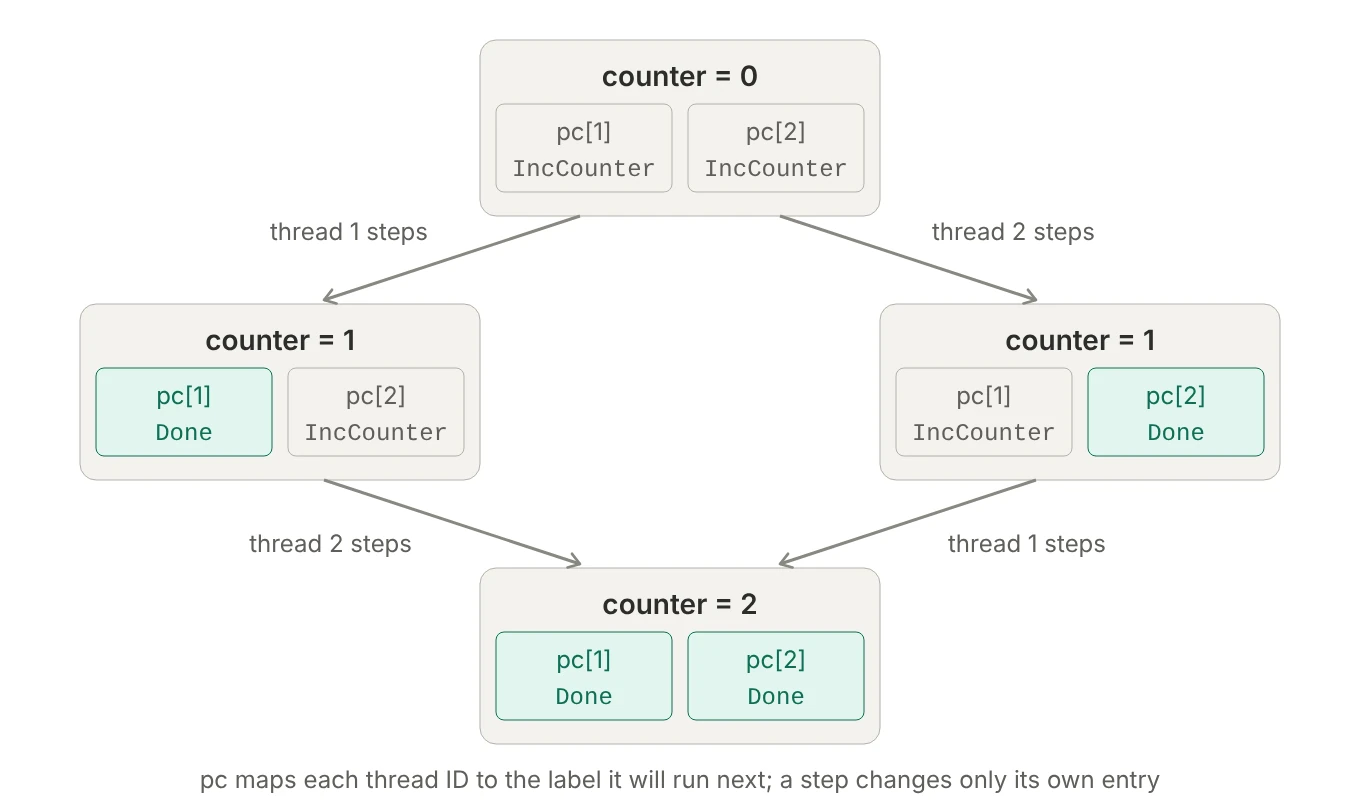 Figure 26.
 pc maps each thread to the label it will run next. A step changes only its own entry.
pc[t] is function application. It looks like sequence indexing because Threads is 1..2, which makes pc a sequence too, and TLC prints it as <<"IncCounter", "IncCounter">>. With model-value threads it would print in the :>/@@ form instead. Inside a process, the translator writes pc[self], where self is that process’s own ID. In a single-process algorithm, pc is just a string, which is why you’ll also see pc = "Done" with no brackets.
Correct is the guarded-invariant pattern from section 5.2: before both threads finish, AllDone is FALSE, so the implication is trivially TRUE; afterwards, counter must be 2. In this version it always passes, because the increment is one atomic step. Split it into two labels, one that reads counter into a local variable and one that writes back the value plus one, and TLC finds the lost update: both threads read 0, and counter ends at 1.
5.8 Names the translator reserves
The translator generates definitions with fixed names, so don’t use these for your own variables, labels or operators: vars (the tuple of all variables), pc, Init, Next, Spec, Terminating (the step that lets a finished algorithm stutter instead of deadlocking), Termination (often generated as a ready-made “eventually finishes” property), ProcSet (all process IDs), self, and stack (the call stack, if you use procedures).
Label, process and procedure names also become operator names in the translation (a label IncCounter: becomes the action IncCounter, and a process thread becomes thread(self)), so they can’t clash with your variables, your define operators, or the names above: a label called Next: would collide with the generated Next.
6. Temporal properties
6.1 A running example
For this section, here’s a small lifecycle spec: a compute cluster that starts, runs and stops, and can fail while starting. metering says whether the customer is being billed.
---- MODULE ClusterLifecycle ----
EXTENDS Naturals

(* --fair algorithm ClusterLifecycle
variables status = "Stopped", metering = FALSE;
begin
Loop:
  while TRUE do
    either
      await status = "Stopped";  status := "Starting";
    or
      await status = "Starting"; status := "Running"; metering := TRUE;
    or
      await status = "Starting"; status := "Failed";
    or
      await status = "Running";  status := "Stopping"; metering := FALSE;
    or
      await status \in {"Stopping", "Failed"}; status := "Stopped";
    end either;
  end while;
end algorithm; *)
\* BEGIN TRANSLATION ... (generated)
\* END TRANSLATION

TypeOK        == /\ status \in {"Stopped", "Starting", "Running", "Stopping", "Failed"}
                 /\ metering \in BOOLEAN
\* invariant
BillingSafe   == metering => status = "Running"
\* step property
NoSkipStart   == [][~(status = "Stopped" /\ status' = "Running")]_status
\* liveness
StartResolves == (status = "Starting") ~> (status \in {"Running", "Failed"})
KeepsCycling  == []<>(status = "Stopped")
====
1
2
3
SPECIFICATION Spec
INVARIANT TypeOK BillingSafe
PROPERTY NoSkipStart StartResolves KeepsCycling
As written, everything passes. Section 7 breaks it on purpose.
6.2 Behaviors: what properties are about
TLA+ doesn’t reason about programs directly. It reasons about behaviors: infinite sequences of states s0 → s1 → s2 → …, where each state assigns a value to every variable. A spec is a formula that’s true of some behaviors and false of others, so a spec is a set of allowed behaviors. A property is the same kind of object, and “the system satisfies F” means Spec => F: every behavior the spec allows is also in F’s set.
What differs between formulas is how much of a behavior they need to see to say true or false: a state predicate like BillingSafe is judged on one state at a time, an action like status' # status on each pair of adjacent states, and a temporal formula on the whole infinite behavior.
6.3 The temporal operators
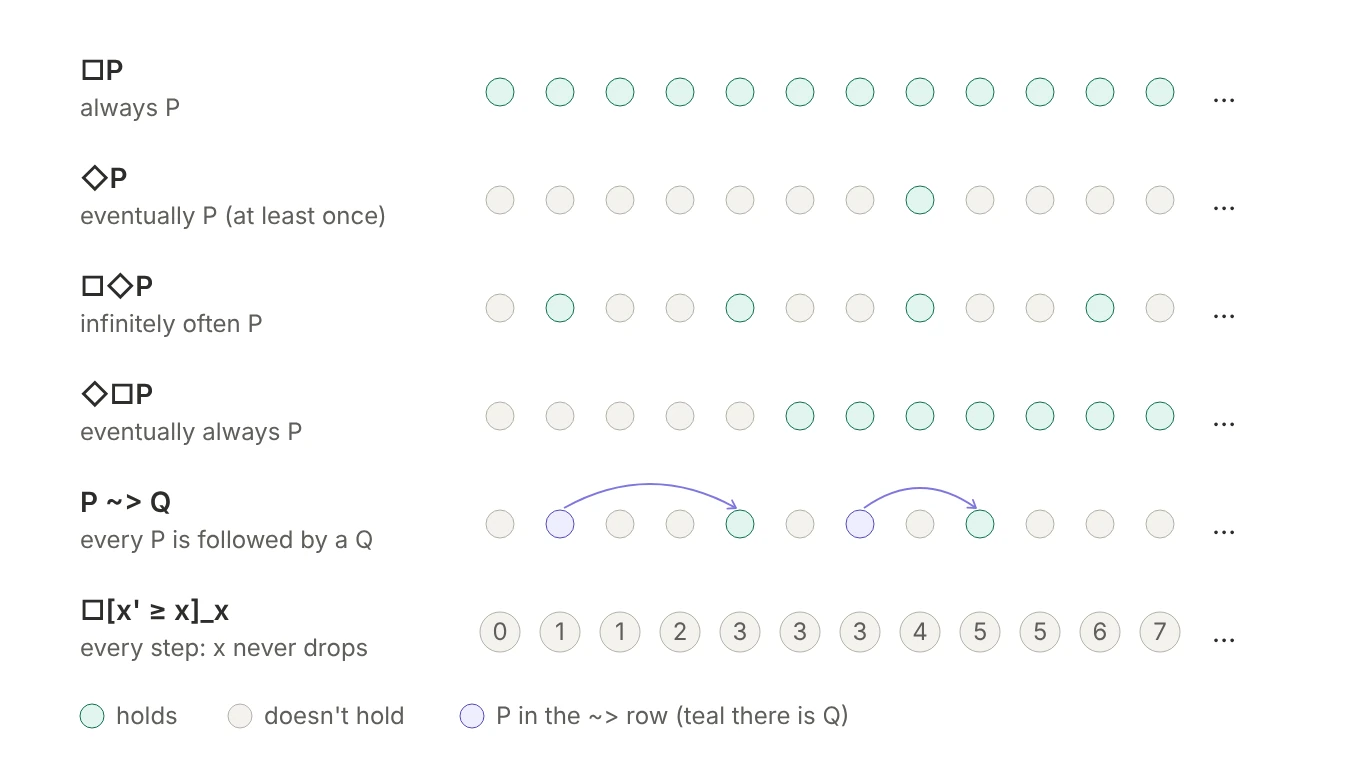 Figure 27. What each operator demands of one behavior. Each dot is a state, left to right in time.
◇Pon its own is weak: onePstate anywhere satisfies it. For a long-running system you usually want□◇P(“keeps returning to P”) orP ~> Q.P ~> Q(“P leads to Q”) is shorthand for□(P => ◇Q): every timePholds,Qholds then or later. That “every time” is why leads-to is the workhorse for request/response properties.◇□Pis stabilization: things eventually settle and stay settled.- TLA has no “next state” operator. Steps are always written
□[A]_v, which also permits stuttering steps wherevdoesn’t change. Section 6.11 explains why.
In TLA+ source, you type □ as [] and ◇ as <>.
6.4 Three kinds of property
Invariants, step properties and liveness properties are all temporal properties, all checked against every behavior of the spec. That shared mechanism is what makes them easy to confuse; what separates them is how much of a behavior each one needs to see:
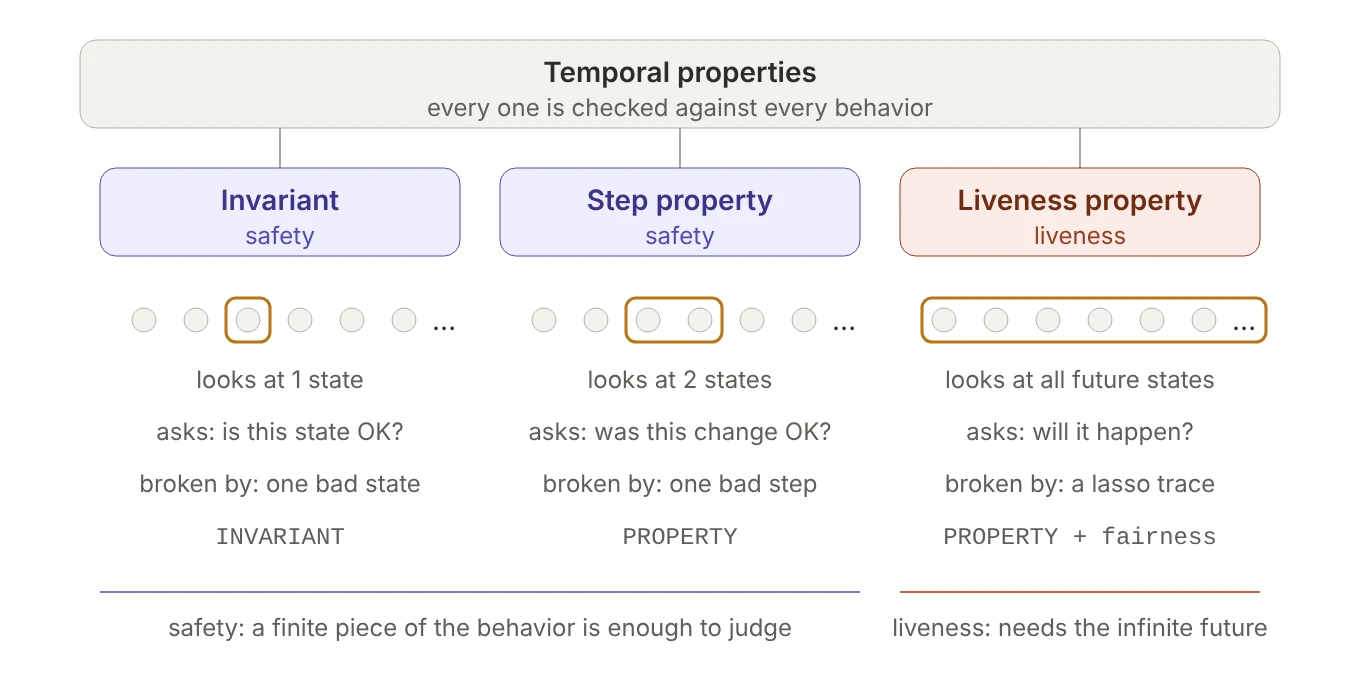 Figure 28. What each kind of property looks at, and what breaks it.
In the cluster spec:
BillingSafeis an invariant: a state predicate that must hold in every reachable state, so it’s□BillingSafewritten temporally. An invariant isn’t the opposite of a temporal property; it’s the simplest one there is.NoSkipStartis a step property. “Never jump fromStoppedstraight toRunning” can’t be judged from one state (Runningis a legal status), but it can be judged from each step.StartResolvesis a liveness property. A cluster that reachesStartingand then sits there forever, or loopsStarting → Retrying → Starting …, has only legal states and legal steps, yetRunningnever shows up. “Stuck inStarting” is the canonical bug that only a liveness property can catch.
The clearest proof that they check different things: take one variable, write one rule of each kind, and find behaviors where each rule fails on its own. With NumThreads = 2:
CounterInRange == counter \in 0..NumThreads              \* invariant: one state
NeverDecreases == [][counter' >= counter]_counter        \* step property: two states
ReachesTarget  == <>(counter = NumThreads)               \* liveness: the whole future
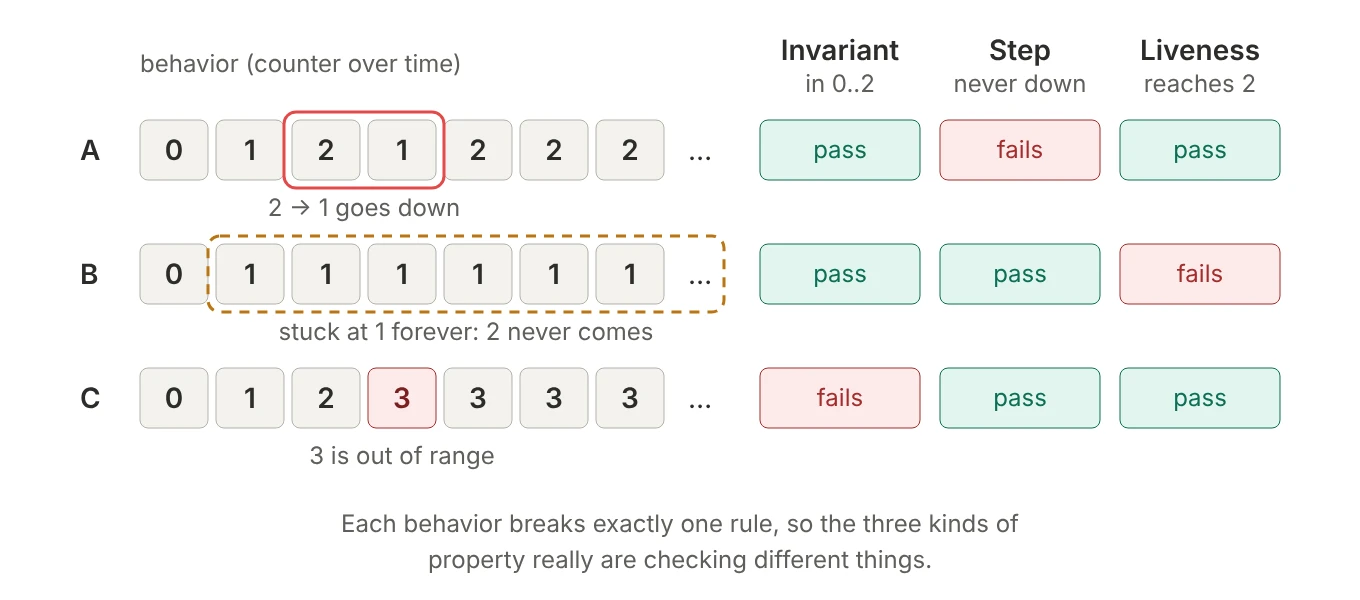 Figure 29. Each behavior breaks exactly one of the three rules.
- A only breaks the step property. Every state is in range and the counter reaches 2, but one change went backwards: the second
1looks perfectly normal on its own, and only the state before it shows the problem. - B only breaks liveness. Every state is fine, and so is every step (staying at 1 never goes down), but 2 never arrives, and no finite prefix shows a problem.
- C only breaks the invariant. One state,
3, is wrong all by itself.
“But liveness also applies at every state.” That’s true, and it’s what makes them look alike: P ~> Q is □(P => ◇Q), so the outer □ applies at every position, just like a step property’s. The difference is what each position’s check needs. A step property’s check at position i needs states i and i+1, nothing more. A leads-to’s check at position i is ◇Q, which can need any amount of future: if Q hasn’t shown up yet, no finite amount of waiting proves it never will.
So when you write a property, ask: to judge it, do I need one state, two consecutive states, or the future? That tells you whether it’s an invariant, a step property or a liveness property, and where it goes in TLC’s configuration: a state predicate under INVARIANT, anything else under PROPERTY. (PROPERTY []TypeOK means the same as INVARIANT TypeOK, but INVARIANT []TypeOK is an error, and INVARIANT is the idiom.)
6.5 Safety vs liveness: the shape of a counterexample
In practice, the dividing line that matters is safety versus liveness:
- Safety means nothing bad ever happens. A violation has a finite moment where things went wrong, and no future can undo it. All invariants and all
□[A]_vstep properties are safety properties. - Liveness means something good eventually happens. No finite prefix can violate it, because any prefix could still be rescued by a good state later.
◇P,□◇P,◇□Pand~>are liveness properties.
Alpern and Schneider showed that every property is the intersection of a safety part and a liveness part. In TLC, the difference you’ll see every day is the shape of the error trace:
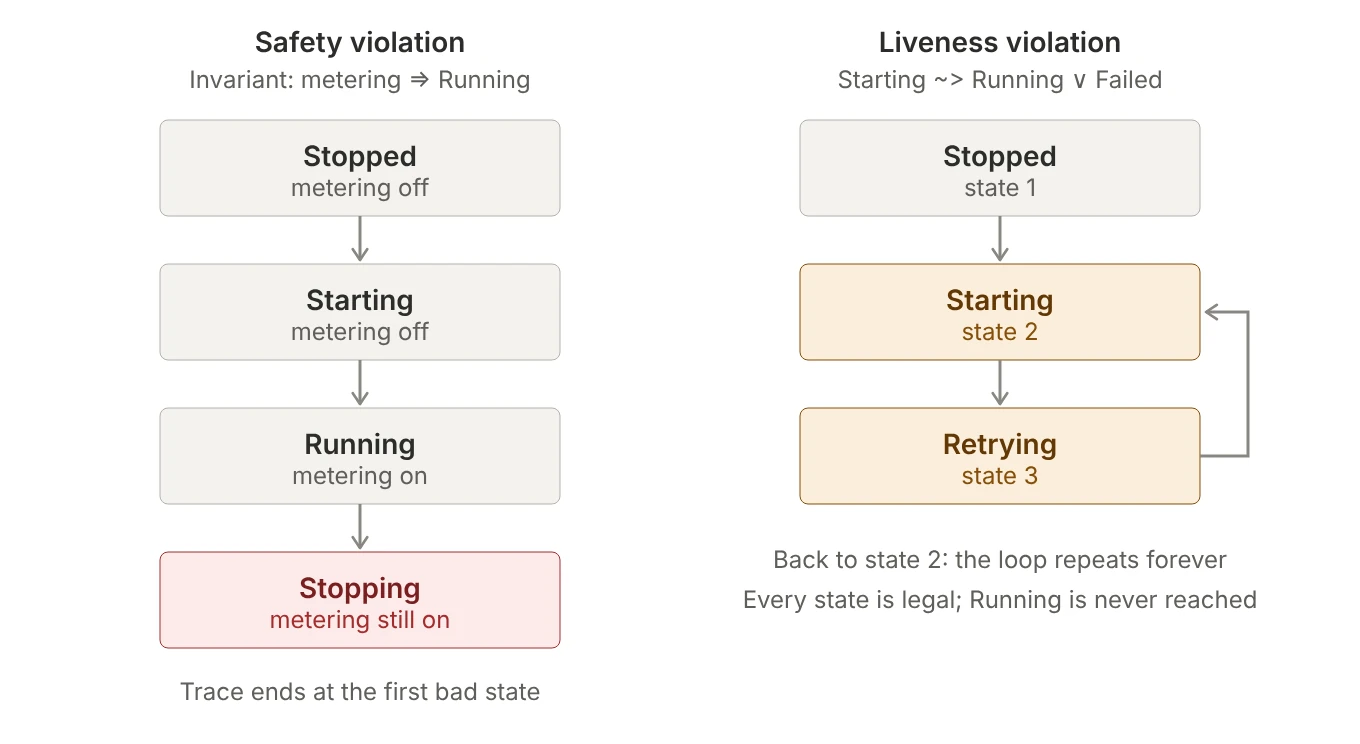 Figure 30. A safety counterexample is a finite trace; a liveness counterexample is a lasso.
A liveness counterexample has to demonstrate “never”, and the only finite way to show an infinite behavior is a loop. TLC ends such a trace with “Back to state N”, or with “Stuttering” when the loop is the system doing nothing at all. When you read one, look at the loop, not the last state: the last state is usually perfectly fine.
6.6 Negation: what ~[]P means
~[]P means “P isn’t always true”. Checked against a whole spec, that could mean two things:
- in every behavior, there’s at least one state where P is false; or
- some behavior has at least one state where P is false.
TLA+ means (1).
![Left: every behavior has at least one state where P is false, so the spec satisfies ~[]P. Right: only behavior 2 has a state where P is false; behaviors 1 and 3 keep P true, so ~[]P is violated. The right-hand situation is not what ~[]P means.](/images/tla-pluscal/31-not-always-p.webp) Figure 31.
Figure 31. ~[]P requires every behavior to make P false somewhere; one behavior doing so isn’t enough.
To see why, keep two levels apart. A temporal formula is judged on one behavior: □P is true of a behavior if P holds in all its states, and ~□P is true of it if P fails in at least one. “The spec satisfies F” then means F is true of every behavior, and that “every” isn’t written inside the formula; it’s applied from outside, by the THEOREM or by TLC. Put those together and you get reading (1).
Reading (2) can’t be written as a formula at all, because TLA has no “there exists a behavior” operator. (Branching-time logics like CTL do; TLA deliberately doesn’t.) You can still ask the question, by turning it into a check you expect to fail:
1
INVARIANT P        \* expect a violation: the error trace is your example behavior
This makes a great sanity check. To confirm that a model can actually reach Failed, define NeverFails == status # "Failed", check INVARIANT NeverFails, and expect TLC to report a violation. If it passes, your model can never fail, which usually means a modeling mistake, like a branch whose await is never true.
A recipe for any combination
Treat the operators as quantifiers over the states of one behavior, counting from the current state onward: □ means “in every state from now on” (like \A), and ◇ means “in some state from now on” (like \E). Negation then works exactly as it did for \A and \E in section 2.6: pushing a ~ inward flips □ into ◇ and vice versa, and ordinary logic handles the rest (~(A /\ B) is ~A \/ ~B, and ~(A => B) is A /\ ~B). Read the result as nested “every”/”some” statements about one behavior, then add the outer “every behavior of the spec”.
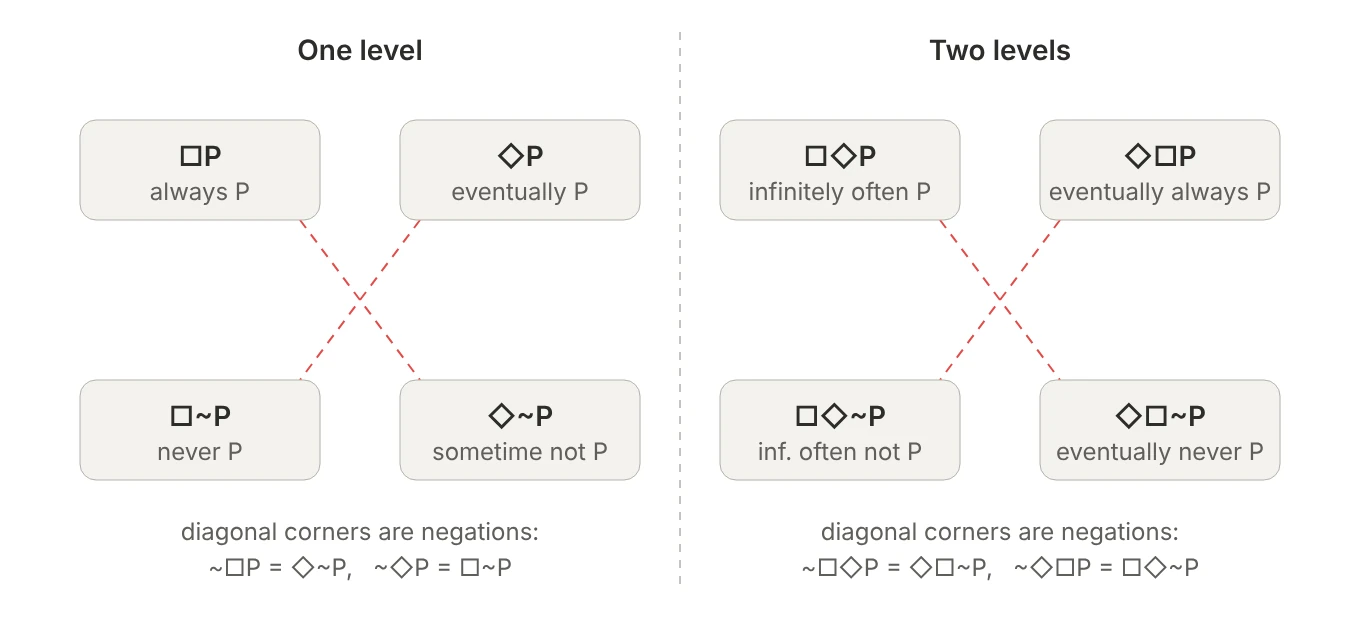 Figure 32. Diagonal corners are negations of each other.
Two worked examples:
~□◇P      =  ◇~◇P   =  ◇□~P                \* not infinitely often = eventually never

~(P ~> Q) =  ~□(P => ◇Q)
          =  ◇~(P => ◇Q)
          =  ◇(P /\ ~◇Q)
          =  ◇(P /\ □~Q)                     \* P at some point, then never Q
Apply the second one to StartResolves: “at some point the cluster is Starting, and from then on it never reaches Running or Failed”. That’s exactly the lasso in Figure 30. A liveness counterexample from TLC is always a concrete behavior that satisfies the negation of your property.
Stacking operators deeper creates nothing new (□□P = □P, ◇□◇P = □◇P, □◇□P = ◇□P), so for a state predicate P, every combination reduces to one of the eight corners in Figure 32. Of those, only □P and □~P are safety properties; the other six are liveness.
Combining with /\ and \/ follows the same intuition: \A distributes over /\ but not \/, \E over \/ but not /\, and □ and ◇ inherit the same behavior. This is where people slip:
□(P /\ Q) = □P /\ □Qholds, and so does◇(P \/ Q) = ◇P \/ ◇Q.□(P \/ Q)is not□P \/ □Q: a behavior alternating P, Q, P, Q satisfies the first, but neither half of the second.◇(P /\ Q)is not◇P /\ ◇Q: P and Q might each happen, but never at the same moment.
6.7 Quantifiers meet temporal operators
This small orchestrator spec, adapted from Learn TLA+, takes servers offline and brings them back online:
EXTENDS Integers, FiniteSets
Servers == {1, 2}

(* --algorithm servers
variables online = Servers;

define
  Invariant == \E s \in Servers : s \in online
  Safety    == \E s \in Servers : [](s \in online)
  Liveness  == ~[](online = Servers)    \* not all servers are always online
end define;

process orchestrator = "orchestrator"
begin
  Change:
    while TRUE do
      with s \in Servers do
        either
          await s \notin online;
          online := online \union {s};
        or
          await s \in online;
          await Cardinality(online) > 1;
          online := online \ {s};
        end either;
      end with;
    end while;
end process;
end algorithm; *)
Liveness can be rewritten with an existential by pushing the ~ inward:
~[](online = Servers)
= <>~(online = Servers)                     \* ~[] becomes <>~
= <>(online # Servers)
= <>(\E s \in Servers : s \notin online)    \* given that online \subseteq Servers
The last step assumes online only ever contains servers; a type invariant such as online \subseteq Servers makes that explicit. The subtle part is where the \E sits relative to the temporal operator:
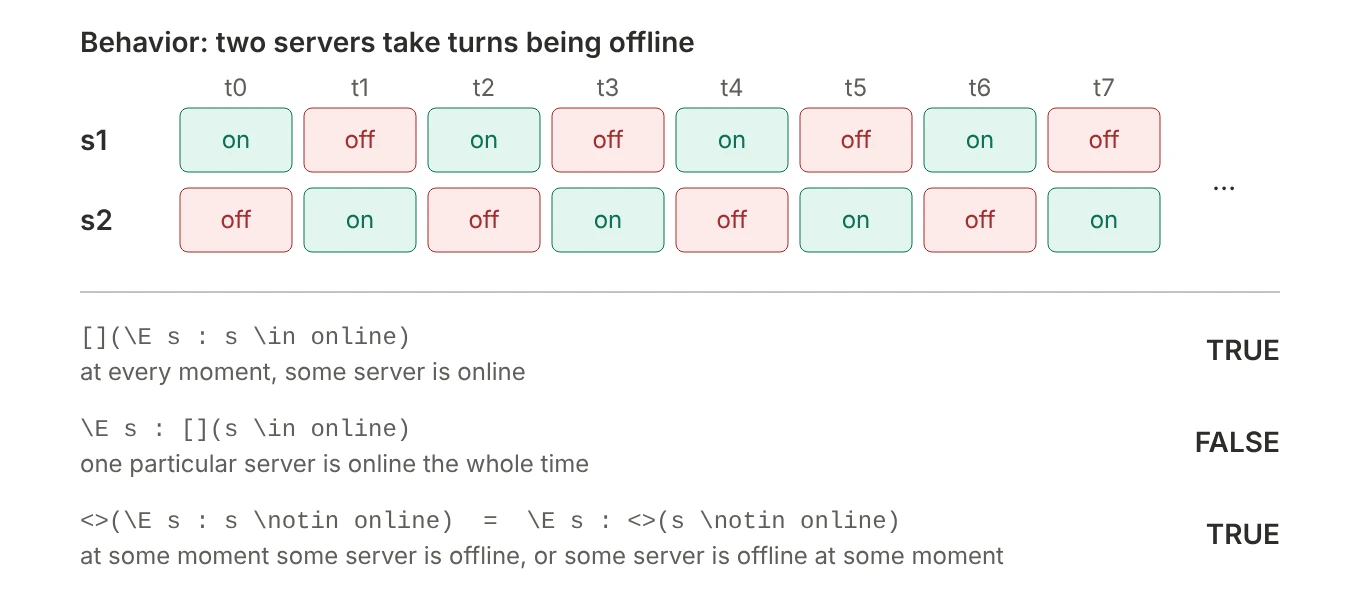 Figure 33. If two servers take turns, “always, some server is online” holds, but “some server is always online” fails.
\Enext to◇is “some … some”, and two “somes” commute:<>(\E s : s \notin online)and\E s : <>(s \notin online)mean the same thing.\Enext to□is “some … every”, and the order matters.Invariant, checked as an invariant (so effectively[](\E s : s \in online)), allows the servers to take turns.Safety,\E s : [](s \in online), requires one particular server to stay up the whole time. This spec satisfies the first and violates the second.
| Swap | Valid? | Why |
|---|---|---|
\A x : []P = []\A x : P |
yes | “for all” with “for all” |
\E x : <>P = <>\E x : P |
yes | “some” with “some” |
\E x : []P vs []\E x : P |
no | “some” with “for all” |
\A x : <>P vs <>\A x : P |
no | “for all” with “some” |
Safety is a safety property that isn’t an invariant. A violation is finite (a prefix in which every server has been offline at some point), but no single state can show it, because it’s about one server’s whole history. So it goes under PROPERTY with Liveness, while Invariant goes under INVARIANT. And as written, Liveness fails: section 6.9 explains why, and the one-word fix.
6.8 Leads-to
Say we have a set of tasks TaskType, an inbound pool (some subset of the tasks, i.e. an element of SUBSET TaskType), and workers, with worker_pool[w] the set of tasks worker w holds. “Every inbound task is eventually picked up by a worker” is a leads-to property:
Liveness ==
  \A t \in TaskType :
    t \in inbound
      ~> \E w \in Workers : t \in worker_pool[w]
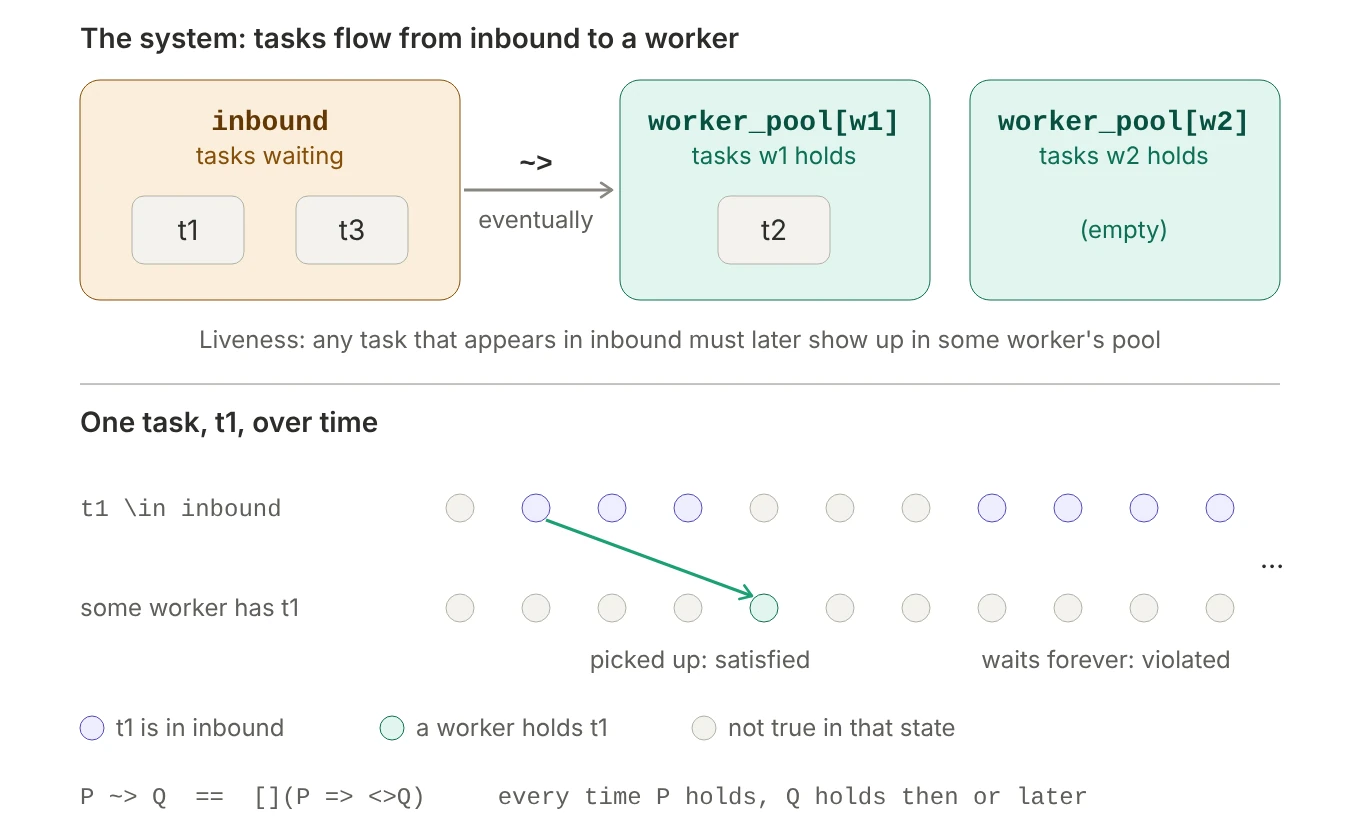 Figure 34. Each time a task enters inbound, some worker must hold it then or later. The first episode is satisfied; the second waits forever.
Unlike P => Q, which needs Q in the same state, P ~> Q accepts Q now or later, and the timeline shows three details: each time P becomes true it needs its own Q afterwards; Q doesn’t have to stay true; and P doesn’t have to stay true while waiting.
The colons are the confusing part. As in section 2.7, each one opens a scope that runs as far to the right as the expression goes:
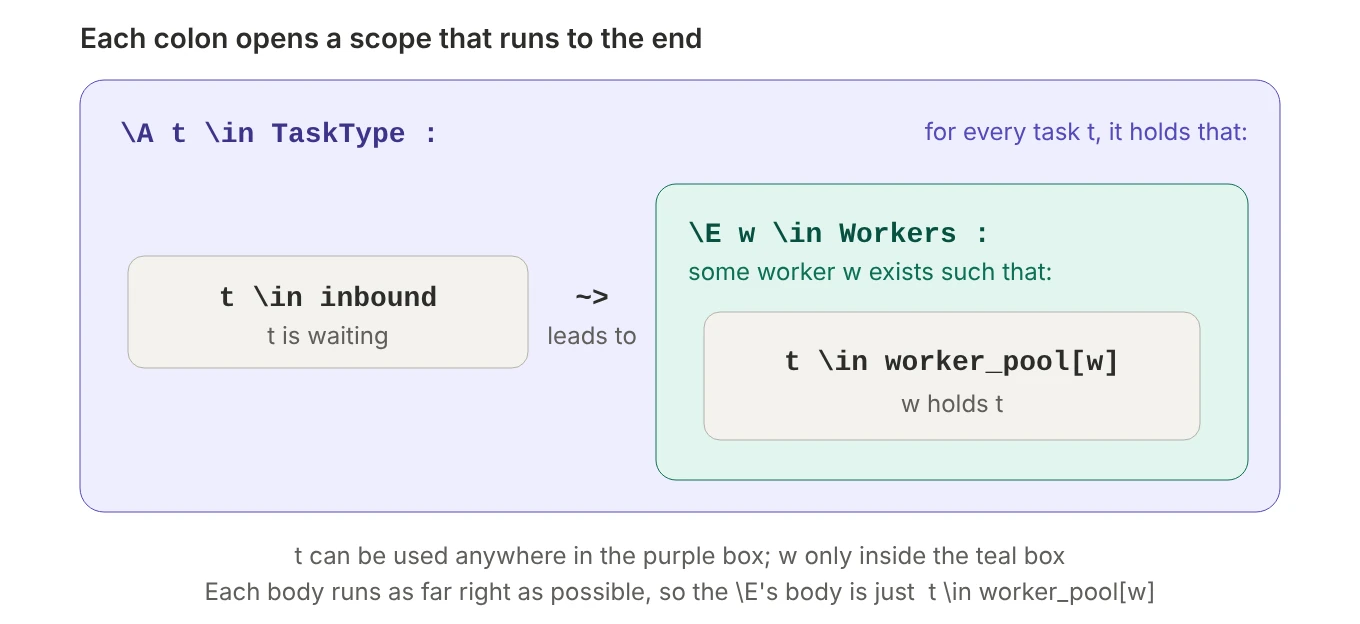 Figure 35.
 t is usable anywhere inside the outer quantifier, w only inside the inner one.
With the parentheses made explicit:
\A t \in TaskType : ( (t \in inbound) ~> (\E w \in Workers : (t \in worker_pool[w])) )
“For every task, whenever it’s waiting in inbound, some worker eventually has it.” Be precise about what this does not say: it doesn’t require the task to leave inbound, or the worker to finish the task or even keep it, and it treats “in some worker’s pool” as the meaning of “processed”. If “processed” really means “completed”, the right-hand side should say that, e.g. t \in done.
A violation is a lasso in which some task waits in inbound and, from then on, no worker ever holds it. The usual causes:
- Workers aren’t fair, and the trace ends in “Stuttering”: the workers are allowed to just stop. If the real workers are supervised and restarted, add fairness (next section).
- Workers keep picking other tasks. Weak fairness forces workers to keep working, not to choose this task. If new tasks keep arriving, or tasks keep getting returned to
inbound, one task can be passed over forever. The fix is in the design (for example, a FIFO queue instead of a set) or in a stronger fairness assumption the real system actually provides. - A real design bug, such as a pickup step whose
await(say, “pool not full”) can stay false forever.
6.9 Fairness: ruling out “the system just stopped”
This is where most first liveness checks go wrong. A PlusCal spec without fairness translates to:
Spec == Init /\ [][Next]_vars
[][Next]_vars says every step is a Next step or a stutter. Nothing forces a real step to ever happen, so “reach Starting, then stutter forever” is a perfectly legal behavior, and almost every liveness property fails with a trace ending in “Stuttering”. TLA+ is a worst-case language: unless you say a component can’t crash, it assumes it can, at the worst possible moment.
Fairness is a liveness assumption you add to the spec to rule out these lazy behaviors:
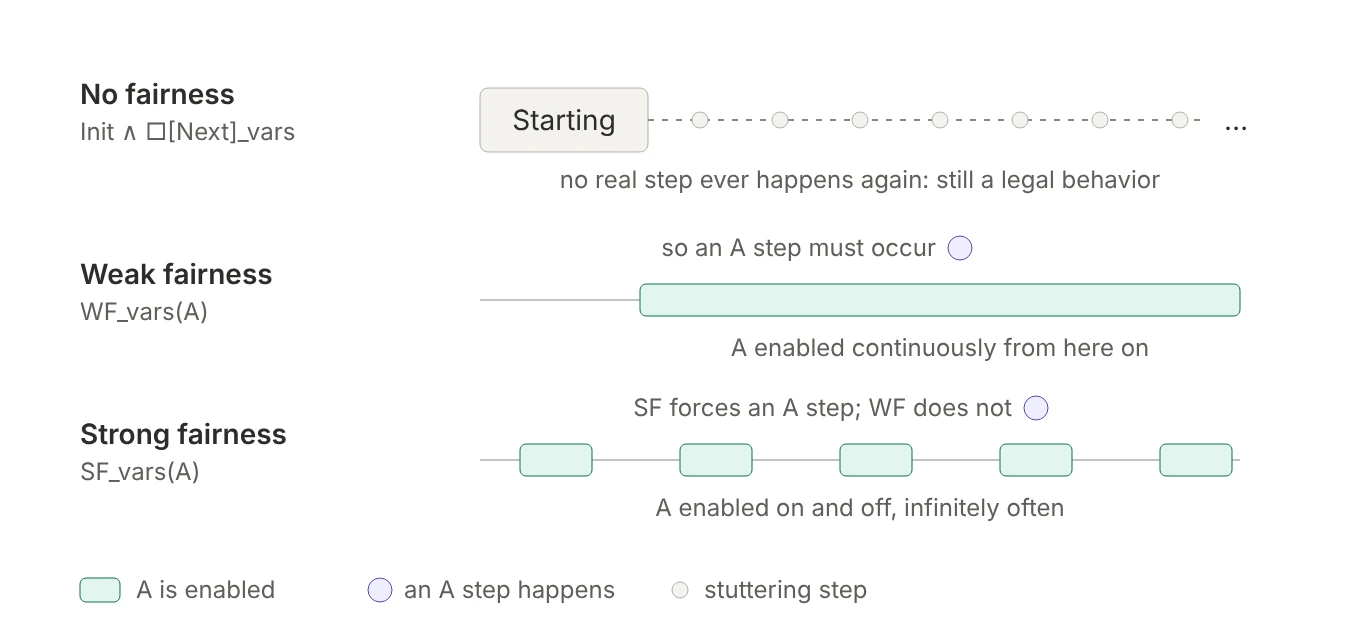 Figure 36. What weak and strong fairness each force.
WF_vars(A), weak fairness: ifAstays enabled continuously, anAstep eventually happens. Formally,◇□ENABLED⟨A⟩_vars ⇒ □◇⟨A⟩_vars. This is the right default: a process that can run will eventually run.SF_vars(A), strong fairness: ifAis enabled infinitely often, even if it keeps getting disabled in between, it eventually happens. Formally,□◇ENABLED⟨A⟩_vars ⇒ □◇⟨A⟩_vars. You need it whenAcompetes for something: a lock another process keeps grabbing, a slot that keeps getting taken.
In PlusCal:
| Syntax | Effect |
|---|---|
--fair algorithm |
weak fairness for a single-process algorithm |
fair process p \in S |
weak fairness for every instance of p |
fair+ process p \in S |
strong fairness for every instance of p |
L:+ on a label |
strong fairness for just that step |
L:- on a label |
that step is excluded from fairness, so it may never happen |
L:- is useful for optional events inside an otherwise fair process. If a user may or may not ever click “retry”, TLC shouldn’t assume the click eventually happens.
Why fair makes the orchestrator’s Liveness pass
Back to the orchestrator from section 6.7. Without fairness, Liveness fails, even though from the starting state the orchestrator can only remove a server. The spec has just three distinct states:
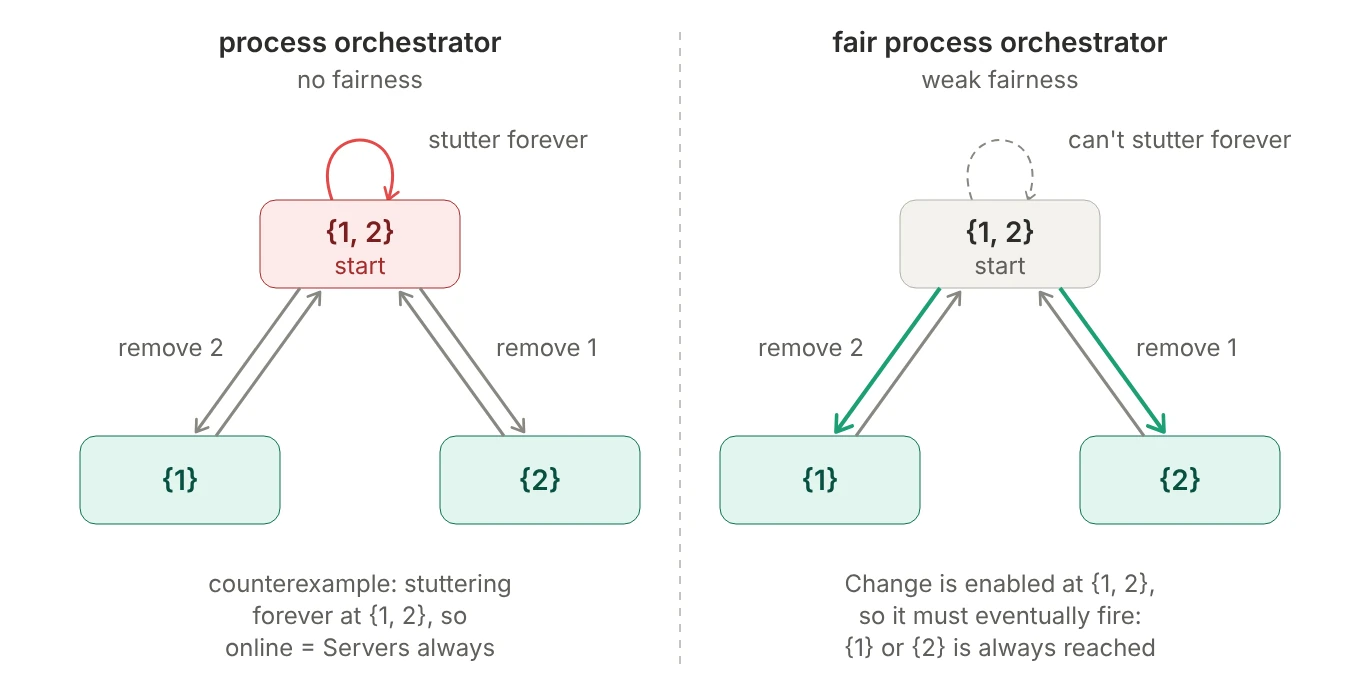 Figure 37. The orchestrator’s three states. Without fairness, it may stutter forever at
 {1, 2}.
The fix is one word:
1
2
-process orchestrator = "orchestrator"
+fair process orchestrator = "orchestrator"
which makes the translator add WF_vars(orchestrator) to Spec. At {1, 2}, Change is enabled; a stutter changes nothing, so it stays enabled; stuttering there forever would mean “continuously enabled but never taken”, which weak fairness forbids. The only real steps possible from {1, 2} remove a server, so every remaining behavior reaches {1} or {2}, and Liveness holds.
The while TRUE loop matters too, just not as the fix: it keeps the process from ever reaching "Done", so there’s always some step for fairness to force. The loop says what the process can do over and over; fair promises it actually keeps doing it. But not which step: {1, 2} → {2} → {1, 2} → {2} → …, always removing and re-adding server 1, is still allowed. Liveness is fine with that, but a stronger property like “server 2 eventually goes offline” would fail even with fair.
What each level rules out
Fairness never changes safety results: a stutter changes no variable, so the reachable states, and every invariant result, are the same with or without it. So fairness can’t make an application “more consistent” (“nothing bad ever happens” is safety) or fix a safety bug. It only changes which infinite behaviors TLC considers when checking liveness.
The difference between fair and fair+ shows up when a step is possible only some of the time, typically because something else keeps taking a shared resource:
EXTENDS TLC
CONSTANT NULL
Workers == {1, 2}

(* --algorithm lock
variables lock = NULL;

fair process worker \in Workers        \* try changing this to fair+
begin
  Acquire:
    await lock = NULL;
    lock := self;
  Release:
    lock := NULL;
    goto Acquire;
end process;
end algorithm; *)

NoStarvation == \A w \in Workers : []<>(lock = w)   \* every worker gets it repeatedly
With fair, TLC reports NoStarvation violated. The lasso shows worker 2 acquiring and releasing forever while worker 1 waits at Acquire. Worker 1’s step is enabled only in the brief states where lock = NULL, and worker 2 grabs the lock again before worker 1 moves. The step isn’t continuously enabled, so weak fairness doesn’t force it. With fair+, worker 1’s step is enabled infinitely often, strong fairness forces it, and the property passes.
Which result is right depends on the real lock. A FIFO or ticket lock guarantees a turn, so fair+ is an honest model of it. A plain test-and-set spinlock doesn’t, so fair is the honest model, and the starvation trace is a real risk in the design rather than a modeling artifact.
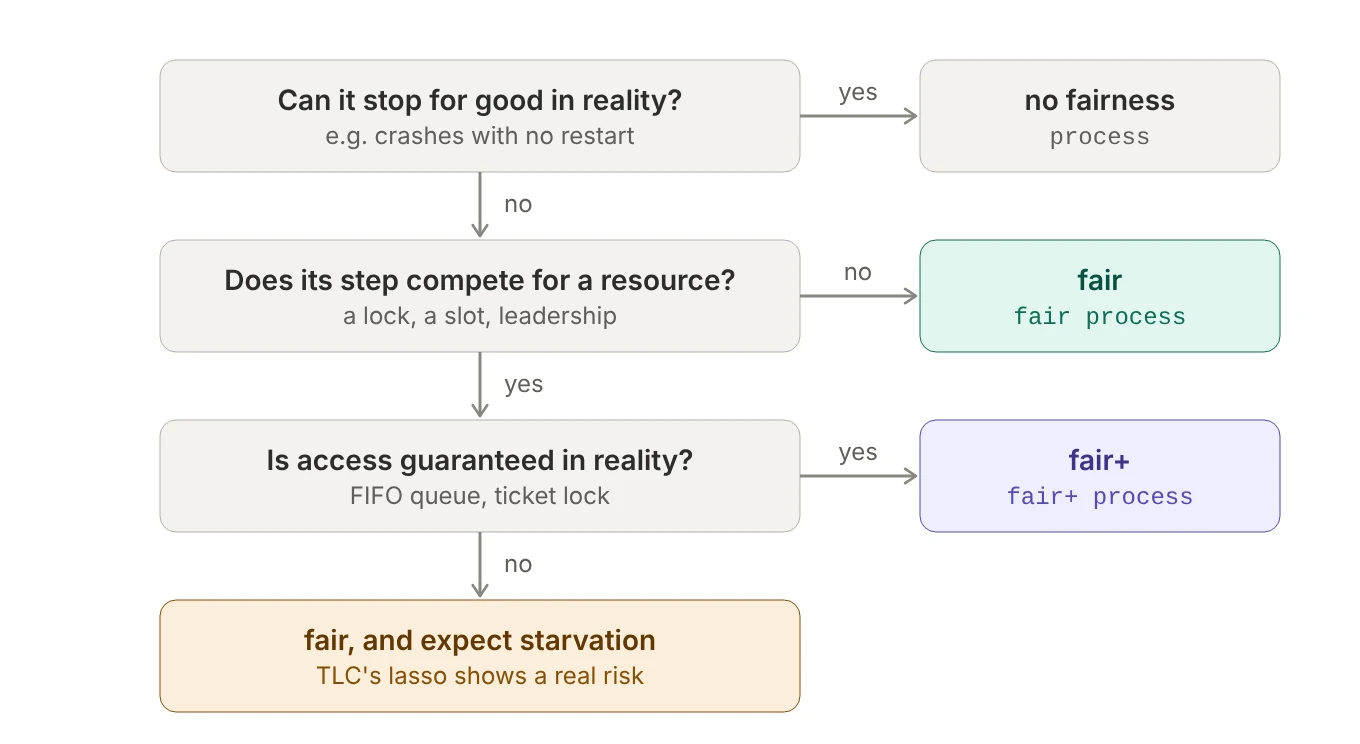 Figure 38. Choose fairness per process, based on what the real component actually guarantees.
Don’t add fairness just to make TLC pass. Each annotation is a claim about the real system. When a liveness check fails, first ask whether the counterexample could happen in reality; if it could, fix the design. Fairness doesn’t rescue the Retrying lasso in Figure 30, for example: the process keeps taking steps in that loop, so weak fairness is already satisfied. That’s a real design bug, and the fix is a bounded retry, not more fairness.
6.10 Step properties
CounterOnlyIncreases == [][counter' >= counter]_counter
A step property is a rule about every step of every behavior: it looks at “before” and “after” and asks whether that change was allowed.
| Piece | Meaning |
|---|---|
counter |
the value now |
counter' |
the value in the next state (the prime means “next”) |
counter' >= counter |
an action: a condition on one step |
[ … ]_counter |
“…or counter doesn’t change at all” |
[] in front |
for every step |
Read [][A]_v as: every step that changes v must satisfy A.
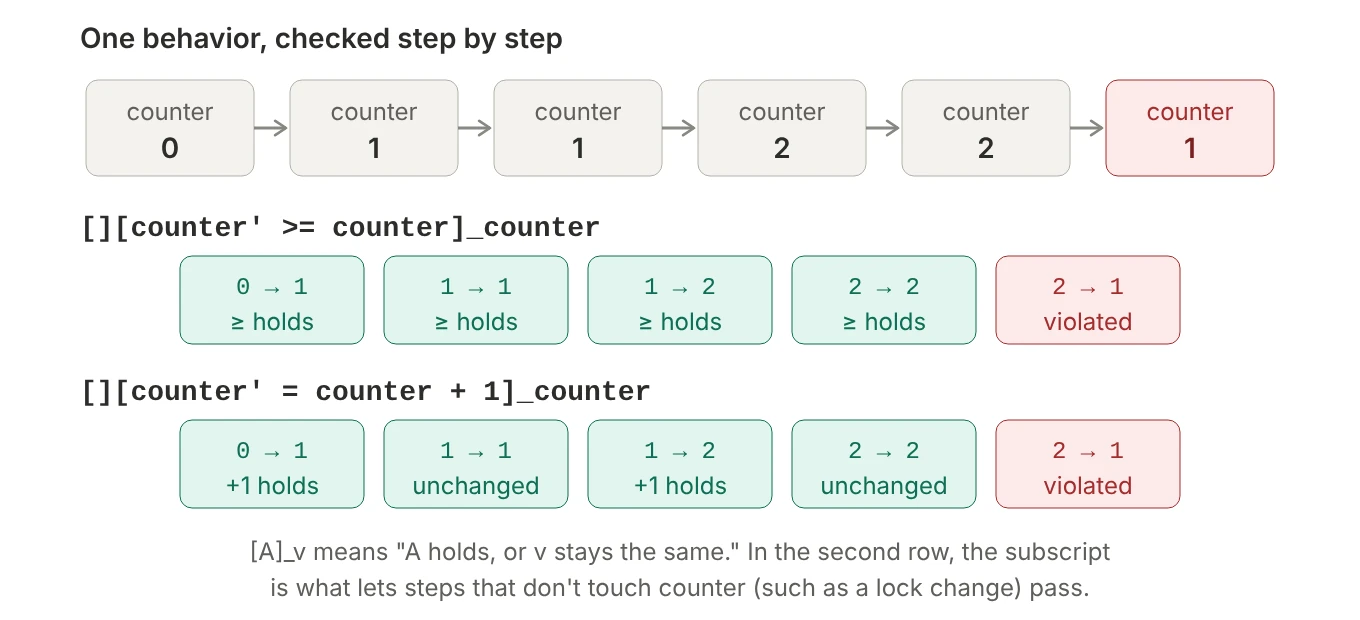 Figure 39. The same behavior checked against two step properties.
The bad step, 2 → 1, is the lost-update race from section 5.7. With three threads and the increment split into a read and a write, TLC finds a trace like this one (the thread numbers can differ from run to run): threads 2 and 3 both read 0; thread 2 writes 1; thread 1 reads 1 and writes 2; then thread 3 writes its stale 0 + 1 = 1. The counter goes backwards, and TLC reports “Action property CounterOnlyIncreases is violated”, with the trace ending on that step.
Restrictions
- It must be wrapped as
[A]_v.[](counter' >= counter)isn’t allowed. That’s a rule of the logic itself, not of TLC; section 6.11 explains why. -
The subscript decides which steps are checked. Only steps that change
vhave to satisfyA, so choosingvwrongly changes the meaning in one of two directions:TLA+[][x' = x + 1]_y \* too narrow: x may change freely whenever y doesn't [][x' = x + 1]_vars \* too wide: a step changing only pc or lock must still bump x [][x' = x + 1]_x \* right: every step that changes x increments it by 1The subscript should be exactly the variables the rule is about.
- It can only forbid changes, never require them. Because “v unchanged” always passes,
[][x' # x]_xis(x' # x) \/ (x' = x), which is always true. “Something must eventually happen” is liveness. - It only sees two states.
Acan compare “now” with “next”, but nothing earlier. A rule like “x never decreases twice in a row” needs a variable that remembers what happened before. - TLC accepts only some shapes. It checks
[][A]_von its own, several joined with/\, and (with current tools)\A x \in S : [][A]_(e)over a finite set, but not step properties under\E,\/or~. That’s a limit of TLC, not of TLA+. Separately, the grammar needs parentheses around any subscript that isn’t a plain name or tuple (section 6.12).
A can be any true/false expression over current and next values, which makes step properties the natural way to state “how things are allowed to change”, a constant need in distributed systems:
\* A log is append-only: it never shrinks, and existing entries never change
AppendOnly ==
  [][Len(log') >= Len(log) /\ SubSeq(log', 1, Len(log)) = log]_log

\* Once committed, always committed
CommitIsFinal == [][committed \subseteq committed']_committed

\* Only legal status transitions
LegalTransitions == [][<<status, status'>> \in AllowedEdges]_status
In AppendOnly, the order matters: /\ stops at the first FALSE, so SubSeq never asks for more entries than log' has.
6.11 Why [A]_v? Stuttering and refinement
The wrapper isn’t a tool quirk. It’s a deliberate design choice in the logic, and the reason is refinement: being able to say “this detailed spec correctly implements that simpler spec”. For that to work, a rule about some variables must not break just because something else happened in a step that didn’t touch them.
Lamport’s classic example is a clock. A simple spec describes an hour clock with one variable hr and the rule “each step advances the hour”. A more detailed clock has both hr and min. It’s obviously a correct hour clock, but most of its steps only move the minutes:
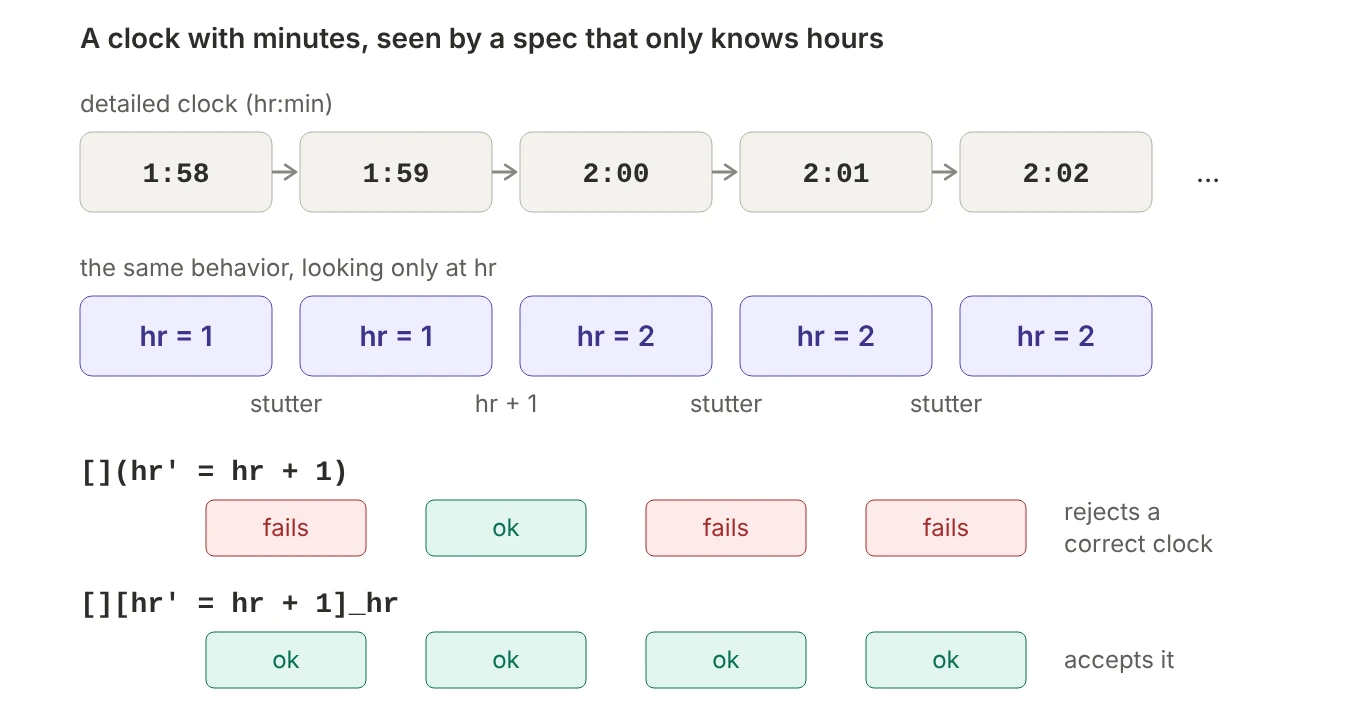 Figure 40. Seen through
 hr, minute ticks are stutters.
On a minute tick, hr' = hr, so the bare rule [](hr' = hr + 1) rejects a perfectly correct clock just because it has more detail than the spec. [hr' = hr + 1]_hr means “advance the hour, or leave hr alone”: minute ticks fall under the second part, so the detailed clock passes.
TLA makes this mandatory. Lamport built the logic so that every formula is stuttering-insensitive: adding or removing steps where the relevant variables don’t change can never change whether a formula is true. A bare action under □ would break that guarantee, so the parser checks what “level” each expression is (constant, state, action or temporal), and □ only accepts state-level formulas, temporal formulas, or the special [A]_v form.
What this buys you: refinement becomes plain implication (DetailedSpec => HourClockSpec, which is what PROPERTY HC!Spec checked in section 4.4), and components compose (in the threads spec, steps that only change lock or pc are stutters as far as counter is concerned). Several things you’ve already met follow from this one decision: TLA+ has no “next state” operator, because any number of stutters can come in between, and specs are written Init /\ [][Next]_vars, so they allow stuttering forever, which is why liveness needs fairness.
_vars vs a single variable
vars isn’t a keyword. It’s an ordinary definition, usually a tuple of every variable in the spec; the PlusCal translator generates vars == << counter, lock, pc >> for you. Priming a tuple primes each element, and two tuples are equal only if every component is, so:
\* "Next, or nothing at all changes"
[Next]_vars  ==  Next \/ (counter' = counter /\ lock' = lock /\ pc' = pc)

\* "A, or counter doesn't change"
[A]_counter  ==  A \/ (counter' = counter)
The difference is which steps get a free pass:
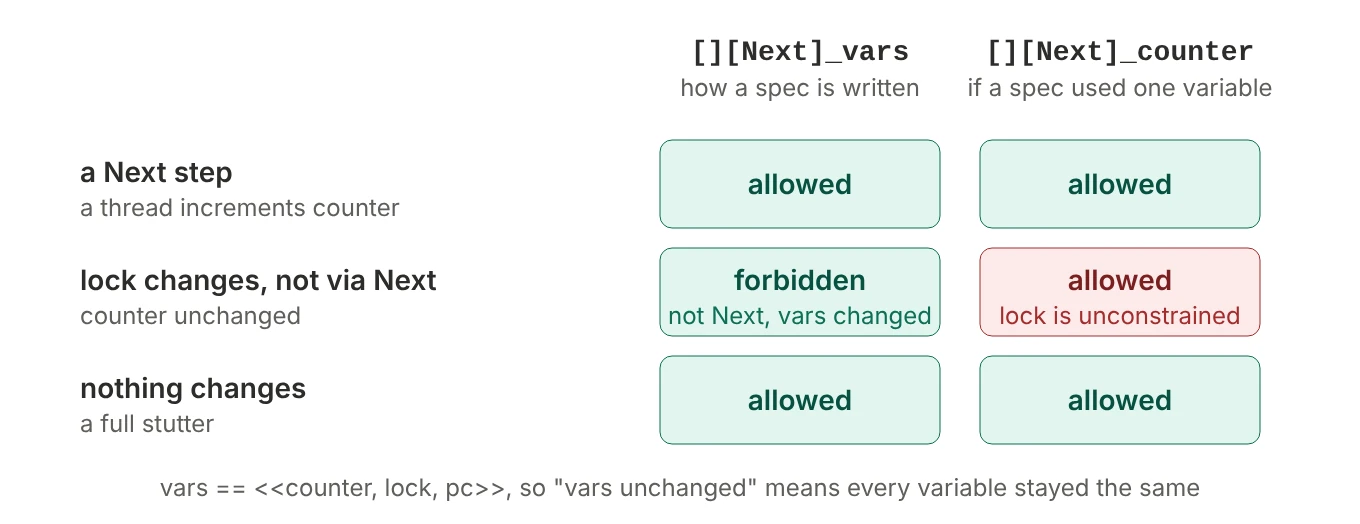 Figure 41. Three kinds of step, checked against
 [Next]_vars and a hypothetical [Next]_counter.
| Where | Subscript | Exempt steps | Why |
|---|---|---|---|
the spec, [][Next]_vars |
all variables | only steps where nothing changes | the spec must control every variable |
a step property, [][A]_x |
the variables the rule concerns | steps that leave those variables alone | the rule shouldn’t judge unrelated steps |
fairness, WF_vars(A) |
usually all variables | an A step only counts if it changes something |
|
UNCHANGED vars |
all variables | short for vars' = vars: nothing changes, e.g. in Terminating |
6.12 Quantified step properties and TLC’s shape rules
With a function of counters, the natural way to write “no counter ever decreases” fails with a confusing error:
CounterOnlyIncreases ==
  \A c \in Counters :
    [][values[c]' >= values[c]]_values[c]
\* error: "[] followed by action not of form [A]_v"
The message makes it sound as if a step property can’t go inside a quantifier, and Learn TLA+ explains it that way. Older TLC really did have that limitation: TLC 2.16, from December 2020, rejects the quantified version even with the subscript fixed. With the current tools (TLA+ tools 1.8.0), though, the only culprit is the subscript. The subscript binds very tightly: ]_values[c] is read as the subscript values followed by [c], which then applies to the whole formula. The practical rule is to keep subscripts to a plain name or a tuple, and wrap anything else in parentheses:
![Top: [][A]_values[c] is read as [] applied to ([A]_values)[c], which the parser rejects with "[] followed by action not of form [A]_v"; [][A]_(values[c]) is a normal step property. Bottom: TLC checks step properties on their own, joined with /\, or under \A over a finite set; it rejects them under \E, \/ or ~.](/images/tla-pluscal/42-subscript-parsing.webp) Figure 42. How the parser reads the subscript, and which combinations of step properties TLC checks.
Figure 42. How the parser reads the subscript, and which combinations of step properties TLC checks.
Parenthesize the subscript and the quantified version works as written. TLC expands \A over a finite set into one step property per element and checks each one on the fly:
CounterOnlyIncreases ==
  \A c \in Counters :
    [][values[c]' >= values[c]]_(values[c])
The same goes for a conjunction written out by hand: [][values["c1"]' >= values["c1"]]_values["c1"] /\ … fails with the same error, and works as …]_(values["c1"]).
You can also move the quantifier inside the brackets, which gives a single step property over the whole function:
CounterOnlyIncreases ==
  [][\A c \in Counters : values[c]' >= values[c]]_values
The two are equivalent because [] commutes with \A (section 6.7): “at every step, for every counter” and “for every counter, at every step” check the same (counter, step) pairs:
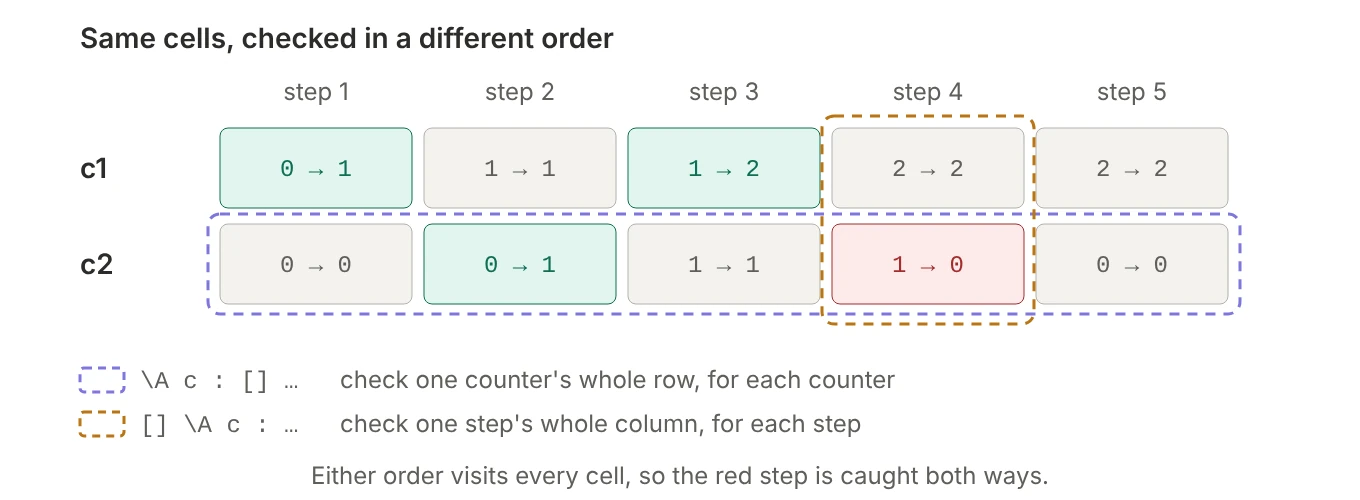 Figure 43. Checking row by row or column by column visits the same cells, so the violation is caught either way.
In general, \A x \in S : [][A(x)]_(v(x)) equals [][\A x \in S : A(x) \/ v(x)' = v(x)]_vars whenever vars covers every v(x): expand each [A]_v, swap \A and [], and re-wrap. CounterOnlyIncreases can drop the per-counter “or unchanged” only because >= already allows no change. For “each counter only ever increments by exactly 1”, it has to stay:
\* What you mean
\A c \in Counters : [][values[c]' = values[c] + 1]_(values[c])

\* Equivalent, with the quantifier inside
[][\A c \in Counters : values[c]' = values[c] + 1 \/ values[c]' = values[c]]_values

\* Wrong: whenever values changes at all, EVERY counter must increment
[][\A c \in Counters : values[c]' = values[c] + 1]_values
This only works for \A: “some … every” don’t commute (Figure 33), so a step property that starts with \E can’t have its quantifier moved inside, and TLC rejects it as written: “Temporal formulas containing actions must be of forms <>[]A or []<>A”.
6.13 How TLC checks each kind
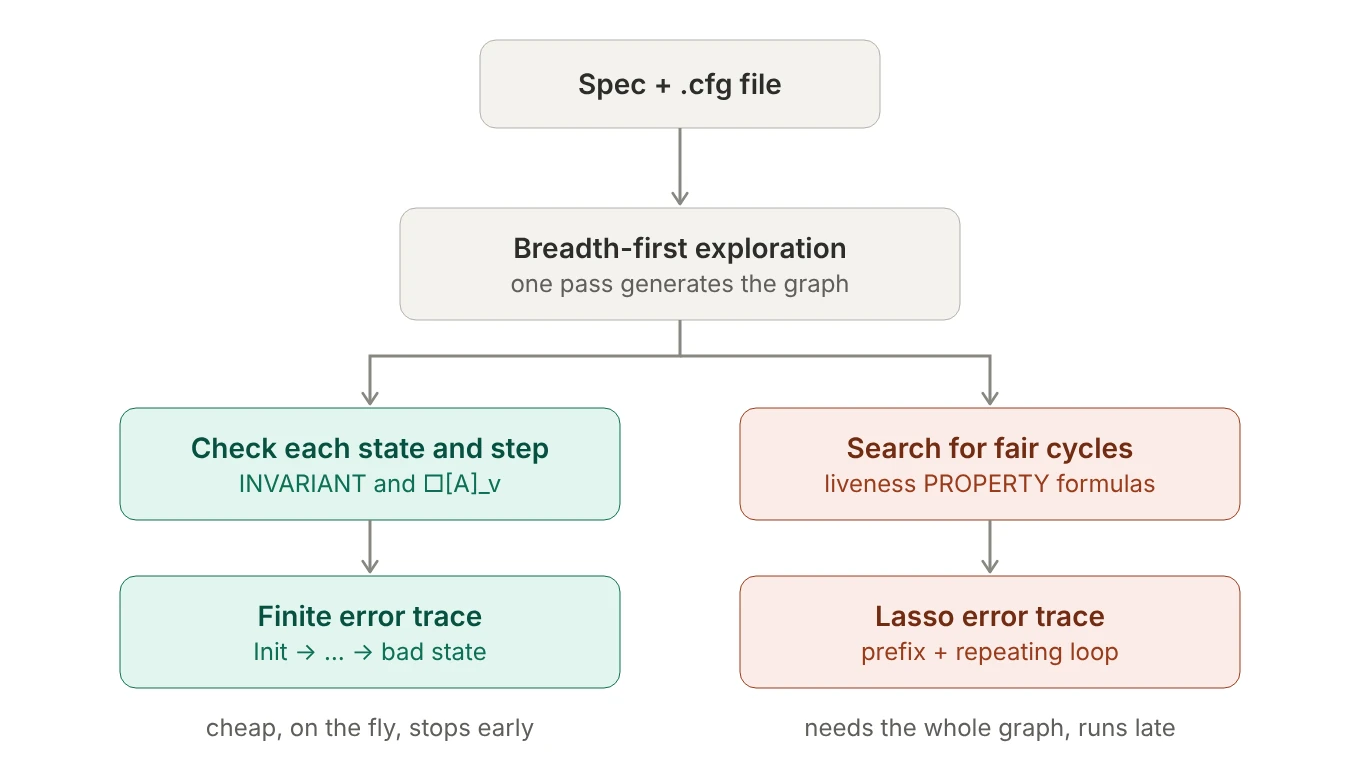 Figure 44. Safety is checked during exploration; liveness needs the stored graph.
INVARIANTformulas and[][A]_vproperties are checked as states and transitions are generated. That’s cheap and parallelizes well, and because exploration is breadth-first, you get the shortest trace to the first violation.- Liveness needs the stored state graph, which TLC searches for cycles that violate the property while respecting fairness. That costs far more memory and time, so TLC runs it periodically and at the end, and symmetry sets and state constraints can make its results misleading. A common workflow is to iterate on invariants with a larger model, then check liveness on a smaller one.
- The biggest temporal property you’ll eventually check is refinement, like
PROPERTY HC!Specin section 4.4. It bundles the abstract spec’s[][Next]_vars(safety) with its fairness (liveness).
7. Exercises: break the spec four ways
Take the ClusterLifecycle spec and configuration from section 6.1, where everything passes. Each of these edits reproduces one idea from this post:
- A safety bug. Move
metering := FALSEfrom theRunning → Stoppingbranch to theStopping → Stoppedbranch.BillingSafefails with a finite trace that ends inStoppingwith metering still on (Figure 30, left). - Missing fairness. Change
--fair algorithmto plain--algorithm. Liveness fails with a trace ending in “Stuttering”. With the full configuration, TLC may listKeepsCycling,StartResolvesor both (when several properties fail at once, the report can vary between runs); checkPROPERTY StartResolveson its own and you’ll see the system park inStartingand simply stop (Figure 36, top). - A real liveness bug. Restore
--fair, add two branches,Starting → RetryingandRetrying → Starting, and add"Retrying"toTypeOK.StartResolves(andKeepsCycling) now fail with a lasso (“Back to state …”), even though fairness is on: the loop keeps taking steps (Figure 30, right). -
The design fix. Bound the retries, and everything passes again (TLC was run with
MaxRetries = 2), because the design now guarantees progress:TLA+\* declare: CONSTANT MaxRetries, and add retries = 0 to the variables or await status = "Starting" /\ retries < MaxRetries; status := "Retrying"; retries := retries + 1; or await status = "Retrying"; status := "Starting"; \* ...and reset retries := 0 in the branch that returns to "Stopped"
8. Cheat sheet
Expressions and data
==defines,=compares. Operators are substituted like macros; functions are lookup tables you can store and compare.- Bulleted
/\and\/lists group by column. Indent with spaces, not tabs. LETnames are definitions, not assignments: no reassignment, no shadowing.CHOOSEpicks one specific value. To model a choice, use\Eorwith.\Afilters with=>;\Efilters with/\.- Sequences are 1-indexed.
0..9is already a set;{0..9}is a set containing a set. \X,[field: Set]and[S -> T]build sets of every combination;<< >>,[field |-> v]and[x \in S |-> e]build one value.- Update functions with
EXCEPT; add keys with@@, where the left side wins. - Model values are safe to compare with anything and impossible to compute with: ideal for
NULL.
PlusCal
- A step runs from one label to the next, and each variable gets one new value per step.
- Every
whileiteration is its own step. Guard invariants about results withpc = "Done" =>. - A label inside an
iforeitherrequires a label after it. Labels can’t go insidewithor macros. - Only the state carries over between steps. Store choices in variables, and reset them when you’re done.
eitherandwithmake TLC explore every branch. What you store, not what you choose, decides the number of states.- Don’t name things
vars,pc,Init,Next,Spec,ProcSet,self,stack,TerminatingorTermination.
Properties
- Ask what you need to see: one state (invariant), two consecutive states (step property), or the future (liveness).
- Safety violations are finite traces; liveness violations are lassos. Read the loop.
~□P = ◇~Pand~◇P = □~P.□commutes with\Aand◇with\E, but not the other way round.- To ask “can P ever happen?”, check
~Pas a named invariant and expect a violation. - Liveness needs fairness:
fairfor “keeps running”,fair+for “eventually wins contended access”. Fairness never fixes a safety bug, and each annotation is a claim about reality. - Step properties are
[][A]_v, withvthe variables the rule is about. Parenthesize any subscript that isn’t a plain name or tuple:[][A]_(values[c]).
Further reading
- Hillel Wayne, Learn TLA+: the tutorial most of these examples come from, and the best place to start.
- Leslie Lamport, Specifying Systems: the original book, including the hour clock and refinement.
- Leslie Lamport, The TLA+ Video Course.
- tlaplus/Examples: a large collection of real-world specifications to read.